Organization Charts
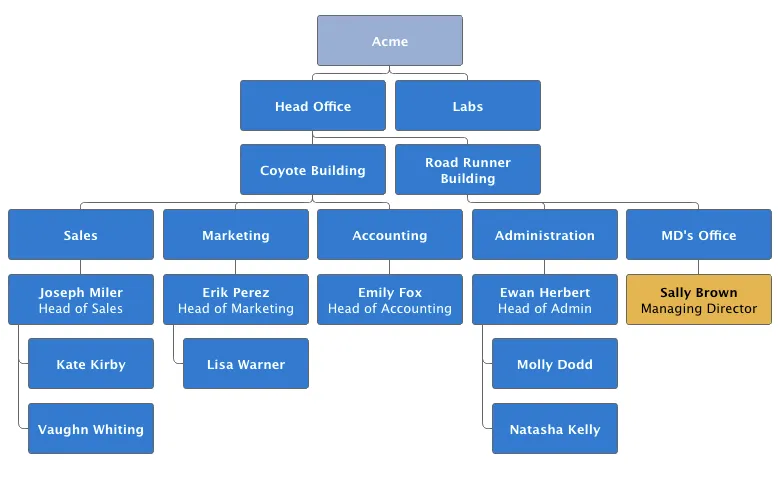
Organization charts are used to visualize parent/child relationships between nodes. They require the use of NodeSeries to add nodes and the hierarchical links between them.
The organization chart is enabled with ChartType.ORGANIZATION and you can make type-specific settings in the PlotOptionsOrganization object, as described later.
Source code
Java
Chart chart = new Chart(ChartType.ORGANIZATION);
Configuration conf = chart.getConfiguration();
conf.getChart().setInverted(true);
conf.getChart().setHeight("500px");
conf.getTooltip().setOutside(true);
conf.setTitle("Acme organization chart");
...
Organization Chart shows a configured organization chart.
Plot Options
The chart-specific options of an organization chart are configured with a PlotOptionsOrganization.
Source code
Java
PlotOptionsOrganization plotOptions = new PlotOptionsOrganization();
plotOptions.setColorByPoint(false);
plotOptions.setColor(new SolidColor("#007ad0"));

//Special color for first level
Level level0 = new Level();
level0.setLevel(0);
level0.setColor(new SolidColor("#99AED3"));
plotOptions.addLevel(level0);
conf.setPlotOptions(plotOptions);
Colors can be defined for all the nodes in the chart, for each level or individually in each node, as described later.
Data Model
To visualize the nodes and the hierarchy between them, you need to create a NodeSeries, create all the Node instances, then add them as NodeSeriesItem.
NodeSeries provides a method NodeSeries.add(nodeFrom, nodeTo) that adds the node to the list and adds a link between nodeFrom and nodeTo.
Source code
Java
NodeSeries series = new NodeSeries();
series.setName("Acme");
Node acme = new Node("Acme");
Node headOffice = new Node("Head Office");
Node labs = new Node("Labs");
Node coyoteBuilding = new Node("Coyote Building");
Node roadRunnerBuilding = new Node("Road Runner Building");
Node sales = new Node("Sales");
Node marketing = new Node("Marketing");
Node accounting = new Node("Accounting");
Node administration = new Node("Administration");
Node mdsOffice = new Node("MD's Office");

Node josephMiler = new Node("Joseph Miler");
josephMiler.setTitle("Head of Sales");
josephMiler.setLayout(NodeLayout.HANGING);

Node erikPerez = new Node("Erik Perez");
erikPerez.setTitle("Head of Marketing");
erikPerez.setLayout(NodeLayout.HANGING);

Node emilyFox = new Node("Emily Fox");
emilyFox.setTitle("Head of Accounting");

Node ewanHerbert = new Node("Ewan Herbert");
ewanHerbert.setTitle("Head of Admin");
ewanHerbert.setLayout(NodeLayout.HANGING);

Node kateKirby = new Node("Kate Kirby");
Node vaughnWhiting = new Node("Vaughn Whiting");
Node lisaWarner = new Node("Lisa Warner");
Node mollyDodd = new Node("Molly Dodd");
Node natashaKelly = new Node("Natasha Kelly");

//Set color for a specific Node
Node managingDirector = new Node("Sally Brown", "Sally Brown",
        "Managing Director");
managingDirector.setColor(new SolidColor("#E4B651"));

series.add(acme, headOffice);
series.add(acme, labs);
series.add(headOffice, coyoteBuilding);
series.add(headOffice, roadRunnerBuilding);
series.add(coyoteBuilding, sales);
series.add(coyoteBuilding, marketing);
series.add(coyoteBuilding, accounting);
series.add(roadRunnerBuilding, administration);
series.add(roadRunnerBuilding, mdsOffice);
series.add(sales, josephMiler);
series.add(marketing, erikPerez);
series.add(accounting, emilyFox);
series.add(administration, ewanHerbert);
series.add(josephMiler, kateKirby);
series.add(josephMiler, vaughnWhiting);
series.add(erikPerez, lisaWarner);
series.add(ewanHerbert, mollyDodd);
series.add(ewanHerbert, natashaKelly);
series.add(mdsOffice, managingDirector);
conf.addSeries(series);