MVP and MVVM Compared Deep Dive
- How MVP Works
- The Example
- MVP in a Component Tree
- How the Patterns Differ
- When to Use Which
- When Neither Is Worth It
- Moving from MVP to MVVM
Model-View-Presenter (MVP) is a pattern that many Vaadin applications use to separate the UI logic of a view from the UI components. The documentation of older Vaadin versions described it as one of the most common patterns for large applications, and many of the applications that are now being migrated to newer versions use it.
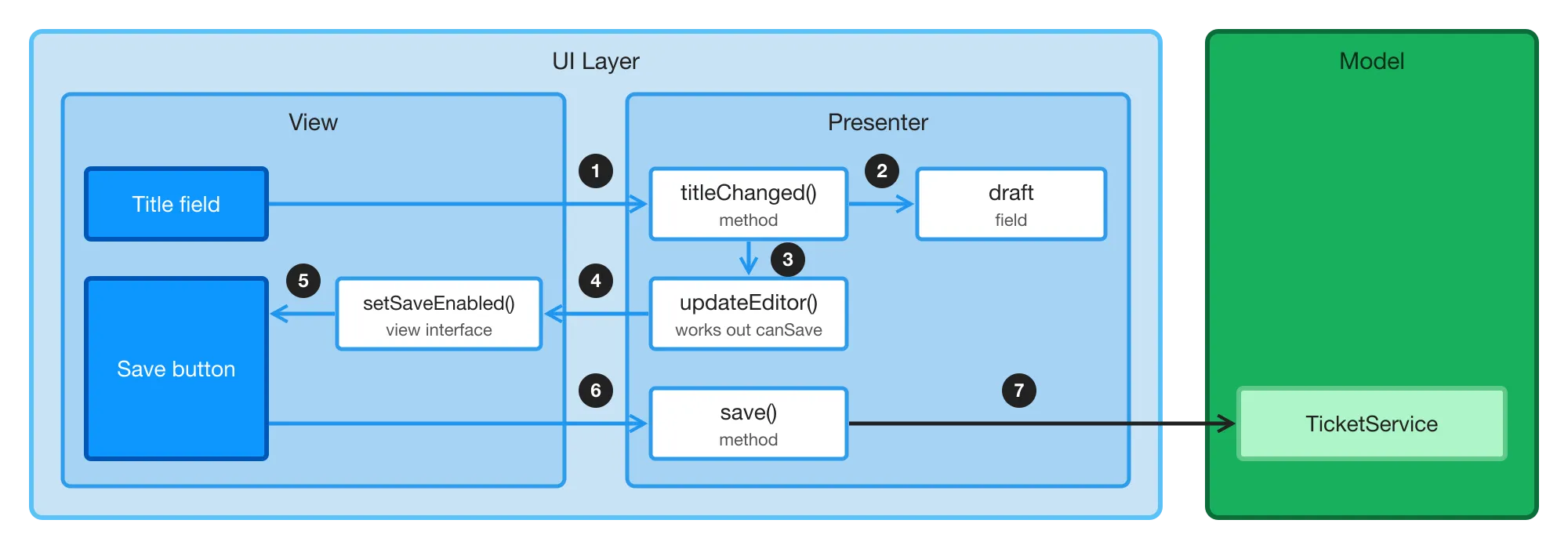
In MVP, a presenter holds the UI logic of a view, and the view is passive: it shows what the presenter tells it to, and reports the user’s actions to the presenter. The following diagram shows a view that edits the title of a ticket, the same view as at the start of Structure Views with MVVM:
-
The user types in the title field. The view passes the new title to the
titleChanged()method of the presenter. -
The presenter stores the new title in its
draftfield. -
It then calls
updateEditor(), which works out whether the ticket can be saved. -
updateEditor()callssetSaveEnabled()on the view, through the view interface. -
The view enables or disables the Save button.
-
When the user clicks Save, the view calls the
save()method of the presenter. -
The presenter passes the ticket to the
TicketService, which saves it.
In code, the presenter sees the view only through an interface:
Source code
Java
// The view, as the presenter sees it
interface TicketEditorView {
    void setSaveEnabled(boolean enabled);
}
Source code
Java
class TicketEditorPresenter {

    private final TicketService ticketService; // The Model
    private final TicketEditorView view;
    private Ticket draft; // The state

    TicketEditorPresenter(TicketService ticketService, TicketEditorView view,
            Ticket ticket) {
        this.ticketService = ticketService;
        this.view = view;
        this.draft = ticket;
        updateEditor();
    }

    void titleChanged(String title) {
        draft = draft.withTitle(title);
        updateEditor();
    }

    void save() {
        ticketService.save(draft);
    }

    // Works out the rule, and pushes the outcome to the view
    private void updateEditor() {
        view.setSaveEnabled(!draft.title().isBlank());
    }
}
The Flow view implements the interface, and passes the user’s actions to the presenter:
Source code
Java
class TicketEditorViewImpl extends VerticalLayout
        implements TicketEditorView {

    private final Button save = new Button("Save");

    TicketEditorViewImpl(TicketService ticketService, Ticket ticket) {
        var presenter = new TicketEditorPresenter(ticketService, this, ticket);

        TextField title = new TextField("Title");
        title.setValue(ticket.title());
        title.addValueChangeListener(
                event -> presenter.titleChanged(event.getValue()));

        save.addClickListener(event -> presenter.save());
        add(title, save);
    }

    @Override
    public void setSaveEnabled(boolean enabled) {
        save.setEnabled(enabled);
    }
}
In MVVM, the same rule is a derived signal that the Save button is bound to. In MVP, the presenter works out the rule and pushes the outcome to the view itself, in steps 3 to 5.
This article shows how MVP looks in a larger Flow view, and compares it with Model-View-ViewModel (MVVM), which builds on signals. It then discusses when to use which, and when neither is worth the extra code.
|
Important
|
Deep Dive - Recommended Approach
This opinionated deep dive weighs two patterns against each other, and recommends when to use which. For new views, the recommendation is MVVM. You don’t need this article to follow the MVVM guides. Read it if your application uses MVP, or if you’re choosing a pattern for your team.
|
How MVP Works
MVP splits a view into three roles:
-
The Model is the application itself: its application services, domain classes, and DTOs.
-
The Presenter holds the UI logic. It reacts to the user’s actions, calls the Model, and tells the view what to show.
-
The View is passive. It shows what the presenter tells it to, and reports the user’s actions to the presenter.
The view interface doesn’t mention Vaadin. The presenter is therefore plain Java: it has no dependency on Vaadin at all, and you can test it with a fake implementation of the view interface. A Vaadin class implements the interface, and that class is the only one that knows about UI components.
The Example
The example is the ticket triage view of the MVVM series, built with MVP and cut down to its core: a searchable list of tickets, an editor for the title of the selected ticket, and a Save button that’s enabled only when the title has changes and isn’t blank. Selecting another ticket while there are unsaved changes asks the user first. The Model is the same TicketService and Ticket record.
The View Interface
The view interface lists everything that the presenter can do to the view. Name its methods after what the view shows, not after UI components:
Source code
TicketsView.java
A question to the user is a method too. The view asks the question in its own way, and passes the answer back by calling the presenter.
The Presenter
The presenter keeps the state of the view in plain fields. It receives the view in its constructor, together with the application services:
Source code
TicketsPresenter.java
After every change, the presenter tells the view what to show. Whether Save is enabled depends on two things, whether the title has changes and whether it’s valid. Therefore, every method that changes the draft ends by calling updateEditor(), which works out both again and pushes them to the view. The keepEditing() method selects the opened ticket again, because the grid still shows the row that the user clicked.
The View Implementation
The route class implements the view interface. It creates the presenter in its constructor, and passes itself to it:
Source code
TicketsViewImpl.java
The listeners only pass the user’s actions on to the presenter. When the presenter sets the value of a field, the field fires a value change event in the same way as when the user changes it. Without the isFromClient() checks, the view would report the presenter’s own changes back to the presenter as if the user had made them.
The rest of the class implements the view interface:
Source code
TicketsViewImpl.java
Setting the items of a grid clears its selection, so showTickets() selects the same ticket again. The view handles this detail of the grid itself, so that the presenter doesn’t need to know about it.
The view also loads the tickets after navigation, and asks the user before leaving with unsaved changes, in the same way as the MVVM version. It asks the presenter with hasUnsavedChanges().
Testing the Presenter
Test the presenter with plain JUnit, and give it a fake view that remembers what the presenter told it:
Source code
TicketsPresenterTest.java
import static org.junit.jupiter.api.Assertions.assertEquals;
import static org.junit.jupiter.api.Assertions.assertFalse;
import static org.junit.jupiter.api.Assertions.assertTrue;

import java.util.List;

import org.junit.jupiter.api.BeforeEach;
import org.junit.jupiter.api.Test;

class TicketsPresenterTest {

    // Remembers what the presenter last told the view to do
    static class FakeTicketsView implements TicketsView {
        List<Ticket> tickets;
        Ticket selected;
        Ticket shown;
        String titleError;
        boolean saveEnabled;
        boolean confirmingDiscard;

        @Override
        public void showTickets(List<Ticket> tickets) {
            this.tickets = tickets;
        }

        @Override
        public void selectTicket(Ticket ticket) {
            selected = ticket;
        }

        @Override
        public void showTicket(Ticket ticket) {
            shown = ticket;
        }

        @Override
        public void showTitleError(String error) {
            titleError = error;
        }

        @Override
        public void setSaveEnabled(boolean enabled) {
            saveEnabled = enabled;
        }

        @Override
        public void confirmDiscard() {
            confirmingDiscard = true;
        }

        @Override
        public void showSaved() {
        }
    }

    FakeTicketsView view;
    TicketsPresenter presenter;

    Ticket printer;
    Ticket vpn;

    @BeforeEach
    void setUp() {
        view = new FakeTicketsView();
        presenter = new TicketsPresenter(new TicketService(), view);
        presenter.refresh();
        printer = view.tickets.get(0);
        vpn = view.tickets.get(2);
    }

    @Test
    void blankTitleCannotBeSaved() {
        presenter.select(printer);
        presenter.titleChanged(" ");

        assertEquals("Title is required", view.titleError);
        assertFalse(view.saveEnabled);
    }

    @Test
    void switchingTicketsWithUnsavedChangesAsksFirst() {
        presenter.select(printer);
        presenter.titleChanged("Printer on fire again");

        presenter.select(vpn);

        assertTrue(view.confirmingDiscard);
        assertEquals(printer, view.shown);
    }

    @Test
    void keepingTheChangesSelectsTheTicketAgain() {
        presenter.select(printer);
        presenter.titleChanged("Printer on fire again");
        presenter.select(vpn);

        presenter.keepEditing();

        assertEquals(printer, view.selected);
        assertTrue(presenter.hasUnsavedChanges());
    }
}
The tests check what the presenter told the view to do. Instead of writing a fake view, you can use a mocking library, and verify the calls to the view interface. Either way, the tests depend on the view interface: when you change it, you also change the fake or the verified calls.
MVP in a Component Tree
MVP doesn’t change how you split a view into child UI components, as Compose with Components describes. The presenter talks only to the route view, through the view interface. The route view implements the interface by calling setters on its child components, and passes their events and callbacks on to the presenter:
Source code
Java
@Override
public void showTicket(Ticket ticket) {
    editor.setTicket(ticket); // A child component of the view
}
Source code
Java
grid.addTicketSelectedListener(
        event -> presenter.select(event.getTicket()));
This is the style of setters and events that Compose with Components describes, with the decisions moved from the view into the presenter.
Keep one presenter for each route view. Don’t give each child component a presenter of its own that calls the presenters of other components. If a child component is complex enough to need a presenter, keep the presenter inside the child, and let the child talk to its parent through its own setters and events, like any other UI component.
How the Patterns Differ
The following diagram shows the ticket editor from the start of this article, built with MVVM:

A derived signal and a binding take the place of steps 3 to 5 of the MVP version. Nothing in the ViewModel calls the view.
Both patterns move the UI logic of a view out of the UI components, into a plain Java class that you test with JUnit. They differ in how the UI follows the state:
| MVP | MVVM | |
|---|---|---|
How the UI follows the state | The presenter calls the view interface after every change | The view binds its UI components to signals once |
A rule over combined state | Worked out again, and pushed to the view, after every change that might affect it | A derived signal, stated once |
Classes for each view | View interface, presenter, and view implementation | ViewModel and view |
What the UI logic depends on | Nothing from Vaadin | Vaadin’s signals, but no UI components |
What the tests check | What the presenter told the view to do | The state of the ViewModel |
Pros and Cons of MVP
MVP has these strengths:
- Independent of the UI framework
-
The presenter is plain Java. When you migrate an application from an older Vaadin version, or from another Java UI framework, you rewrite the view implementations, and keep the presenters and their tests. If the presenter doesn’t use any Vaadin types, an old and a new view implementation can even share it while you migrate the views one at a time, for example with Multiplatform Runtime.
- Explicit contract
-
The view interface lists everything that the presenter can do to the UI. It’s easy to review, and one developer can work on the presenter while another builds the view.
- Imperative and familiar
-
Each change to the UI is a method call that you can follow in a debugger. Many Java developers know the pattern, and many existing applications use it.
MVP has these weaknesses:
- Updates by hand
-
The presenter has to update every part of the UI that depends on the state it changes. A forgotten call leaves the UI out of date. The compiler doesn’t notice, and the tests notice only if they check that part of the UI. As the rules combine more state, methods like
updateEditor()grow, and more methods have to call them. - More code
-
Each view needs three classes, and showing one more value in the view touches all of them: a method in the interface, its implementation, and a call in the presenter.
- State in two places
-
The state lives in the presenter, and again in the UI components: the values of the fields and the selection of the grid. The view implementation has to keep the two in step, as the example does when it filters the presenter’s own changes with
isFromClient()and selects the ticket again after replacing the items. - Tests tied to the view interface
-
The tests check calls to the view. A change to the view interface changes the tests, even when the behavior stays the same.
- Large views get tangled
-
When a large view is split into parts, each with a presenter of its own, the presenters tend to call each other, and the flow of a user’s action becomes hard to follow. MVP in a Component Tree shows how to avoid this.
Pros and Cons of MVVM
MVVM has these strengths:
- Derived instead of pushed
-
A rule is a derived signal, stated once, and every UI component that is bound to it follows it. Nothing can forget to update the UI.
- Less code
-
MVVM needs no view interface. A field binds to a signal and a command in one line.
- State in one place
-
The signals of the ViewModel are the only copy of the state. A field doesn’t pass a value that it got from its signal back to the ViewModel, so the view needs no checks to tell the ViewModel’s changes from the user’s.
- Tests that check state
-
The tests read the state of the ViewModel. Replacing a button with a menu item doesn’t change them, as long as the item calls the same command.
- Shared state
-
Several UI components, and child components, bind to the same signals, so the parts of a view share state without calling each other.
MVVM has these weaknesses:
- Depends on Vaadin
-
The ViewModel uses no UI components, but it depends on the signal classes of Vaadin, and needs a Vaadin version that has them. It doesn’t survive a change of UI framework as it is.
- Gaps in the bindings
-
Vaadin doesn’t have bind methods for every property, such as the items of a grid and the error message of a field. For those, the application needs small helpers, as Bind the View shows.
- A new way of thinking
-
Developers have to learn to derive state instead of setting it, to read signals with
peek()in commands, and to keep effects out of the ViewModel. One-off interactions, such as a notification after a save, need a returned outcome, because they aren’t state.
When to Use Which
| Situation | Pattern |
|---|---|
A new view with rules over combined state, shared state, flows, or background work | MVVM |
A view that you’re rewriting anyway, in an application with signals | MVVM |
An application that uses MVP, and that you’re migrating to a newer Vaadin version | MVP |
UI logic that has to work with more than one UI framework, or one that you plan to replace | MVP |
A view that shows none of the signs of a complex view | Neither |
When you migrate an application that uses MVP, keep MVP during the migration. Port the view implementations, and keep the presenters and their tests as they are. The tests then show that the UI logic still works on the new version. Changing the pattern at the same time would change the code that the tests check, and you couldn’t tell whether a failure comes from the migration or from the new pattern.
After the migration, you don’t have to convert anything. Move a view to MVVM when you change it substantially anyway, and its updates by hand get in the way. A mix of patterns in one application is fine, as long as each view uses one of them.
Use MVP for a new view only when its UI logic really must not depend on Vaadin. Most applications never change their UI framework, and paying for that option in every view rarely pays off.
When Neither Is Worth It
Both patterns cost extra code. Most views don’t need either: a login view, a settings view, a read-only page, a list with one filter, or a form that loads and saves one entity. Build those as plain views, with Binder for the forms, and use signals in the view when a few UI components share some state. When to Use MVVM lists the signs that a view has outgrown that.
MVP costs the most for a simple view, because it needs three classes for each view, however simple the view is.
Testing alone isn’t a reason to use either pattern. A browserless test runs a plain view without a browser, and checks what the user sees after clicking and typing. See Browserless Tests. A separate presenter or ViewModel pays off when the view has rules worth testing on their own, not when the only rule is that a button calls a service.
Moving from MVP to MVVM
When you move a view from MVP to MVVM, the presenter becomes the ViewModel, and the view implementation becomes the view:
-
Remove the view from the presenter’s constructor. Keep the application services.
-
Turn each field that holds state into a private signal.
-
Turn each method that the presenter calls on the view to show something into a read-only signal. A value that the presenter works out, such as whether Save is enabled, becomes a derived signal. Remove the code that pushes the values, such as
updateEditor(). -
Keep the methods that the view calls as commands.
-
Turn each question that the presenter asks the view into state, such as
confirmingDiscard, or into an outcome that a command returns. -
In the view, bind the UI components to the signals instead of implementing the view interface, and remove the interface. A listener with an
isFromClient()check becomes abindValue()call. -
In the tests, replace the fake view with assertions on the signals, read with
peek().
The result is the ViewModel of Write a ViewModel. Move one view at a time, and run its tests after each step.