
Editor's note: Since this article was originally published, the Swing Modernization Toolkit has been renamed to SwingBridge.
Java Swing has been the workhorse of enterprise desktop applications for more than two decades. It powered internal tools, financial platforms, logistics systems, and ERP front-ends across industries where reliability mattered more than aesthetics. And for a long time, that bargain held.
It no longer does.
Table of Contents
- Introduction
- Why Swing Applications Need Modernization Now
- The Three Migration Approaches
- Decision Framework: Choosing Your Approach
- Architecture: What the Incremental Migration Looks Like
- Common Objections and How to Address Them
- Risk Matrix
- Timeline Estimates by Application Size
- What a Successful Migration Project Looks Like
- Getting Started: A Practical First Step
- Key Takeaways
Oracle stopped active development of Swing years ago. The framework still receives security patches and critical bug fixes, but no new capabilities are being built. Meanwhile, every force shaping enterprise software—cloud-native architecture, remote workforces, mobile-first expectations, and a generational shift in the developer talent pool—is pulling in the opposite direction from a desktop-only UI toolkit.
If you are responsible for a Java Swing application in 2026, the question is not whether to modernize. It is how to modernize without destroying the business logic, domain expertise, and institutional knowledge embedded in your existing codebase.
This guide lays out the three primary migration approaches, provides a decision framework for choosing between them, and walks through the timelines, risks, and architectural considerations that determine whether a Swing modernization project succeeds or stalls.
Why Swing Applications Need Modernization Now
Before diving into strategies, it is worth understanding the converging pressures that have made Swing modernization urgent rather than aspirational. These are not theoretical concerns—they are operational realities that compound with each year of delay.
The Talent Gap Is Already Here
The developer ecosystem has moved decisively to web-based frameworks. Computer science programs do not teach Swing. Bootcamps do not cover AWT layout managers. Every developer entering the workforce in 2026 has never written a line of Swing code and has no interest in starting.
For organizations maintaining large Swing codebases, this creates an acute hiring problem. The pool of experienced Swing developers is shrinking through retirement and attrition. Replacements are expensive to find and even more expensive to retain, because those developers know their skills are scarce. Every year you wait, the talent market gets worse.
User Experience Expectations Have Shifted Permanently
Enterprise users in 2026 use Microsoft 365, Salesforce, SAP, and ServiceNow, Figma, Slack in their daily workflows. They interact with polished, responsive web interfaces that adapt to their screen size, support dark mode, and provide real-time collaboration. Then they switch to an internal Swing application that looks and feels like it was designed in 2005—because it was.
This is not vanity. Poor UX in internal tools reduces adoption, increases training costs, drives workarounds in spreadsheets, and quietly erodes data quality. When a logistics coordinator avoids the "official" tool because the web-based alternative is faster, you have a modernization problem masquerading as a data governance problem.
The Operational Overhead of Desktop Swing Applications
Desktop Swing applications carry significant operational overhead that web-based applications simply do not. Every deployment requires installing and managing a Java runtime on each user's machine. Every version update must be pushed to every endpoint. IT teams must maintain compatibility across different operating systems, hardware configurations, and Java versions. Remote access requires VPN or remote desktop infrastructure—itself a cost and security consideration.
As organizations move to cloud platforms like AWS, Azure, or GCP, the operational gap becomes even more visible. Web applications deploy instantly, scale automatically, and require zero client-side installation. Swing applications do none of these things. The overhead of managing desktop installations across a workforce—patching, version control, OS compatibility—represents a meaningful cost that compounds with every passing year.
Security Risks Are Expanding, Not Shrinking
Swing desktop applications carry a security profile that is increasingly difficult to defend in a modern threat landscape. Every client machine runs a full JVM with broad default permissions—access to the local file system, network, and external processes—creating a wide attack surface that must be secured and patched on every individual device. Oracle continues to issue Critical Patch Updates for Java SE quarterly, addressing vulnerabilities like CVE-2025-50106, CVE-2025-30749, and CVE-2025-30761 in recent cycles alone. Each patch must be deployed to every client installation, and any machine that falls behind becomes a potential entry point.
The architectural patterns common in Swing applications compound the problem. Many Swing clients hold database credentials locally or establish direct JDBC connections to back-end databases, bypassing the API layers and authentication gateways that modern web application security architectures rely on. Connection strings embedded in client-side configuration files, unencrypted local caches of sensitive data, and JVM processes running with unrestricted permissions are not theoretical risks—they are the reality of how many Swing applications were built in an era when every user sat on a trusted corporate network.
Centralizing the application on the server—as both Phase 1 of the Vaadin Swing Modernization Toolkit and a full web migration achieve—eliminates the client-side JVM entirely. Database connections stay behind the firewall. Credentials never leave the server. Patching happens once, centrally, instead of across hundreds or thousands of client machines. The security posture improves immediately and structurally, not just incrementally.
Accessibility and Regulatory Compliance Are No Longer Optional
The regulatory landscape has shifted decisively. The European Accessibility Act (EAA), enforceable since June 28, 2025, requires businesses operating in the EU digital market to meet EN 301 549 accessibility standards—which incorporate WCAG 2.1 Level AA. In the US, Section 508 and ADA-related litigation continue to expand the scope of digital accessibility obligations. Organizations that provide software to government agencies, financial institutions, healthcare systems, or public-facing services are increasingly required to demonstrate accessibility compliance as a condition of procurement.
Java Swing was never designed with web accessibility standards in mind. Swing components have their own accessibility API (the Java Accessibility API), but it does not map cleanly to WCAG criteria, ARIA roles, or the assistive technology ecosystem that has standardized around web content. A Swing application cannot produce a VPAT (Voluntary Product Accessibility Template) that meets WCAG 2.1 AA in any meaningful sense, because the framework does not generate the semantic HTML, keyboard navigation patterns, or screen reader hooks that the standard requires.
This is not a cosmetic gap. For organizations selling into the EU market, serving government clients, or operating in regulated industries, a Swing front end is becoming a compliance liability. Modern Java web frameworks like Vaadin provide WCAG 2.1 AA certified components out of the box—migrating to web views does not just improve the user experience, it resolves a regulatory exposure that will only grow more acute as enforcement matures.
The Cost of Waiting Is Compounding
Legacy maintenance is not a flat cost. It compounds. Each year of deferred modernization means more code written against deprecated APIs, more institutional knowledge concentrated in fewer people, and more technical debt layered onto a foundation that is not receiving investment. The longer you stay on Swing, the more expensive any future change becomes—whether that is hiring, migrating, or simply maintaining what you already have.
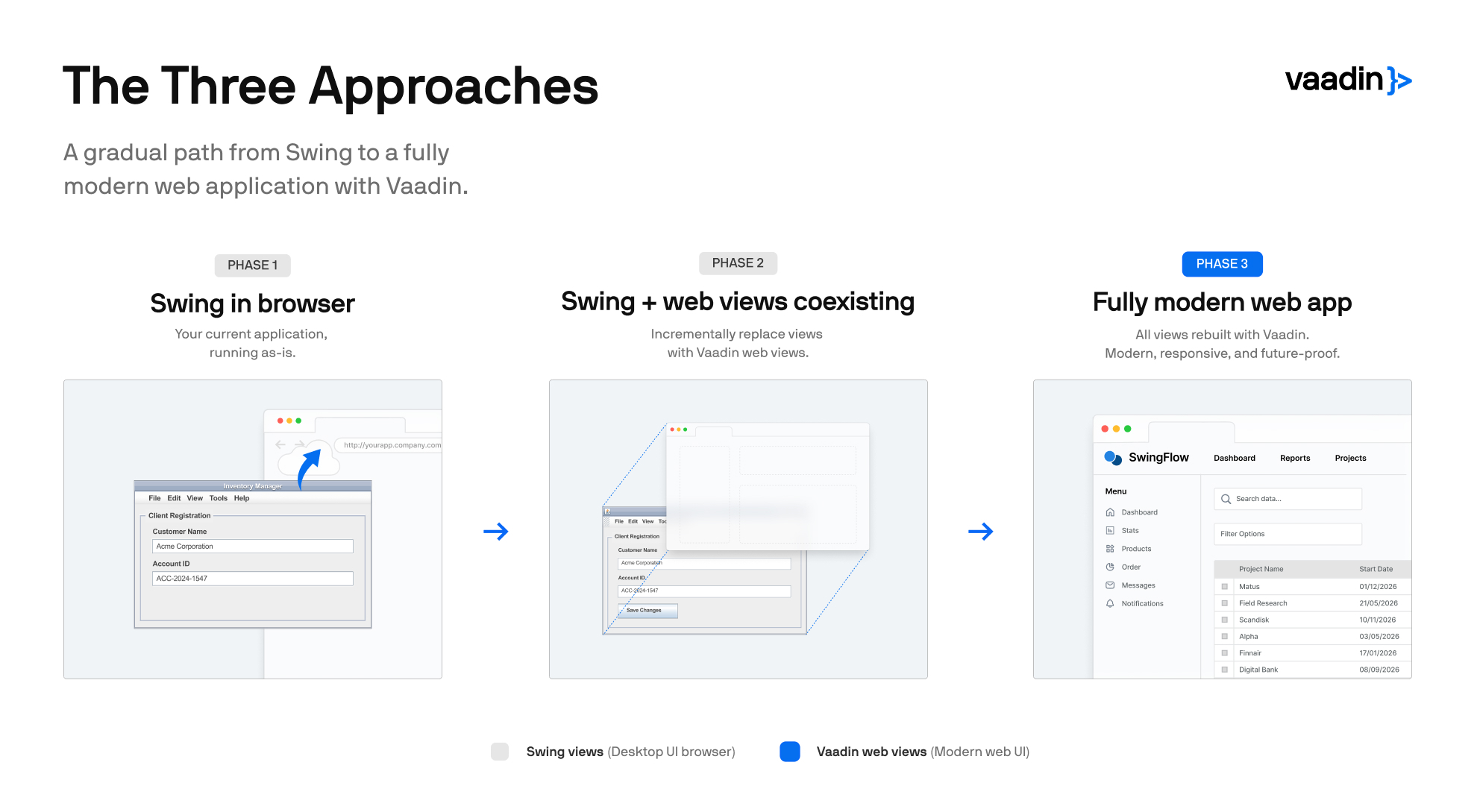
The Three Modernization Approaches
Every Swing modernization project falls into one of three categories. Each has distinct cost profiles, risk characteristics, and timelines. Understanding the trade-offs is essential before committing resources.
Approach 1: Lift-and-Shift (Run Swing in the Browser)
The fastest path to web-based access is to run the existing Swing application on a server and stream its rendered output to a web browser. The Vaadin Swing Modernization Toolkit supports this as its first phase, acting as a bridge between the Java application and the browser. The Swing UI renders on the server and is delivered to the client via the browser, with user interactions relayed back transparently.
How it works: The application continues to run as a standard Swing application on a server-side JVM. A rendering layer captures the visual output and streams it to the browser. Mouse clicks, keystrokes, and other input events are captured in the browser and sent back to the server. From the application's perspective, it is running on a desktop—it simply does not know the "desktop" is actually a remote browser session. Minor modifications are needed to support multi-tenancy—ensuring the application can safely serve multiple concurrent users from a single server process—and to handle web-appropriate session lifecycle (timeouts, browser navigation).
Advantages:
- Minimal source code modification required. The existing application runs largely as-is, though some changes are needed to enable multi-tenancy (serving multiple users from a single JVM).
- Fastest time to browser-based access—often measurable in hours or days, not weeks or months, depending on the complexity of multi-tenancy adaptations. Ongoing server infrastructure costs scale with concurrent users.
- Eliminates the need to install or manage a Java runtime (JVM) on every user's machine—users access the application through any standard web browser.
- Enables remote access and centralized deployment immediately.
Limitations if you stop here:
- The visual design and interaction model do not improve. The application still looks and behaves like a desktop application—rendered in a browser window but not redesigned for it. The deployment model changes (from a locally installed desktop app to a browser-accessible service), which is itself a meaningful improvement, but the UI does not adapt to screen sizes, support modern interaction patterns, or feel like a native web application.
- Server resource requirements are significant. The JVM moves from each client machine to a centralized server—but each concurrent user session still runs a full Swing application instance on that server, consuming CPU, memory, and network bandwidth proportional to the complexity of the UI.
- The deployment model changes—from a locally installed desktop application to a centrally deployed, browser-accessible service. This brings real operational benefits: easier updates, reduced IT overhead, and remote access. However, the underlying application modernization remains untouched. The technology debt is still there; only the delivery mechanism has changed.
The critical distinction is whether lift-and-shift is your end state or your starting point. Some tools treat browser-based rendering as the final destination, leaving you with a streamed desktop UI and no path forward. The Vaadin Swing Modernization Toolkit treats it as Phase 1—a foundation that unlocks incremental screen-by-screen modernization (Approach 2 below). You get browser access in weeks, then continue modernizing without starting over.
Best suited for: Organizations that need browser access urgently (regulatory, remote access mandates) as a first milestone, with the option to continue modernizing incrementally. Also appropriate for applications with a limited remaining lifespan where deeper investment is not justified.
Typical timeline: Hours to days for browser-based access, depending on the complexity of multi-tenancy adaptations. Ongoing server infrastructure costs scale with concurrent users.
Approach 2: Incremental Migration (Screen-by-Screen Modernization)
The incremental approach replaces individual Swing views with modern web views one screen at a time, while keeping the rest of the application functional. This is the strategy that balances risk reduction with genuine modernization—you are improving the application continuously rather than waiting for a big-bang replacement.
How it works: If you have already completed a lift-and-shift (Approach 1), you are ready to begin. If not, the process starts the same way: the application is adapted to run on a server with its UI accessible in a browser. Then, individual screens are rebuilt using a modern Java web framework. During the transition period, users interact with a mix of legacy Swing views and new web views within the same application. Business logic, services, and domain models remain intact throughout—only the presentation layer changes.
Vaadin's Swing Modernization Toolkit is purpose-built for this two-phase approach. Phase 1 delivers browser access. Phase 2 provides automation to help convert Swing UIs into modern Java web views built with Vaadin. Both Swing views and new web views coexist during the transition, so the application remains fully functional at every stage.
Advantages:
- Risk is distributed across the project timeline. Each screen migration is a small, bounded deliverable. If priorities shift, you can pause the migration and still have a partially modernized, fully functional application.
- Business logic is preserved. The existing Java services, domain models, and back-end integrations do not need to be rewritten. Only the UI layer changes.
- User experience improves incrementally. High-traffic or high-pain screens can be prioritized first, delivering visible value early.
- The team learns as it goes. Lessons from early screen migrations inform later ones, reducing the error rate and increasing velocity over time.
- Automation reduces manual effort. Vaadin's toolkit automates the conversion of many common Swing UI patterns to web equivalents, preserving logic, structure, and even code comments.
Disadvantages:
- Requires adaptation of the existing application for server-side multi-tenancy and browser-based rendering before incremental screen replacement can begin.
- The coexistence of Swing and web views means maintaining two rendering paradigms during the transition period, which adds some complexity.
- Total project duration is longer than a clean rewrite in theory (though shorter in practice, because rewrites almost always exceed their estimates).
Best suited for: Organizations with large, business-critical Swing applications that cannot tolerate downtime or a prolonged parallel-run period. Also ideal when the existing Java business logic is sound and the primary modernization need is in the UI layer.
Typical timeline: Phase 1 (browser access) in 4–8 weeks. Phase 2 (screen-by-screen migration) runs over 6–24 months depending on application size and team capacity. Most teams migrate 2–4 screens per sprint once they hit their stride.
Approach 3: Full Rewrite
The full rewrite discards the existing codebase and rebuilds the application from the ground up using a modern technology stack. This is the approach that gets proposed most often in executive strategy meetings and succeeds least often in practice.
How it works: A new application is designed and built to replace the existing Swing application entirely. The technology stack is chosen freely—React, Angular, or a Java web framework like Vaadin on the front end; Spring Boot, Quarkus, or Micronaut on the back end. The existing Swing application continues to run in production until the replacement is feature-complete and validated, at which point users are cut over.
Advantages:
- Complete architectural freedom. You can adopt modern patterns (microservices, event-driven architecture, API-first design) without being constrained by legacy decisions.
- No legacy code to carry forward. The new codebase starts clean.
- Opportunity to rethink workflows, not just replicate them. A rewrite can simplify overly complex screens, eliminate unused features, and redesign processes around current business needs.
Disadvantages:
- High risk of failure. Industry data consistently shows that large-scale rewrites take 2–3 times longer than estimated, cost 2–4 times more than budgeted, and frequently fail to reach feature parity with the application they are replacing. The Standish Group's research on large IT projects reinforces that the larger and longer the project, the lower its chance of success.
- Loss of embedded domain knowledge. Legacy codebases contain years of business rule refinements, edge case handling, and integration workarounds that are not documented anywhere except in the code itself. Rewrites lose this knowledge, and the loss usually surfaces as defects in production.
- Extended parallel-run period. The existing Swing application must remain operational and maintained throughout the rewrite, doubling the team's maintenance burden.
- Opportunity cost. Every developer working on the rewrite is not working on new features, integrations, or improvements that could deliver business value today.
- API layer overhead. A rewrite using a JavaScript front end (React, Angular) requires designing and maintaining a REST or GraphQL API between the front end and back end—a significant ongoing engineering cost that did not exist in the original Swing architecture and does not exist in a Vaadin migration.
Best suited for: Applications that are small enough to rewrite within 6–12 months, applications where the business logic itself needs to change fundamentally (not just the UI), or situations where the existing codebase is so deteriorated that incremental migration is not feasible.
Typical timeline: 12–36 months for enterprise applications. Budget for 2x the initial estimate as a realistic baseline.
Decision Framework: Choosing Your Approach
The right approach depends on your specific constraints. Use the following factors to guide your decision.
Factor 1: Application Size and Complexity
Small applications (under 50 screens, limited integrations) can tolerate a rewrite. The risk is manageable because the scope is bounded. Large applications (hundreds of screens, deep integrations with ERP, databases, and external systems) are almost always better served by incremental migration. The rewrite risk for a large application is simply too high for most organizations.
Factor 2: Quality of Existing Business Logic
If your Java business logic is well-structured—clean service layers, reasonable separation of concerns, tested domain models—then preserving it through incremental migration is the efficient choice. You are leveraging years of refinement rather than recreating it from scratch.
If your business logic is tangled into Swing event handlers with no separation of concerns, incremental migration is harder (though still possible with refactoring). A rewrite may be more appropriate if the codebase is fundamentally unsalvageable.
Factor 3: Time to Value
How quickly do you need to show results?
- Hours to days: Lift-and-shift gives you browser access immediately.
- Weeks to months: Incremental migration delivers visible improvements on a continuous basis, with browser access as the first milestone.
- Months to years: A full rewrite delivers nothing until it is finished, and it is not finished until it reaches feature parity.
Most stakeholders and sponsors have a limited appetite for long projects with no intermediate deliverables. Incremental migration aligns better with how organizations actually fund and govern IT initiatives.
Factor 4: Team Composition
If your team is primarily Java developers, an approach that preserves the Java stack is significantly less disruptive. Incremental migration with a Java web framework like Vaadin means the team can be productive immediately without learning an entirely new language and ecosystem.
If you are building a new team or the existing team is already fluent in modern JavaScript frameworks, a rewrite using React or Angular may be viable—but factor in the back-end transition cost as well.
Factor 5: Budget and Risk Tolerance
Lift-and-shift has the lowest upfront cost but does not solve the underlying problem. Incremental migration has a moderate and predictable cost that scales linearly with the number of screens migrated. Full rewrites have the highest cost, the widest variance in actual-vs-estimated spend, and the highest risk of failure.
Decision Matrix
| Factor |
Lift-and-Shift |
Incremental Migration |
Full Rewrite |
| Time to browser access |
Hours–days |
4–8 weeks |
12–36 months |
| UX improvement |
None |
Continuous |
All at once (if completed) |
| Business logic preserved |
Yes (untouched) |
Yes (reused) |
No (rewritten) |
| Risk level |
Low |
Low–Medium |
High |
| Cost predictability |
High |
High |
Low |
| Team disruption |
Minimal |
Moderate |
Significant |
| Long-term technical debt |
Unchanged (unless you continue to Phase 2) |
Eliminated incrementally |
Eliminated (if completed) |
| Path to full modernization |
Yes, via incremental migration |
Built in |
Yes (if completed) |
| Scales to large apps |
Yes |
Yes |
Poorly |
Architecture: What the Incremental Migration Looks Like
Because incremental migration is the recommended approach for most enterprise Swing applications, it is worth understanding the architecture in more detail.
Phase 1: Browser-Based Access
The existing Swing application is deployed to a server environment. The Swing Modernization Toolkit handles rendering the Swing UI in the browser and managing user sessions. Minor modifications are required to support multi-tenancy (multiple users running concurrent sessions) and web-appropriate behaviors (session timeout, browser navigation, etc.).
At the end of Phase 1, users access the application through a URL instead of a locally installed client. The application looks the same as before—but it now runs centrally, can be accessed from any device with a browser, and no longer requires a JVM on client machines.
This phase is not cosmetic. It solves real operational problems immediately. IT teams can deploy updates centrally instead of pushing installers to every client machine. Access control moves to URL-based authentication rather than per-machine configuration. Users working remotely—a permanent reality in most organizations—can access the application from any browser without VPN tunneling to a specific desktop.
Phase 2: Screen-by-Screen Replacement
With browser access established, the team begins replacing Swing views with modern web views. The toolkit provides automation that converts many Swing UI patterns—layouts, input fields, tables, dialogs—to their Vaadin web equivalents. Code structure, comments, and logic flow are preserved during the conversion.
Each migrated screen goes through a standard workflow: automated conversion, manual review and refinement, testing, and deployment. The application in production always contains a mix of remaining Swing views and completed web views. Users experience a progressively modernized interface with each release.
Teams typically prioritize screens based on a combination of user traffic, business criticality, and migration complexity. The highest-value, lowest-complexity screens go first, building team confidence and establishing patterns that accelerate later migrations.
This is where the Java advantage becomes decisive. Because Vaadin is a server-side Java framework, your existing Java developers write the new web views in the same language, on the same build system, using the same IDE they already know. There is no context-switching to JavaScript, no REST API layer to design between front end and back end, and no separate front-end build pipeline to maintain. The migration is a Java-to-Java transformation, which fundamentally changes the The toolkit integrates with standard Maven and Gradle builds, so it fits into existing CI/CD pipelines without requiring a parallel front-end toolchain. skills equation compared to approaches that require adopting an entirely new technology stack.
Phase 3: Completion and Swing Removal
Once all screens have been migrated, the Swing rendering layer is removed entirely. The application is now a standard modern Java web application running on Vaadin, with all the advantages of a web-native architecture: responsive layouts, accessibility compliance, modern component libraries, and standard web deployment.
At this point, the application is indistinguishable from one that was built as a web application from the start. It can be deployed in containers, scaled horizontally behind load balancers, and integrated into CI/CD pipelines using standard tooling. The Swing dependency—and all the operational and talent constraints that came with it—is gone.
Common Objections and How to Address Them
Enterprise modernization projects inevitably face internal resistance. Here are the objections that surface most frequently and how to think about them.
"Our Swing application works fine. Why change it?"
It works fine today, with the current team. The question is whether it will work fine in three years when two of your senior Swing developers have retired and the remaining team spends 60% of its time on maintenance rather than improvements. Modernization is not about fixing something broken—it is about preventing a predictable failure before it becomes an emergency.
"We tried a rewrite before, and it failed."
Many organizations carry the scars of a previous rewrite attempt. This is actually an argument for incremental migration, not against modernization. The incremental approach was designed specifically to avoid the failure modes of big-bang rewrites: unbounded scope, loss of business logic, and extended periods with no deliverable output. Every sprint produces a working, improved application.
"Can we just use AI to rewrite everything?"
AI-assisted code transformation is a legitimate tool in the modernization toolkit, and some vendors are exploring this space. However, the challenge with Swing modernization is not primarily a code generation problem. It is an architecture problem—how do you transition a desktop application to a web deployment model while preserving business logic and maintaining continuity of service? Automated code translation can accelerate individual screen conversions (and the Vaadin toolkit uses automation for exactly this purpose), but it does not replace the architectural strategy, phased deployment plan, and organizational change management that determine whether a modernization project succeeds.
"We should skip Java web frameworks and go straight to React or Angular."
This is viable if you are willing to rewrite your back end as well, hire or retrain your team in JavaScript/TypeScript, and accept the timeline and risk profile of a full rewrite. For organizations whose core competency is Java—and whose team knows Java—staying in the Java ecosystem for the front end eliminates an enormous category of project risk and dramatically shortens the timeline to first results. (For a detailed comparison, see Java Swing alternatives for building modern web apps.) Beyond the language switch, the JavaScript ecosystem introduces its own complexity: npm dependency management, frequent framework version upgrades, bundler configuration, and a front-end build pipeline that must be maintained alongside your Java back end. For teams accustomed to the relative stability of the Java ecosystem, this is not a trivial operational change.
Risk Matrix
Every modernization approach carries risks. Identifying them early allows you to mitigate them structurally rather than reactively.
| Risk |
Lift-and-Shift |
Incremental |
Full Rewrite |
| Project failure / cancellation |
Low |
Low |
High |
| Loss of business logic |
None |
None |
Significant |
| Scope creep |
Low |
Medium |
Very High |
| Extended timeline |
Low |
Medium |
Very High |
| User disruption during transition |
Low |
Low (gradual) |
High (big-bang cutover) |
| Talent dependency on legacy skills |
Unchanged |
Decreasing over time |
Eliminated (but new skills required) |
| Integration breakage |
None |
Low (APIs preserved) |
High (new integrations) |
Timeline Estimates by Application Size
These estimates assume a typical enterprise context: a dedicated team of 3–6 developers, standard code review and QA processes, and normal organizational decision-making cadence.
| Application Size |
Lift-and-Shift |
Incremental Migration |
Full Rewrite |
| Small (10–30 screens) |
1–3 weeks |
3–6 months |
6–12 months |
| Medium (30–100 screens) |
2–6 weeks |
6–12 months |
12–24 months |
| Large (100–300 screens) |
4–8 weeks |
12–24 months |
24–36+ months |
| Very Large (300+ screens) |
6–12 weeks |
18–36 months |
36–60+ months (high failure risk) |
Note that for incremental migration, these timelines include Phase 1 (browser access). Visible modernization begins within the first few months and continues on a predictable cadence throughout the project.
What a Successful Migration Project Looks Like
Having guided numerous organizations through Swing modernization, a pattern emerges in the projects that succeed.
Weeks 1–4: Assessment and architecture. The team inventories the existing application—screens, integrations, business logic layers, and technical debt. They select the migration approach, define the Phase 1 scope, and set up the server infrastructure for browser-based access.
Weeks 4–8: Phase 1 delivery. The existing Swing application goes live in the browser. Users get remote access. IT gets centralized deployment. The team has now delivered a tangible result to stakeholders, which builds confidence and sustains funding for Phase 2.
Months 3–6: First wave of screen migrations. The team migrates the highest-priority screens—typically the ones that users interact with most frequently or that cause the most support tickets. These early migrations establish the team's conversion patterns, testing strategies, and deployment cadence. Velocity typically doubles between the first and third screen migration as the team internalizes the toolkit's automation capabilities.
Months 6–18+: Steady-state migration. The team settles into a predictable rhythm of 2–4 screens per sprint. Each release is a small improvement, each sprint reduces the remaining Swing surface area, and each month the application looks and feels more modern. The organization can adjust pace, reprioritize screens, or pause without losing progress.
Final milestone: Swing removal. The last Swing view is replaced, the rendering bridge is removed, and the application is a fully modern Java web application. For many organizations, this moment is anticlimactic—by the time it arrives, 90% of the application has already been modernized and running smoothly in production for months. (For a real-world example of this pattern, see how IZUM migrated over 1,000 Swing views with 90% code reuse.)
Getting Started: A Practical First Step
If you are evaluating how to modernize a Java Swing application, the most productive first step is an assessment of your current codebase. This assessment should answer:
- How many screens does the application have, and which are most heavily used?
- How cleanly is business logic separated from the Swing UI layer?
- What external integrations exist, and how are they accessed?
- What is the current server infrastructure, and what constraints does it impose?
- What is the team's familiarity with modern Java web frameworks?
These inputs feed directly into the decision framework above and allow you to estimate timelines, costs, and risks with reasonable accuracy.
You do not need to answer these questions alone. Vaadin offers a Swing modernization assessment that evaluates your application against these criteria and provides a concrete recommendation with a preliminary migration plan, including timeline estimates and resource requirements. If you are managing a Swing application and considering modernization, this is the fastest way to move from "we should do something" to "here is what we should do, how long it will take, and what it will cost."