
In a test run on Vaadin 25.3.5 and Spring Boot 4.1.2, Claude Code finished the same six-step task in 24% less time and at 28% lower cost when the Dev Loop applied its edits to the running app instead of restarting it.
TL;DR
- What it is: Vaadin 25.3 adds the Dev Loop (
vaadin-dev), a preview CLI and daemon. It applies a coding agent's edits to the running app by hot module replacement, Java hot swap or, only when needed, a restart, and it reports the result as an exit code. - The result: the same prompt with and without the Dev Loop took 157 s vs 207 s of agent time and cost $1.17 vs $1.63 at API list price, using Opus 5.5. This is one run.
- Restarts only when needed: 5 of 7 steps went live in under a second. A new Spring service needed a restart (5.2 s), and the deliberate compile error was rejected.
- Requirements: Java 21+, Maven (no Gradle yet), Claude Code or Codex. It's still a preview feature.
- Code: SebastianKuehnau/devloop-demo
For Java developers who use Claude Code or Codex on Vaadin Flow and Spring Boot apps.
Coding agents are good at writing code, but slow in checking it. After each edit, the agent rebuilds the project, restarts the app and checks the change with Maven tests, E2E tests or in the browser. In a large task with dozens of edits, these restarts accumulate and take a lot of time.
Vaadin 25.3 adds the Dev Loop as a preview feature. It gives the agent one command that makes its edits live and tells it if they are. In short, the Dev Loop:
- Owns the app process. A daemon runs the app, so the agent no longer restarts it with Maven after each edit.
- Picks the lightest path. CSS is pushed into the open page, Java changes are hot-swapped, and the app restarts only when it has to.
- Gives a clear answer.
vaadin-dev applyreports how the change went live (HMR, hot swap or restart) and returns exit code 0 when it is live and 1 when it failed, for example on a compile error.
It's made for agentic development, but it also works with an AI assistant in the terminal. Below, I set it up in a Spring Boot project and test it with Claude Code. The full example is on GitHub: SebastianKuehnau/devloop-demo.
What is the Vaadin Dev Loop?
The Vaadin Dev Loop is a command-line tool and background daemon, vaadin-dev, that owns a Vaadin app's edit-to-running-app cycle. It compiles changed sources, hot-swaps them or restarts the app, pushes changed stylesheets into the open page, and reports what happened.
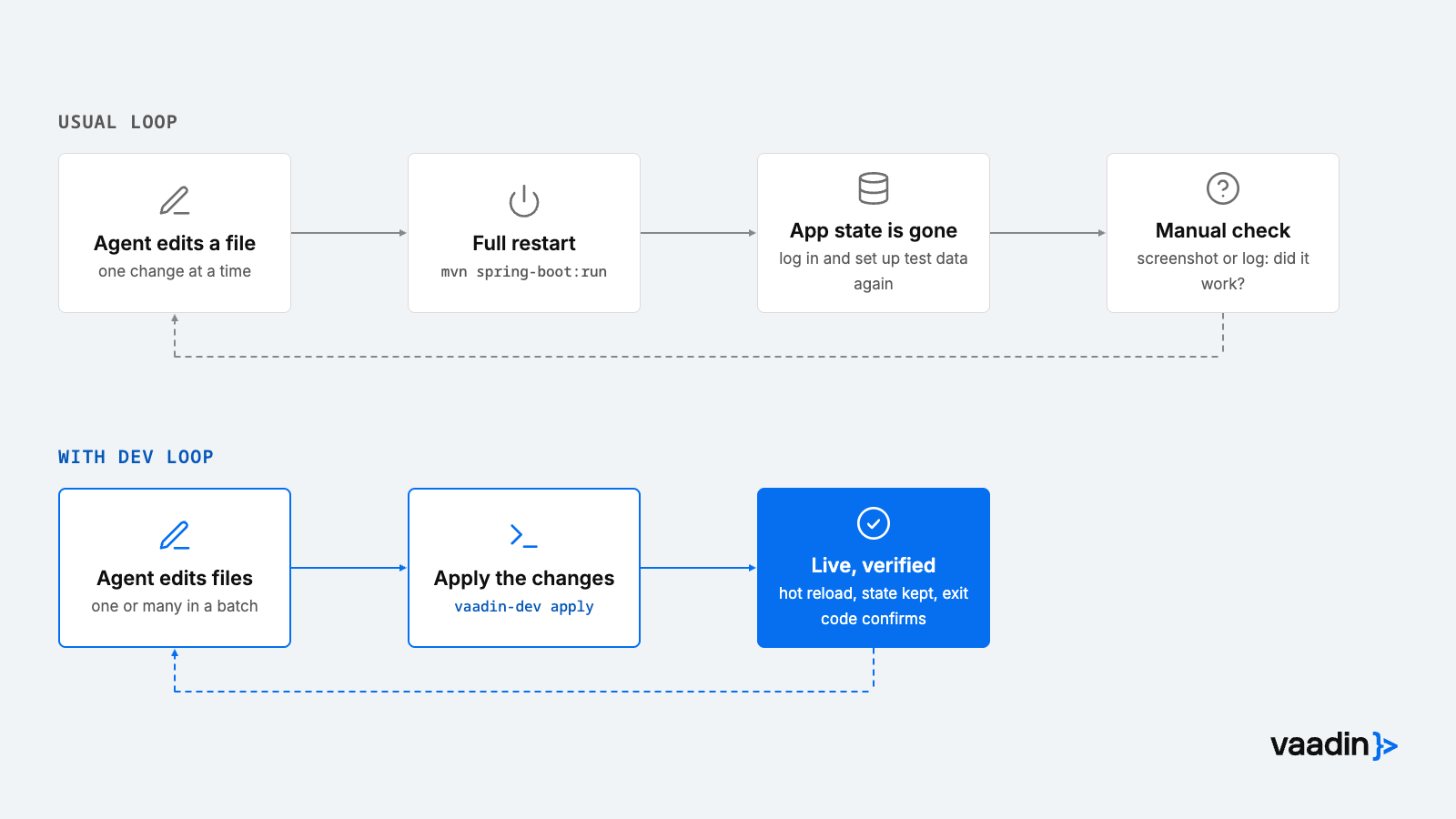
In the usual loop, every change ends in a full restart. The app state is lost, and the agent has to find out with tests or in the browser if the change worked. With the Dev Loop, the agent edits, runs apply and reads the result. Most changes go live without a restart.
How to set up the Dev Loop with Claude Code
You need Java 21 or newer, Maven, Vaadin 25.3 or newer and Claude Code or Codex. Use the JetBrains Runtime if you can. On a standard JDK, more changes need a restart.
The CLI starts its daemon from the vaadin-dev dependency, and optional keeps it out of your production build. Add it to your pom.xml:
<dependency>
    <groupId>com.vaadin</groupId>
    <artifactId>vaadin-dev</artifactId>
    <optional>true</optional>
</dependency>
Then install the CLI and the agent skills:
./mvnw vaadin:install-dev-cliThis adds the CLI in .vaadin/ and the skills in .agents/skills/ and .claude/skills/. Commit them, like mvnw. The install goal also downloads HotswapAgent once per machine, so it needs network access. If your agent runs in a container or a Docker Sandbox, run it while the network is still open.
Then add the Vaadin skills and MCP server to Claude Code:
/plugin marketplace add vaadin/agent-marketplace
/plugin install vaadin-skills@vaadin-marketplace
The Dev Loop skills also expect a browser automation tool, such as a Playwright MCP server.
Finally, start the app through the Dev Loop:
.vaadin/vaadin-dev startThe daemon owns the process, so don't also start it with ./mvnw spring-boot:run.
Dev Loop vs. full restarts: Claude Code test results
I gave Claude Code six steps on a new HelloDevLoopView: create the view, change the CSS, change a text, add a button, add a Spring service and break the build on purpose. The full prompt and all results are in the README. The result with Vaadin 25.3.5, Spring Boot 4.1.2, Opus 5.5 high and Claude Code 2.1.226, on 20.11.2026:
| Step | Path | Exit code | Duration |
|---|---|---|---|
| 1. New view | Hotswap, page reload for the new route | 0 | 0.69 s |
| 2. CSS color | HMR | 0 | 0.07 s |
| 3. Text and placeholder | Hotswap | 0 | 0.63 s |
| 4. Button and notification | Hotswap | 0 | 0.66 s |
| 5. GreetingService | Restart (automatic) | 0 | 5.19 s |
| 6a. Compile error | Error | 1 | 0.08 s |
| 6b. Fix | Hotswap | 0 | 0.64 s |
CSS, text and button changes went live in under a second. Only the new GreetingService caused a restart, because Spring scans for components only at startup. The compile error returned exit code 1, and the app kept the last working version.
I also ran the same prompt without the Dev Loop. These are the totals for both runs:
| Total | With Dev Loop | Without Dev Loop | Saved with Dev Loop |
|---|---|---|---|
| Agent time | 157.3 s | 207.2 s | 24% |
| Output tokens | 12,023 | 15,532 | 23% |
| Input tokens | 2,262,611 | 3,524,846 | 36% |
| Cost (API list price) | $1.17 | $1.63 | 28% |
With the Dev Loop, the agent needed 24% less time and 28% less money for the same result. It's a single run, so read it as a trend.
Limits and status
The Dev Loop is a preview feature in Vaadin 25.3, so it may still change. Before you hand it to an agent, know where it stops:
- Maven only. There is no Gradle equivalent yet.
- Fewer hot swaps on a standard JDK. Without a JetBrains Runtime, structural Java changes restart the app.
- Some changes always restart, and a restart resets the app state. Examples: a new Spring bean like the
GreetingServiceabove, a JPA entity mapping, or a change toapplication.properties. - Annotation processors such as Lombok don't run on
apply, and a changed method signature can leave callers stale whileapplystill reports success. - Exit code 0 isn't always the end of the story. If
applyprints anapp log:line, the code went live and then threw. If it reportsno browser connected, there was no open page to update. The installed skills teach the agent to check both.
The CLI reference lists all of them. For what else is new in this release, see the Vaadin 25.3 release post.
Try it on your own app
Clone devloop-demo and run the prompt from its README, or add the Dev Loop to your own project with the steps above. The Dev Loop tutorial builds a full feature with an agent. Feedback on the preview goes to the Vaadin forum.