Everyone who runs Claude Code seriously ends up fighting the permission prompts. Approve every file write, every shell command, every build, and you're pair-programming with extra steps instead of delegating. So you type --dangerously-skip-permissions, and Anthropic named that flag exactly what it is.
The way to go for me was a DevContainer with a firewall in front of it. The agent got its own environment, my machine stayed mostly out of reach, and I stopped thinking about it, which was the problem. A DevContainer is a long-lived place I live in, sharing my kernel, carrying my Claude sessions and whatever six months of agent runs installed. Then I came across Docker Sandboxes, and two words from the description stuck: isolated and disposable.
So I tried it out on a Vaadin project: a sandbox with the network locked down to what the build actually needs, and the official Vaadin MCP server wired in so the agent isn't working from a stale training set. This is what that setup looks like, and what it changed.
What is a Sandbox?
A sandbox is a disposable container with its own filesystem, its own Docker daemon, and network access that goes through a proxy on my host, where I control it. The agent can go all out (=YOLO) without constantly asking for permission, because none of its work touches anything outside the sandbox unless I explicitly allow it. Practically, that's a small thing to run: around 1.6 GB of RAM, up in seconds, configured by a single YAML file.
Each sandbox runs in a MicroVM with its own kernel, and everything except my project folder is cut off. It exists to keep an agent I'm not supervising from reaching my machine. DevContainers, VMs and containers are built to provide a service and keep their state from one task to the next. A Docker Sandbox is built for a single run and thrown away afterwards.
That's what makes --dangerously-skip-permissions a different proposition. The flag itself is no safer, but the terrain around it changed. There are fewer places for something to go wrong: one folder instead of my whole disk, an allowlist instead of my network, a virtual kernel that isn't mine. Same agent, same flag, much smaller blast radius.
Install and first run
sbx is the CLI for Docker Sandboxes. It's a separate binary, not a docker subcommand.
# macOS — see the docs for Windows & Linux
$ brew install docker/tap/sbx
$ sbx login

$ cd ~/my-vaadin-app
$ sbx run claude
sbx run creates the sandbox if there isn't one for this folder yet, and attaches to it if there is. That's fine for a first look. As soon as you want a kit, a name, or clone mode, you split it in two: sbx create sets those up once, and sbx run attaches from then on.
On the first run, sbx asked me to pick a network policy: Open, Balanced, or Locked Down. I went with Balanced, which denies by default but already allowlists the common dev services.
Claude Code starts inside the sandbox and runs without a permission prompt on every file edit or shell command. I can swap claude for codex or gemini depending on the agent I want to use; sbx ships templates for all three, plus a few more.
Sharing code with the sandbox
The only place the sandbox shares with my host is the project folder, which is the one you want. It's mounted read-write at the same absolute path it has on the host, so the agent's edits appear in my editor as it works. Everything else (installed packages, its own Docker daemon, its processes) stays on the other side of the boundary and disappears with the sandbox.
That means the agent's output isn't quarantined either, and that's deliberate. The sandbox holds the agent, and my tooling stays outside. I still build, run, and debug on the host with my own JDK and my own IDE attached. What changed is when I look. I don't watch the agent work; I read git diff or pull requests afterwards, the same way I'd read a colleague's branch.
When I want a harder line, --clone gives me one. The sandbox mounts my repository read-only at /run/sandbox/source and the agent works on its own clone inside the VM. Nothing reaches my working copy until I fetch it. But the clone dies with the sandbox, so fetch or push the changes before you remove the sandbox with sbx rm.
Opening the firewall only where it matters (host-wide)
I didn't need the Open policy to get things done. Two things to know before typing these commands: they take effect immediately, and they live on my machine, in sbx's own policy store rather than in the project. Every sandbox I start gets them; nobody who clones the repo does. I explicitly allowed what the project needed:
$ sbx policy allow network api.anthropic.com
$ sbx policy allow network "mcp.vaadin.com, repo1.maven.org, ..."
$ sbx policy deny network ads.example.com
These are the right tools when I need one more host, right now. They aren't portable, though. On my next laptop I get to type them all again.
Shareable configurations (per project)
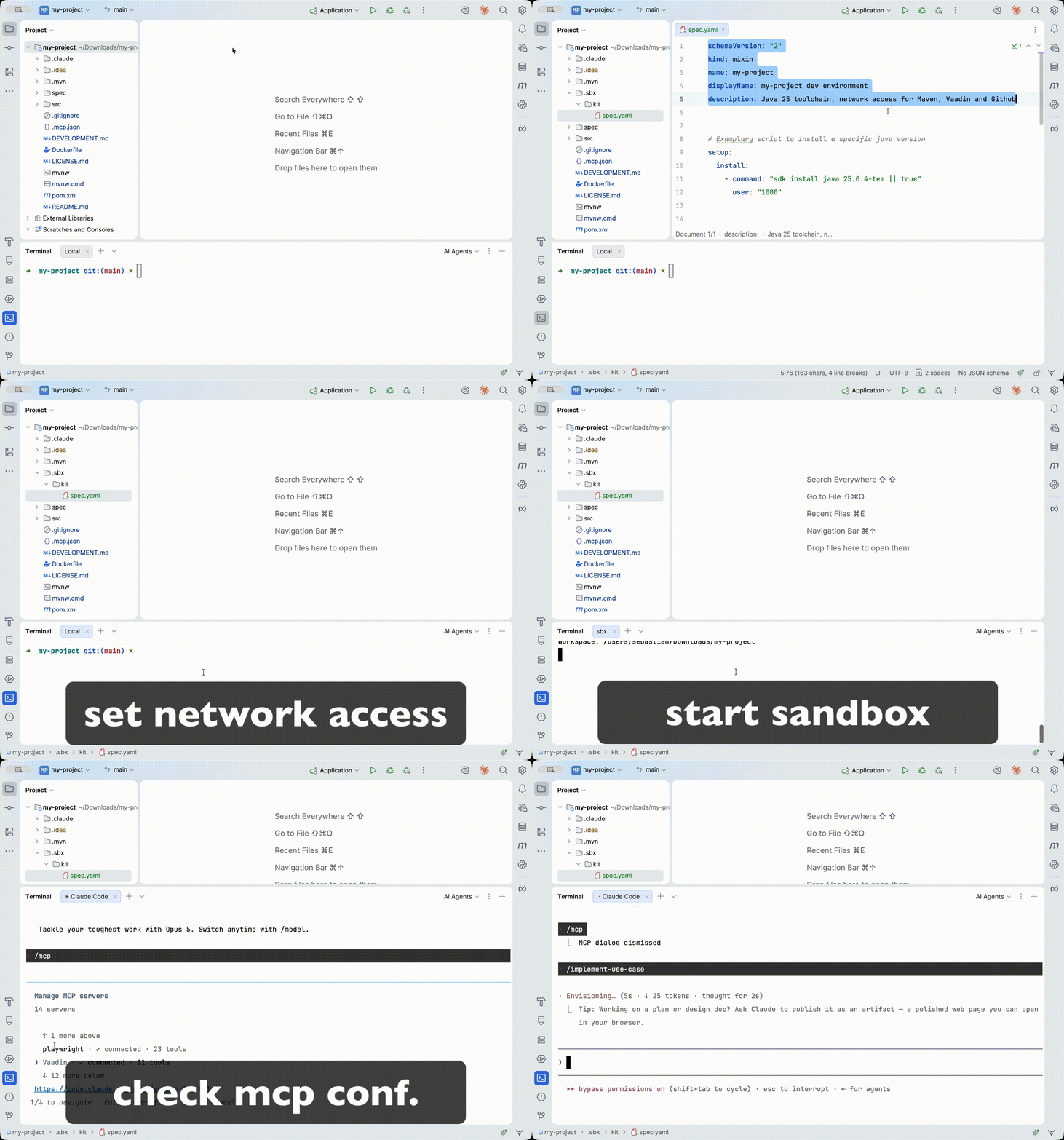
Out of the box, the Balanced policy blocks Maven Central and other hosts I need. A kit configures every sandbox I spin up for this project. The rules are the same as before, but they've moved out of my machine and into the repo. I drop a file named spec.yaml under .sbx/kit in the project folder:
schemaVersion: "2"
kind: mixin
name: my-project-dev
displayName: Vaadin dev environment for my project
description: Java toolchain plus network access for Maven, Vaadin, and GitHub

setup:
  install:
    - command: "sdk install java 25.0.4-tem || true"
      user: "1000"

permissions:
  network:
    allow:
      - repo.maven.apache.org
      - repo1.maven.org
      - central.sonatype.com
      - github.com
      - codeload.github.com
      - raw.githubusercontent.com
      - mcp.vaadin.com
      - vaadin.com
      - registry.npmjs.org
The kit is only read when the sandbox is created, so this is where create and run split apart. The trailing . is the workspace to mount:
$ sbx create claude --kit .sbx/kit --name my-vaadin-app .
$ sbx run --name my-vaadin-app
From then on it's just sbx run --name my-vaadin-app. Anyone who clones the repo gets the Java toolchain and the network allowlist from those same two commands.
A word on what this actually cost me. The setup was the easy part. The cost was the mental model: that the workspace is live, that --clone exists and why you'd want it, and that the firewall denies by default on purpose. That was one afternoon. Everything after that has been copying the kit from the last project.
The kit above, plus a CLAUDE.md to go with it, is on GitHub as vaadin-claude-sandbox. Copy .sbx/kit into your own project, adjust the Java version, and you have the whole setup from this post.
API Key Usage
To authorize API access, I need keys for each provider. Docker Sandboxes stores the keys securely on the host. A proxy on the host side injects each key into outbound requests, so the sandbox itself never sees the real value. The same flow works for GitHub, OpenAI, or any custom service.
$ sbx secret set anthropicWiring in the Vaadin MCP server
This is the part I'd skip last. Vaadin ships an official MCP server that puts current component APIs, theming tokens, and best-practice guidance one tool call away, instead of whatever the agent picked up during training.
If you're on Claude Code, the shortest path is Vaadin's Agent Marketplace plugin. One install gives you the MCP server plus a set of Vaadin development skills, and that's what I use. What follows is the same thing by hand, which is what you need on a different agent, or when you want the config checked into the repo.
I wired it in through Claude Code's own MCP support. Every agent already has its own way to talk to MCP servers, sandbox or not, and that's the simpler path.
For Claude Code, that means a .mcp.json file in the project root:
{
  "mcpServers": {
    "vaadin": {
      "type": "http",
      "url": "https://mcp.vaadin.com/docs"
    }
  }
}
The .mcp.json file lives in the project folder, which is already mounted into the sandbox, so Claude Code loads it on startup with no extra setup.
I ran the same prompt with and without the MCP server. Both produced working code, in about the same time. Without MCP the agent didn't guess. It ran javap against the Vaadin jars. That proves a method exists; it doesn't tell you it's the right one. The clearest case was theming. With MCP, the agent used Vaadin 25's current variant constants. Without it, the agent took the Vaadin 24 “LUMO_” spelling, which is still valid and still compiles, with no warning from anywhere, but it's legacy.
// without MCP — legacy name of Vaadin 24 era
createButton.addThemeVariants(ButtonVariant.LUMO_PRIMARY);

// with MCP — as documented for Vaadin 25.2
createButton.addThemeVariants(ButtonVariant.PRIMARY);
I could also have run
$ claude mcp add --transport http vaadin https://mcp.vaadin.com/docsand let Claude Code write that file for me. The result is the same, so pick whichever is faster for you.
If you're on Codex or Gemini CLI instead, the mechanism is different. Codex reads MCP servers from ~/.codex/config.toml, and Gemini CLI from its own settings file. The idea is the same: point the agent at https://mcp.vaadin.com/docs using whatever config format that agent expects. Vaadin's setup guide has the exact syntax for each one.
Running more than one agent at once
Now that names are in play, parallel sessions are straightforward: each sandbox is created once with its own name, and sbx run picks the one you mean. Clone mode has to be decided at creation time; you can't switch a sandbox into it later.
$ sbx create claude --kit .sbx/kit --name feature .
$ sbx create claude --kit .sbx/kit --clone --name spike .

$ sbx run --name feature
$ sbx run --name spike
feature works directly in my project folder. spike gets its own clone inside the VM, so the two don't step on each other.
And when I'm done, they go away:
$ sbx ls
$ sbx rm <sandbox-name>
Installed packages, Docker images and whatever else the agent set up in there all disappear with the sandbox. My workspace files stay untouched, and the next sbx create builds the environment back in seconds.
Letting the agent check its own work: Playwright
Server-side Vaadin tests can't tell me whether a notification is actually green. Playwright can, and a sandbox is the one place where letting an agent launch a browser costs me nothing.
Both pieces live in the kit, so every sandbox comes up with them:
setup:
  install:
    - command: "npm install -g @playwright/cli@latest && playwright-cli install --skills"
      user: "1000"
user: "1000" is the detail that bites, because Playwright caches its browser under ~/.cache and a root install leaves the agent unable to find it. (registry.npmjs.org is already on the kit's allowlist.)
The Playwright skills also saved me from a Vaadin catch. ::part() works in CSS but isn't a Playwright locator, so asserting a real background color means reaching through the shadow root with evaluate(). In my example the colors applied fine, but they were Aura's muted defaults and barely visible.
Commercial Vaadin components
For projects using Vaadin components that need a license, I copy the license file in and lock it down:
$ sbx cp ~/.vaadin <sandbox-name>:/home/agent/.vaadin
$ sbx exec <sandbox-name> -- bash -c "chmod 600 /home/agent/.vaadin/*"
Try it yourself
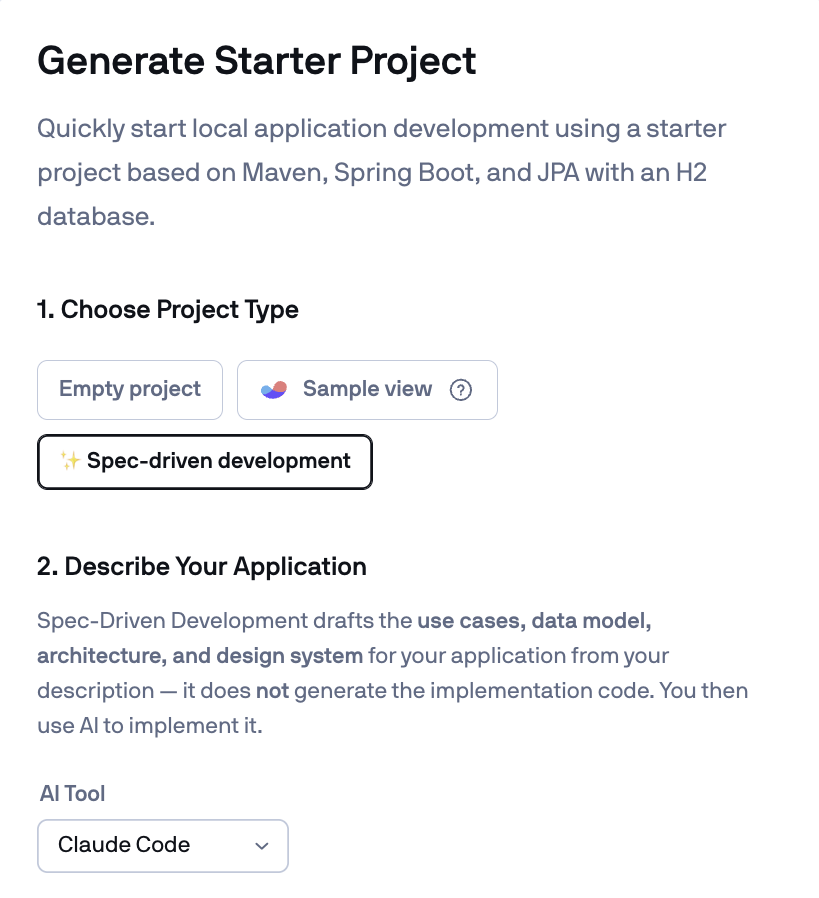
I'd start at start.vaadin.com rather than downloading a Hello World starter. When you set up the starter project, pick “Spec-driven development” as the project type rather than an empty project or sample view. It sets the project up around a minimal written spec, which gives the agent something concrete to build against instead of guessing. The same configurator has a field for the AI tool you use (Claude Code, Codex, Gemini CLI, or GitHub Copilot), so the downloaded project already ships with the right configuration files.
From there it's the flow above: unzip, copy .sbx/kit from vaadin-claude-sandbox, add a .mcp.json, and sbx create your sandbox. The repository also contains a complete demo project where you can experiment with Vaadin's Spec-Driven Development and run Claude Code unleashed inside a Docker Sandbox.
The MCP server is the part I can measure. The sandbox is the part I notice by its absence. I start the agent, go to a meeting, and come back to a diff instead of a permission prompt frozen at step three. If you're already typing --dangerously-skip-permissions, the experiment costs one install and one command. Run it in a sandbox once and see whether you go back.
I'm curious to see where Docker Sandboxes go from here, both the API and new features. Right now they're refreshingly quick to set up and free to use; whether that stays true is another question.