
Vaadin 25.3 is the third feature release in the 25.x line. Three of its larger additions answer the same question in different places: what just happened? You can see which form fields the AI filled and how confident it was, what your application is doing in production, and whether a coding agent's last edit reached the running app.
Around them is the usual release work, and there is a fair amount of it: a Switch component, a Table family for HTML tables, date constraints, upload validation and chat style variants for Message List. Under the hood, Flow's browser-side engine is now TypeScript instead of Java compiled to JavaScript with GWT. And three kits are on their way out: SSO Kit, Collaboration Kit and AppSec Kit are deprecated and will not be in Vaadin 26. The upgrade section says what replaces each.
AI you can audit
25.2 shipped the AI form filler. 25.3 adds the record behind it.
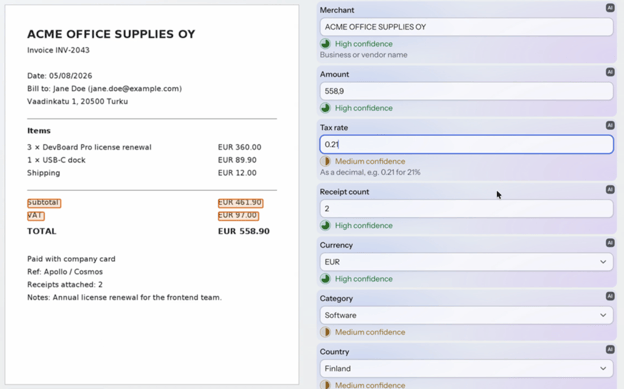
Every field the AI changes now gets a marker. Clicking it opens a popover that says the value came from the AI, with a control to revert that one field. The user can see what the model wrote and undo or correct the wrong values, without retyping the ones that were already right.
Turn on source tracking and each value the model fills from an attached document also carries a ValueSource: the ConfidenceLevel the model reports for it, and the SourceExtract snippets it says it read, with a SourceLocation on the page when it gives one. The confidence then shows next to the field, you can put the snippets into the marker's popover, and the location lets you highlight the passage in the source document. The controller does not check the snippets against the document, so they tell a reviewer where to look rather than proving the value. Tracking is off by default because it costs output tokens on every fill, and like the form filler itself it needs a commercial subscription.
RequestInterceptor sees every user prompt and attachment before the orchestrator acts on it. You can inspect the request, replace its text or attachments to mask parts of it, or reject it. That makes a data-protection rule about what users send something you enforce in code.
For each turn, ResponseMetadata gives your listeners the finish reason and the token usage, so you can log what a turn cost and spot a response that was cut off at the output limit. ToolException lets a tool tell the model why a call failed, in a message that is safe to pass back. The built-in providers also gain per-turn tool call limits, and opt-in background execution, which releases the session while a non-streaming turn runs (you need push or polling to deliver the answer).
The Spring AI and LangChain4j providers are built in as before, and you can write your own against the LLMProvider API.
One packaging change to know about before you upgrade. The AI modules are now split. vaadin-ai-core-flow is free and holds the interceptor, the response metadata and the provider API. The Grid, Chart and Form controllers and the field marker live in vaadin-ai-extensions-flow and need a commercial subscription, checked in development mode. The vaadin dependency includes both. If you build on vaadin-core, the controllers are no longer included. If you depended on vaadin-ai-components-flow directly, that coordinate is gone and there is no automatic replacement.
The AI integration is still a preview feature, as the API may still change. Enable it with the com.vaadin.experimental.aiComponents feature flag, from Copilot's experimental features tab or in src/main/resources/vaadin-featureflags.properties. Without it, the first prompt fails.
Components
Switch is a new component for a setting that takes effect the moment you flip it, where a checkbox would need a save button next to it. It needs no feature flag, and it has the same features as other input field components, like helper text, a required indicator and an error message, plus icon, small and reverse style variants.
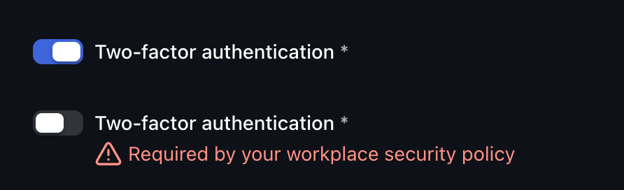
Table replaces NativeTable. Table, TableHead, TableBody, TableRow and their siblings give you <table> markup from Java with a typed API: setCaptionText, addHeaderRow, addRowWithHeader. Use it for tabular content that is not a data grid, such as a report or an invoice. NativeTable and its companions are deprecated and will be removed in Vaadin 26.
Table table = new Table();
table.setCaptionText("Invoice 2026-114");
table.addHeaderRow("Item", "Quantity", "Price");
table.addRowWithHeader("Consulting", "12", "1,440.00");
For rows that come from data, table.getBody().bindChildren(signal, ...) keeps an otherwise empty body in step with a ListSignal.
Message List becomes a proper chat UI. MessageListVariant adds bubble and one-to-one layouts, and MessageListItemVariant marks a message as the user's own or full width. A typing indicator, showing who is typing by name and avatar, is available behind the messageListTypingIndicator feature flag. If you built a chat view on 25.2, this is the styling you wrote by hand.
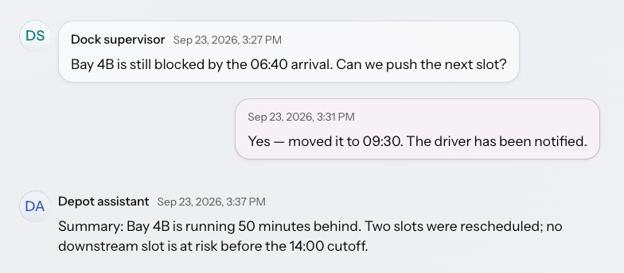
MessageListVariant.BUBBLE draws the messages as chat bubbles. MessageListItemVariant.SELF marks the current user's own messages, and FULL_WIDTH drops the bubble for an assistant response.
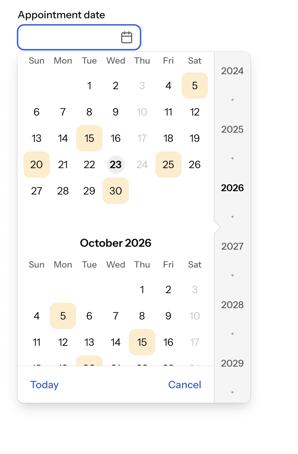
Date Picker and Date Time Picker can rule dates out. You can disable individual dates and whole weekdays, and a DateMetadataProvider attaches metadata to individual dates, including a custom part name you can target with ::part(). A booking form can show what is unavailable instead of validating it after the fact.
Combo Box can commit a partial match. With setPartialMatchMode, pressing Enter after typing part of a label selects either the first match (FIRST_MATCH) or the only one left (ONLY_MATCH), and the item it will pick is highlighted as you type. The default still needs an exact match.
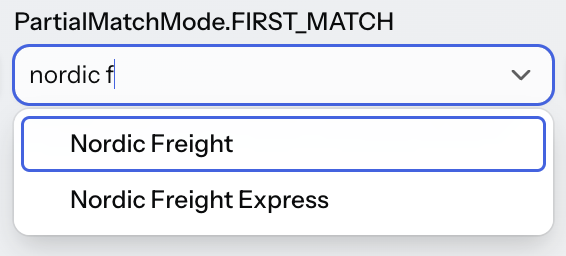
With PartialMatchMode.FIRST_MATCH, typing "nordic f" highlights Nordic Freight, the item Enter will select.
Breadcrumbs leaves preview. It arrived in 25.2 behind the breadcrumbsComponent feature flag. In 25.3 that flag is gone and the component is standard, so you can delete com.vaadin.experimental.breadcrumbsComponent from vaadin-featureflags.properties. Leaving it in only logs a warning.
Upload handlers can vet a file. An UploadValidator on the built-in upload handlers can check the metadata before any bytes are read, the first bytes of the file, or the complete upload, and refuses a file by calling reject(...) on the event. Your listeners then get an UploadRejectedException carrying the reason.
Accessibility
Two new mixin interfaces standardize ARIA attributes. HasAriaDescription lets a field point at the element that describes it through aria-describedby, and HasAriaRole sets the role on Dialog, Popover, Badge and Card, replacing the deprecated setRole on the first three. Login and Accordion take a configurable heading level. Split Layout's splitter can now take focus and be moved from the keyboard, and SplitLayoutI18n gives it an accessible label. InputMode lets a Text Field ask for the right on-screen keyboard on a phone. Grid's invisible strings for screen readers, the accessible names of its selection checkboxes and sorters, can now be localized through the GridI18n API.
Styling
Overlay components such as Confirm Dialog, Notification and Date Picker get a shared set of properties for their open and close animations (Lumo keeps its own). Date Picker gains new parts, Message List gains properties for its bubbles, and Upload's file name, status and error properties now work in Lumo as well as Aura.
Forms, data and the framework
BeanValidationBinder gains JSR-303 validation groups. Set the default groups with setValidationGroups(...), or pass groups to validate(...) and isValid(...) per call, so a draft and a submission can validate the same bean to different standards. See binding beans to forms.
Grid stops computing what it does not show. Hidden columns no longer generate or send data, and their value providers no longer run to render cells. If a value provider was doing real work for a column nobody had visible, you get that back. It is a behavior change too: a value provider with a side effect stops running while its column is hidden, though sorting by that column still calls it.
whenAttached keeps attach and detach work in one place. Available on both Component and Element, it runs your setup each time the component reaches a UI and takes back a Registration to run when it leaves, instead of splitting the work between onAttach and onDetach overrides.
Element.sizeSignal() tracks an element's rendered size, so a layout can react to its own dimensions without you writing a ResizeObserver. Shared signals also accept a Jackson TypeReference, which is what you need for a parameterized value type.
Server push can run over Server-Sent Events. A new SERVER_SENT_EVENTS push transport can replace WebSocket, which is worth knowing about if a proxy in front of your application has opinions about long-lived sockets. It is experimental, behind the ssePushTransport feature flag.
Browserless tests cover seven more components. 25.3 adds testers for Grid Pro, Tree Grid, Grid's context menu, Switch, Split Layout, Card and Avatar Group, so views built from them can be tested in the JVM without a browser. The testers also act more like a user: a context menu opens and closes the way it does in the browser, and a Tree Grid expands the way it does on a click.
Type checking moves to TypeScript 7. The frontend's type check, which runs in production builds and in the dev server, now uses TypeScript 7 instead of 6. Its native compiler is about ten times faster than TypeScript 6.
Observability Kit 5: no agent, one dependency
Observability Kit used to attach to your application as an OpenTelemetry Java agent: a separate JAR, a -javaagent flag, and a deployment conversation with whoever owns the runtime. Version 5 is rebuilt on Micrometer. You add a dependency and it starts recording.
<dependency>
    <groupId>com.vaadin</groupId>
    <artifactId>observability-kit-starter</artifactId>
</dependency>
Metrics go out through Spring Boot Actuator and the Micrometer registry you already use, so they reach Prometheus, Datadog or any OTLP collector, and Grafana from there. Once exposed, the endpoints are /actuator/prometheus and /actuator/vaadin/observability.
Most of the value is in answers 4.x could not give. Interaction Insights keeps the interactions that failed or took longer than a second, with the route, component and stack frame behind each. UI State Size, which you switch on, counts the component-tree nodes each open browser tab holds on the server, the first number to look at when someone asks why the heap grows through the afternoon. JDBC queries, also opt-in, carry the view that triggered them, and the browser reports its LCP and FCP. Vaadin Copilot also shows an observability panel while you develop, so the cost of a view is visible before it reaches production. There is a live demo at observability-cases.fly.dev.
Observability Kit 5 needs Java 21 and Vaadin 25.3, and it is a commercial feature. The Spring Boot starter needs Spring Boot 4, and plain Spring and standalone Micrometer setups are supported too.
The 25.3 BOM manages version 5, so upgrading the platform moves you onto it. Meter names change, and timers no longer publish histogram buckets by default, so a dashboard built on histogram_quantile goes empty until you turn them back on. Version 5 also does not cover client-side views: observability-kit-starter-hilla has no 5.0 release. Read the migration guide before you upgrade.
A dev loop built for coding agents
When a coding agent edits your Vaadin application, it has no reliable way to know whether the change took effect. It guesses, or it restarts everything and waits.
25.3 adds a dev-loop daemon and CLI, in preview. It needs Maven and Java 21. Install it once per project, from the application module:
mvn vaadin:install-dev-cliThen .vaadin/vaadin-dev status, start, apply and restart drive it, and the install also writes agent skills for it into .agents/skills/ and .claude/skills/. The useful part is apply: it takes the edits, works out the cheapest way to make them live, and reports the result as an exit code. A CSS change goes straight to an open browser, and a method body is hot-swapped in place. Structural changes restart the application on a stock JDK, or hot-swap on a JetBrains Runtime. If the edit does not compile, the error comes back with the file and the line, and the running app stays on its last good version.
It has limits worth knowing before you hand it to an agent: annotation processors such as Lombok do not run on apply, and a changed method signature can leave callers stale while apply still reports success. The Dev Loop CLI documentation lists them, and the tutorial builds a feature with an agent end to end.
The client engine is now TypeScript
Every Vaadin Flow application has a piece of code running in the browser that applies server-side changes to the DOM and sends user events back. Since Flow's first release in Vaadin 10, that code was written in Java and compiled to JavaScript with GWT. As of 25.3 it is TypeScript, and Flow's own browser code no longer uses GWT (Spreadsheet's client still does).
The port covers 107 modules, about 19,000 lines of TypeScript, and more than 700 browser tests, about 230 of them ported from a specific Java test in the old suite. The old suite ran its client tests as GWTTestCase classes inside HtmlUnit; the new ones run in real browsers.
Your Java API does not change, so application code has nothing to migrate. Add-ons built on the old GWT client (com.vaadin.client.*) are the exception and have to be rewritten. The engine now ships as TypeScript source that goes through your application's Vite build, with real source maps, so the browser code is something you can read and step through, and fixing something on the client side no longer means learning GWT first.
Copilot
Vaadin Copilot goes further into Kotlin projects. Initial Kotlin support arrived in a 25.2 maintenance release. In 25.3 the properties panel reads and writes Kotlin property values, and what Copilot cannot do yet is disabled in the UI instead of erroring after you act.
The All Components view is the addition worth trying first. Copilot scans the classpath and writes an ordinary Flow view, CopilotAllComponentsView.java, into your project, served at __copilot/all-components. It renders every component it can instantiate: Vaadin's, the plain HTML wrappers, and your own. Each card shows the component plainly, with its theme variants, or with its interactive states.
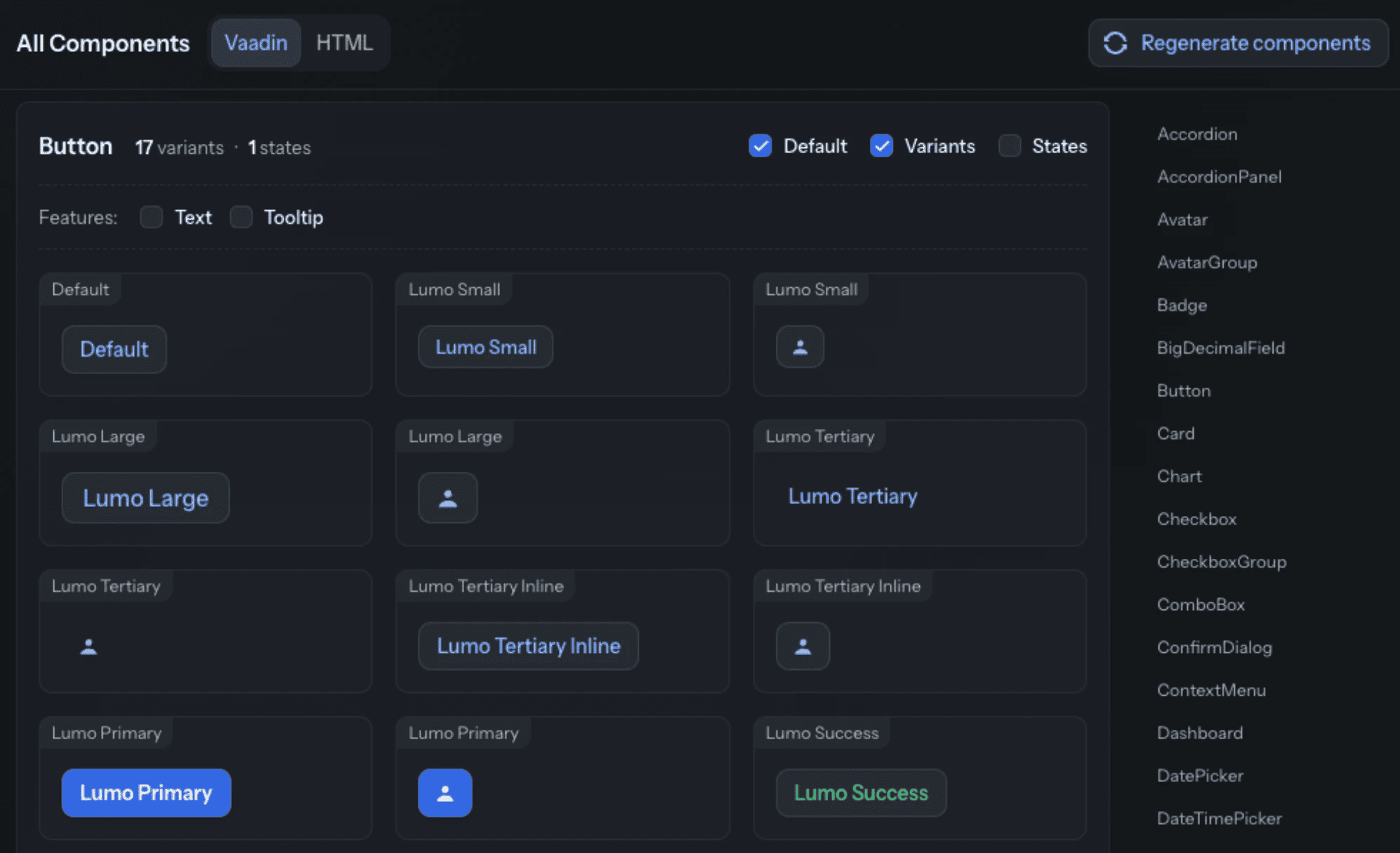 The All Components view in Copilot, showing Button's theme variants.
Open it beside the theme editor and one color change is visible across the whole set, including the components nobody thinks to check. It is experimental, behind the Copilot experimental flag, and regenerating rewrites the file, so keep your own code out of it.
The Aura theme editor gains a reset. FormLayout joins the UI library, draggable into place, with its responsive steps editable from the properties panel. Switch and Breadcrumbs are in the library now too.
Existing routes can have their title, menu entry and icon changed in place, and the icon picker reaches more places. Settings gains a notifications tab, and when Copilot's plugin CDN cannot be reached the toolbar says so instead of failing quietly.
Kotlin support and the components view are both new enough that early feedback still shapes them. If you run Copilot on a Kotlin project, or point the components view at your own theme, tell us where it falls short.
Upgrading to 25.3
Most applications on 25.x upgrade by changing the version. Five changes can need action:
- SSO Kit, Collaboration Kit and AppSec Kit are deprecated and will not be in Vaadin 26. All three still work in 25.3. SSO Kit and Collaboration Kit now give deprecation warnings when you compile, and each has a migration guide: SSO Kit to Spring Security, Collaboration Kit to shared signals. Shared signals run in a single JVM for now, without clustering or session serialization, so check that before you migrate a clustered application. AppSec Kit is to be replaced by an online service for Vaadin Enterprise, planned before the Vaadin 26 release.
- Observability Kit 5 comes with the BOM, replacing the 4.x Java agent, so the
-javaagentflag goes and meter names change. See the migration guide linked above. - The AI modules are split, as described above, and
AIController's request and response hooks now take event objects. - Production builds target specific browser versions (Chrome and Edge 152, Firefox 140, Safari 17.6) instead of
es2023. Check this if you support older browsers. - Browserless tests behave more like a user. Several testers changed, so expect some existing tests to need updating.
Smaller changes: a service event bus replaces the session lock and RPC listeners, NativeTable is deprecated, Image no longer takes child components, Spring Security answers 401 for sub-resource requests, and 156 VaadinIcon constants are deprecated. Read the release notes and the upgrade guide before bumping the version.
Try it out
Set vaadin.version to 25.3.0 and let us know what you build. Full details are in the release notes.
Join the release webinar on Wednesday, September 30, at 15:00 CEST / 9:00 AM ET, live on YouTube. We will demo the highlights and take questions.
Found a bug, or have feedback on something still experimental? File it on GitHub or post in the Forum.