
A lot of the productivity and performance of Vaadin originates from the ability to use pure Java, utilizing the full Java ecosystem and executing your app with the JVM. When one needs to break the abstraction provided by Vaadin Flow, built-in components, and widely available add-ons, one enters the world of web development: client-server communications, bizarre browser APIs with a lot of legacy, DOM, and also a totally different programming language. This procedure may feel overwhelming if one has spent a lot of time in the Java bubble and also can’t utilize existing Java code.
With some special tooling, one can execute code written in Java in the browser. Although it doesn’t fix all the problems of web development, it may make it a bit less approachable for those who primarily work in Java. Additionally, it can facilitate the reuse of code on the browser side when developing more complex client-side components or even complete views that function independently of the server.
GWT
Older Vaadin versions infamously used the most well-known solution, GWT, to also implement client-side components in pure Java. It transpiles Java source code into JavaScript and provides certain helper libraries to interact with JS, DOM, and various browser APIs. Limitations are related to language and JDK support. The Reflection API is not available, and the JDK is only partially emulated. For example, the Java.awt and Graphics2D classes, which many Java developers use to implement Tetris, are not available.
On the positive side, the GWT transpilation process has very sophisticated dead code eliminations and other optimizations for the generated JS. Thus, GWT applications generally load just as fast as regular JS apps, and if you are not doing anything trivial, the generated code size is comparable to modern JS optimizers. GWT also has an extensive library for various browser APIs. In this case, I conveniently used the built-in com.google.gwt.canvas.Canvas module as a replacement for the missing java.awt.Graphics2D.
For me, using GWT after some years felt both very familiar and also odd at the same time. The latest M4 Pro Max MacBook has eliminated the legendary long compilation times. Other GWT quirks are still there, though. For example, when reusing the common parts of the game logic, I couldn’t just reuse the existing jar file as such but had to craft so-called GWT module description files to make the dependency compatible with GWT.
TeaVM
The largest differentiation of TeaVM from GWT is that it compiles JVM class files instead. This means it can also eat bytecode generated from Kotlin sources. Like with GWT, basic programming is pretty much like real Java and JVM, but there are limitations with reflection, resources, and class loaders. Typically, these tools do not allow you to directly bring your library or application to the browser, but they can handle trivial classes and business logic immediately. For instance, in my Tetris exercise, reusing the game library only required adding a dependency, a process significantly simpler than with GWT.
TeaVM also has an option to generate WebAssembly (WASM) instead of JS, which can in some cases generate slightly faster applications. As in this kind of game example, there would be so many context switches (which eat resources) when interacting with the DOM and rendering the graphics; my guess is that there would be no benefits at all.
Similarly to GWT, there is a nice (but smaller) API for browser and DOM access.
CheerpJ
The most heavyweight solution for executing Java in a browser is CheerpJ. This approach is fundamentally different because it executes a JVM with JIT directly in the browser. You can reuse and run the SDK for your libraries and applications. Java Web Start applications can be launched directly in the browser, and this technology can also run old-school Java applets as if it were still 2001. The browser's sandbox naturally limits you, but otherwise, the user interface closely resembles a genuine Java experience. I didn’t try it out, but you could probably run things like Hibernate and the H2 database in the browser with this beast.
The power naturally comes at a cost, and I’m not talking about the license fees. Transferring required parts of JVM, your application code, and parts of JDK to the browser requires quite a bit of bandwidth and takes a while to boot the application. But once it is up and running, the execution speed is quite decent. When the browser caches the resources, subsequent restarts are notably faster, but there is still a bit of latency when you start this version of the game.
There are JS interoperability APIs available, which I used to build the communication to the Vaadin Flow component (that runs in the “real JVM”), but they are less advanced than the ones in GWT and TeaVM.
Because of its limitations (largish bandwidth requirements and the small startup latency), I wouldn’t consider CheerpJ for greenfield development over the three other contenders, but based on my short experience, it would be an option if I had legacy apps that needed urgent Vaadin/web modernization. Performance probably can’t match the recently released Swing Modernization Toolkit, but on the other hand, the execution of Swing code needs almost no server resources with this approach.
GraalVM (preview in 25)
GraalVM has for a while been able to execute WebAssembly modules. An experimental new feature (available in GraalVM since the 25 pre-release versions) allows you to do the reverse: it enables you to compile your Java code into WebAssembly, which can then be executed in compatible runtimes such as NodeJS or web browsers. So instead of compiling your Java code to Java bytecode or native binary for your specific operating system and processor architecture, the code is compiled to WebAssembly. Like with regular natively compiled apps, there is no JVM needed, so the artifact size is relatively small. WasmGC, a fairly new addition to WebAssembly, is used for garbage collection.
Similar to GraalVM’s basic “native compilation,” you’ll need to employ some workarounds for features like reflection in the current implementation. As things are not executed on JVM, there are also limitations regarding things like threading and graphics. Despite these drawbacks, the project’s primary demo is pretty impressive: the javac (the Java compiler) can be executed in the browser. You read it right: you can compile Java code in the browser and then execute it locally on your JVM 🤯
Similarly to the other options, there are also custom APIs available for JS interoperability that can be utilized to establish communication with the server-side counterparts of your Vaadin component. For the game demo, I also needed to use the JS interoperability API to create an API for the HTML5 canvas. To become a truly development-friendly approach, many helpers for DOM and browser APIs need to become available, either to GraalVM or to third-party libraries. The generated WASM binary was 1.7 MB, but I didn’t succeed with wasm-opt, which is supposed to compress the binary quite a bit. Still, it's a much smaller artifact than what an actual JVM requires (CheerpJ).
Although today I’d consider GWT or TeaVM as superior solutions (development experience, battle-proven, and generated artifact size), it will be very interesting to follow how this project continues in the future. If you are interested in this option, I suggest checking out the inspiring WASM I/O presentation from last spring.
Integration examples for Vaadin Flow
I wanted to draft examples of all the above possibilities. As an example, I dug up the source code of an old Tetris game built with Vaadin. Previously, we have used it to showcase WebSocket communication and to downplay latency concerns typical for evaluators.
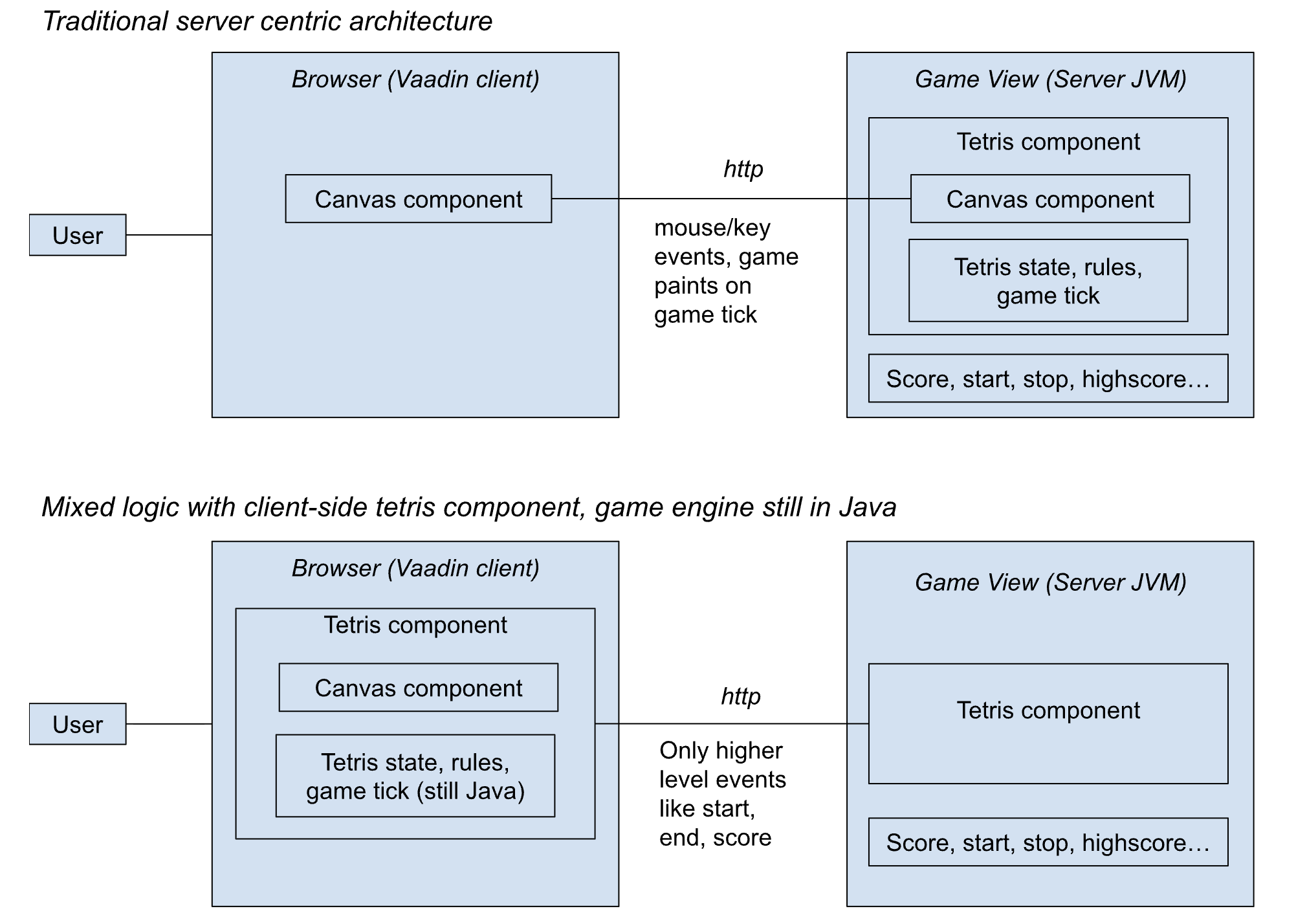
In these versions, the game logic is now transferred to the browser, unlike the secure and server-centric original, but it is still written in Java. For all of these, there is also a Vaadin Flow component (naturally also written in Java), which is still centered in the JVM like the rest of your app. In Vaadin Flow apps, this approach can be utilized to optimize and fine-tune specific components or entire views, regardless of whether Java, JavaScript, or TypeScript is used on the browser side.
- Build views or components that can work even offline. For example, with these implementations, the game could continue, even if your network connection were to stall when driving into a tunnel.
- Minimize client-server traffic on often-used views/components
- Completely remove latency between client and server (good enough for Tetris, but maybe in some other games every millisecond matters)
Here are some comments on the implementation of the examples and my feelings about building them.
Tetris Component with TeaVM
- Game logic in Java executes in the browser
- Renders graphics directly to HTML Canvas element with the TeaVM browser emulation APIs
- Emits custom JS events for users; the Vaadin Flow component has a clean Java API for them.
Tetris Component with CheerpJ
- Same as the TeaVM version, but the game logic draws with java.awt.Graphics2D
- Built the actual game first as a pure Java Swing app, that is then run as such in the browser, inside a Vaadin component
- Refactored common parts of the game to a separate lib that both TeaVM and CheerpJ then re-used
Tetris Component with GWT
- Bread and butter for me when we built Vaadin version 5 and 6
- I had completely forgotten how tricky the module definition system (xml files et al.) is and how difficult it is to reuse existing Java code (unless you are brutally copy-pasting code to your project)
- SSDs and modern CPUs have cured GWT of its worst part (long compilation time).
I haven't thoroughly examined the debugging process, but I anticipate it to be "tolerable" when utilizing browser tools and source maps.
Tetris Component with GraalVM
- The Tetris component is technically very similar to TeamVM, but it uses the experimental GraalVM tooling and always builds a WASM module.
- JS interoperability is not yet at the level of TeaVM/GWT, with no ready-made helpers.
- Based on some official demos, I managed to build an HTML5 Canvas API that renders the game status.
- Connected to Vaadin with custom JS events that the Vaadin Flow component listens to.
The demo application contains all three versions and their source code.
Summary
Vaadin Flow keeps you productive in “pure Java on the JVM,” but advanced UI work can push you into traditional web dev (DOM, browser APIs, JavaScript). This article surveys ways to run Java in the browser—GWT (source-to-JS), TeaVM (bytecode-to-JS/WASM), CheerpJ (a JVM in the browser), and the emerging GraalVM→WebAssembly approach—and compares their tradeoffs in size, startup time, compatibility, and developer experience. Using a Vaadin Tetris demo, it shows how you can keep the app server-side in Flow while moving selected component/view logic to the client (still in Java) to reduce latency and traffic and enable offline-capable experiences.