
Every few weeks, a new model or agentic coding tool claims it writes better code than the last one. Those numbers are useful signals about general code writing, but for a Java shop building or maintaining real Vaadin applications, the relevant questions are narrower: can an agent wire Vaadin's Binder correctly? Will it keep a Grid lazily loaded? Will it reach for an HTML div when you actually asked for a Card?
That is why we built VaadinBench to benchmark for coding agents on real Vaadin development tasks, scored by the same kind of tests you would want your pull requests to pass. It follows the idea of Terminal-Bench and Harbor tooling to create an environment to run and publish the results.
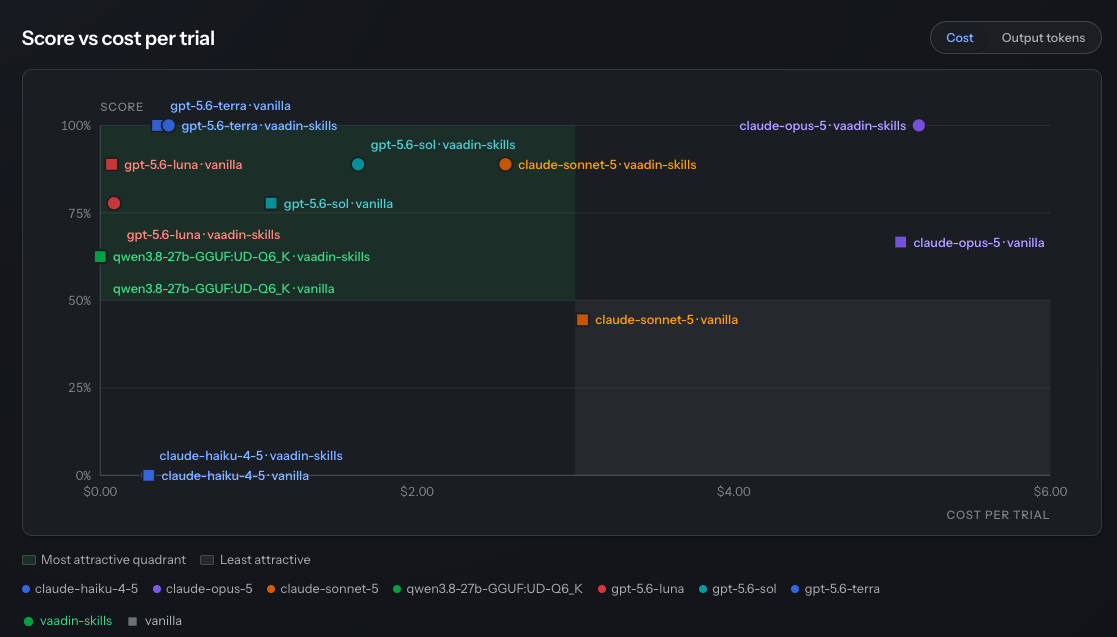
The project is running, and results are published on the VaadinBench leaderboard.
Realistic everyday scenarios
Every VaadinBench task is a real developer job: a written spec, a Vaadin project to work in, and a grading script the agent never sees. Tasks run inside isolated Docker containers with a clean project skeleton. Grading happens in a separate verifier container once the agent is done. A deterministic pipeline builds the submission offline with Maven, checks that the agent did not fake a passing test, then runs held-out JUnit suites and Playwright browser tests against real Chromium.
The scoring is binary. A task scores 1 if every prerequisite and behavioral test passes, 0 if anything fails. Before a task enters the suite, the reference solution must score 1, the untouched starter project must score 0, and at least one plausible-but-wrong solution must be rejected.
The suite currently has five tasks:
- flow-new-project (Medium) — Bootstrap a Vaadin app from an empty directory, add an app shell and an interactive list view. The only task with network access, since generating the project requires a download.
- flow-new-view (Medium) — Add a contact form with validation, a saved list of sent messages, and a navigation guard so an unfinished message cannot be lost.
- flow-grid-filtering (Hard) — Add two combined filters and a live result count to a lazily loaded Grid, without breaking lazy loading or querying the backend on every keystroke.
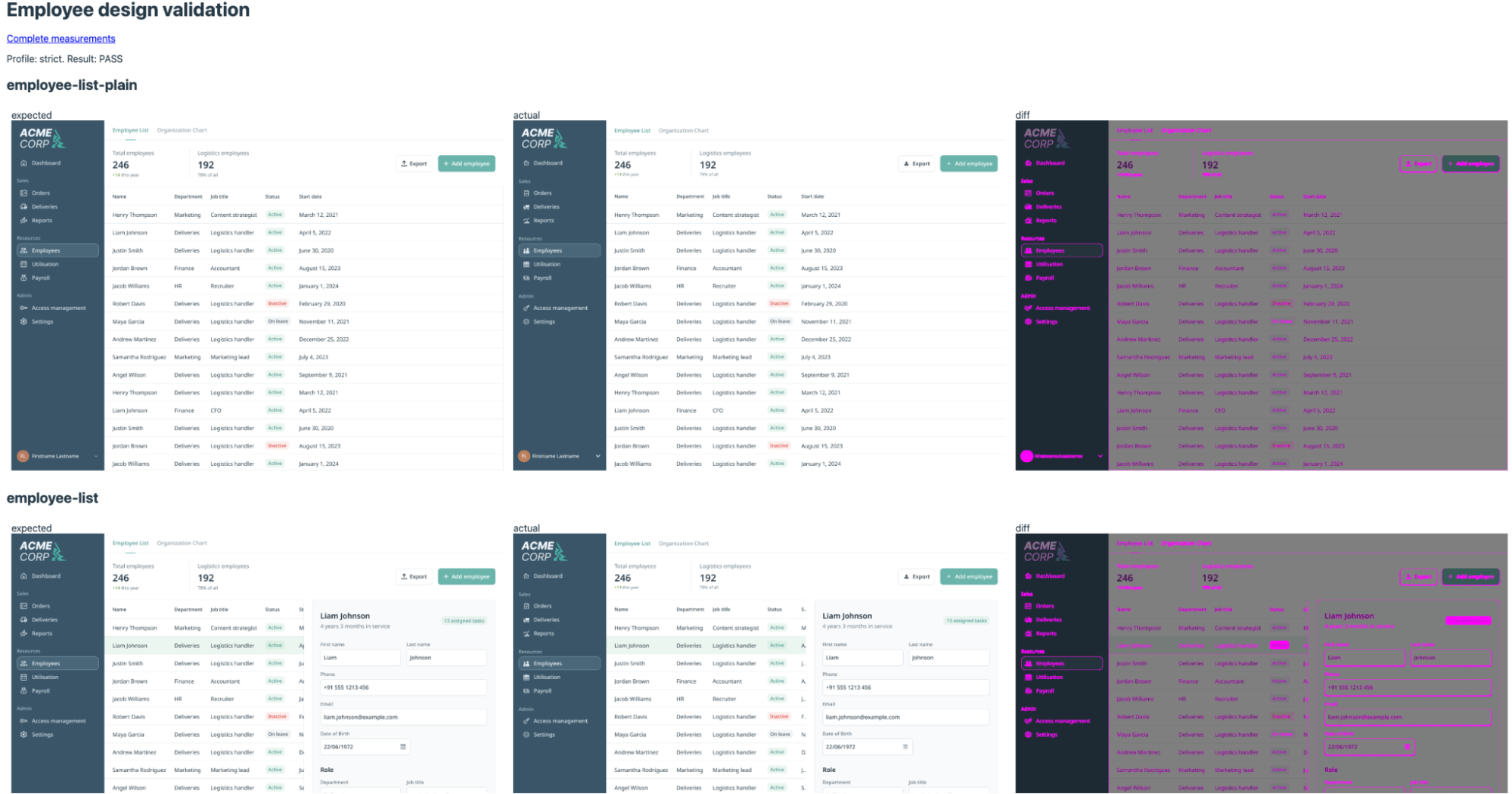
- flow-employee-list-strict (Hard) — Rebuild an employee list from a Figma reference using real Vaadin components and icons, with specified interactions and responsive rules. Graded on geometry, styles, and SSIM image comparison. Strict tolerances: 1 CSS px, SSIM 0.95.
- flow-employee-list-lenient (Hard) — Same task and evaluator, looser tolerances: 4 CSS px, SSIM 0.90.
Here is a screenshot comparison building a Vaadin screen from a design screenshot:
We also test every agent under different conditions, how much Vaadin-specific help it gets. A condition can be nothing (vanilla), Vaadin's agent skills, a live documentation MCP server, a native CLI tools plugin, or a mix of these. Keeping task, agent, model, and condition separate is what lets us actually answer "did the skills help?" instead of guessing.
The weaker the model, the bigger the jump
Vaadin-specific help barely moves a model that is already strong, but it can nearly double the score of a model that is struggling:
- Opus 5: 50 to 67% unassisted, up to 100% with Vaadin's skills or the documentation MCP server.
- Sonnet 5: 44% unassisted, up to 78 to 89% with the documentation server.
- Haiku 4.5: near 0% across most conditions, reaching only a quarter of tasks in its best setup. Not yet reliable for real Vaadin work, regardless of how much help it gets.
Matching the right combination to the model
One result helped us tune the setup rather than just critique it. Sonnet 5 solved 92% of tasks (11 of 12) with Vaadin's agent skills alone. Adding the documentation MCP server and a CLI tools plugin on top brought that down to 58% (7 of 12), mostly on one task: flow-new-project dropped from 6 of 6 to 2 of 6. Opus 5 solved every task in both setups, so the same extra tools cost it nothing.
Skills, docs, and tools help across the board, and for most models they pushed scores up, in some cases to a perfect run. The best mix can differ by model. That is exactly what this benchmark is for.
The first local-model number: Qwen 3.8-27B
We ran Qwen 3.8-27B, a 27B-parameter open-weight model, on the same three tasks. It was served locally in GGUF format at Q6_K quantization through OpenCode. Qwen solved 5 of 8 attempts with no help, and 5 of 8 with Vaadin's agent skills — 62% either way. Unlike every cloud model in the benchmark, skills made no real difference.
That still puts it ahead of Claude Haiku 4.5 (0%) and Sonnet 5's unassisted score (44%). It falls behind Sonnet with skills (89%) and well behind Opus 5 or GPT-5.6 Terra (100% with help).
The bigger difference is speed. Qwen averaged 31 minutes per attempt, four to nine times slower than the Claude and Codex rows, and used far more tokens — up to 28 million on one attempt, against a few million for Claude on the same task. None of that shows up as a dollar cost, since VaadinBench does not price self-hosted computers, but it is a real cost in time and hardware.
This is one data point, not a verdict on local models generally. If you run something else in-house — a different Qwen size, Llama, DeepSeek, or your own fine-tune — the instructions later in this post are the same ones we used to get the number above.
Codex looks cheap and strong, with a catch
We ran the same documentation-MCP comparison through OpenAI's Codex CLI on three GPT-5.6 variants, next to Claude Code. GPT-5.6 Terra solved 8 or 9 of 9 tasks in every condition, at $0.36 to $0.46 per task. Claude Opus 5 cost $3.80 to $5.05 per task in the same comparison. Terra matched or beat Opus 5's solve rate in two of the three conditions.
The caveat: VaadinBench's own design warns against treating Claude and Codex scores as directly comparable, since the two run through different CLIs and harnesses. Still, Codex looked both cheap and strong here. Worth taking seriously, and worth testing further yourself.
What this does, and does not, tell us
Put it all together and a few things stand out. Vaadin's skills and docs help most where a model needs it, and a top hosted model can solve everything once it has that help. The best combination of skills, docs, and tools can differ by model. Codex looked competitive on cost and solve rate, with the caveat above. The one local model we tested lands in a usable middle: ahead of the smallest hosted model, behind the frontier ones, and slower than both.
What we need more data on:
- More than one local-model result.
- A wider task set beyond these three scenarios.
- Enough repeat runs to separate signal from noise (each cell here is only 8 to 12 attempts).
Filling in more local-model rows is exactly what the rest of this post asks for your help with.
Try it yourself: start with the model you can actually run
VaadinBench is a public repo, not an internal tool. It was built to test self-hosted models as easily as cloud ones. If you are evaluating an in-house or air-gapped model, this is the run we most want to see.
Setup is the same regardless of which model you point it at:
git clone https://github.com/vaadin/vaadinbench
cd vaadinbench
uv sync
Before spending any budget, API cost or compute, check that the harness works. Both checks run offline, with no model involved:
uv run harbor run -p tasks -a oracle   # reference solutions: expect mean 1.000
uv run harbor run -p tasks -a nop      # untouched starter projects: expect mean 0.000
Point it at your own model. Any OpenAI-compatible endpoint works, including llama.cpp, vLLM, LM Studio, Ollama's compatible API, or whatever you already serve in-house. VaadinBench reaches it through OpenCode:
uv run vaadin-bench.py \
  -c vanilla -m your-local-model-name -t flow-new-view -k 1 \
  --openai-compatible http://model-host:8080/v1
A private endpoint you point it at never becomes part of anyone else's default run. Nothing about it leaves your machine, except what the model itself sends back. Only export OPENAI_API_KEY if your test setup actually needs one. VaadinBench uses a placeholder key for servers that do not require authentication.
For comparison, here is the same command against a cloud model. This is the "hello world" version, if you want to see the harness work before pointing it at your own model:
export ANTHROPIC_API_KEY=...
uv run vaadin-bench.py -c vanilla -m haiku -t flow-new-view -k 1
When you are ready for a wider sweep, a command like uv run vaadin-bench.py -c 'vaadin-skills*' -m your-local-model-name -k 3 runs a full matrix instead of one trial. Run uv run vaadin-bench.py with no arguments to list every condition, agent, model, and task currently defined. Use uv run harbor view jobs to inspect any run and see the agent's actual steps, not just a pass or fail number.
Once you have a result, local model or cloud, open a new issue on the vaadinbench repo. Tell us what you ran and what you saw. The leaderboard lives in a separate repository, vaadinbench-results, and results are published there using that repository's own publish.py script. The split is intentional: a run never touches the thing being measured.
Self-hosted results are the ones we have the least of. If you only do one thing from this post, run the benchmark against whatever model you actually have.
Or write a task that reflects your own work
If there is a Vaadin job you do often and you suspect an agent would fail it, that is a good candidate. A tricky theming requirement, a form with cross-field validation, or a performance trap in a large data grid all work. Start from TASK-TEMPLATE.md and describe the job the way you would hand it to a developer. Then scaffold it:
harbor init --task "vaadin/<name>"A task needs four things: an instruction.md the agent sees, a reproducible starting state, a hidden verifier with tests the agent never sees, and a reference solution plus at least one wrong answer that looks right. Write every check so a script can judge it without reading the code. Observable through the UI or API, exact, and identical on every run, with no timing and no randomness. Then open a pull request to github.com/vaadin/vaadinbench.
Let's keep measuring
This benchmark exists so Vaadin developers have somewhere real to look, rather than trusting a vendor's word. That of course includes our word. We will keep running it as models and tools improve, and we would rather have more people's runs in the dataset than fewer. You can clone it, point it at whatever model you are running, and tell us what you find.
Browse the VaadinBench leaderboard
See how every model and condition stacks up across all tasks — updated as new results come in.
Browse the results