
We recently made a study for new people experiencing using Vaadin for the first time. When finding people who are doing Java web development, many are currently working on Angular applications. The study was very successful and many liked the “Vaadin way”, but we were left with an open question about how to use Vaadin if you are already using Angular?
Angular + Spring Boot projects seem to use a similar team split: backend exposes REST, frontend renders everything. However, many times the UI logic leaks to the backend and suddenly the backend team owns complex grid logic. Every sort order, filter combination, and lazy-loading variant becomes a REST contract negotiation. The frontend team re-implements pagination in TypeScript, or the backend team ships an API designed around the table widget.
Sometimes a different boundary could make sense. Frontend owns routing, state, and form interactions. backend owns the data and grid logic running on the JVM and querying the database efficiently and securely. 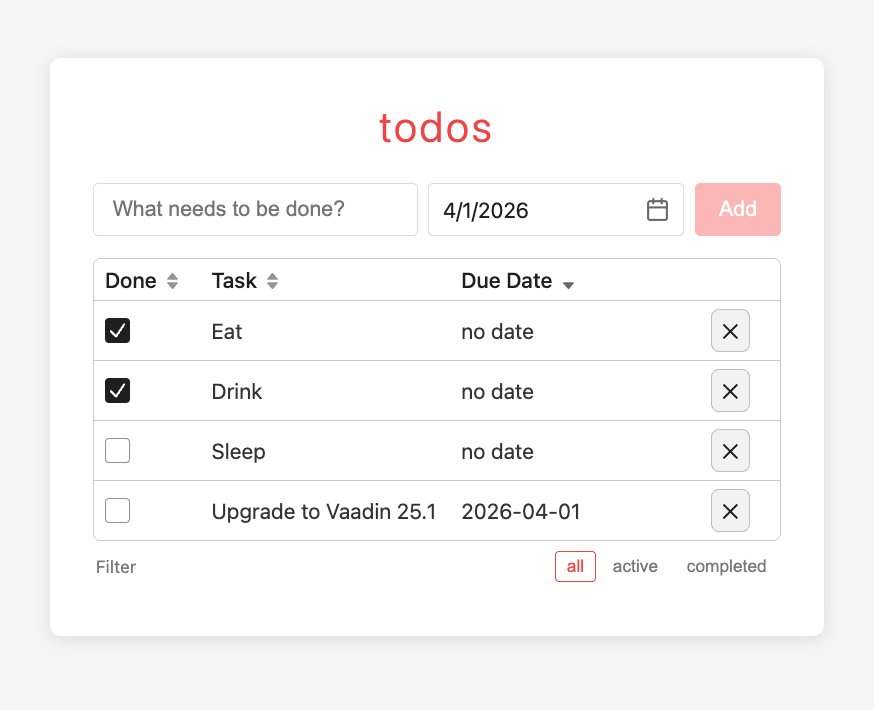 Perhaps exactly for this reason Java developers have always loved Vaadin Grid. You can build sophisticated filtering and sorting logic with only a few lines of Java without any frontend code whatsoever. To show how this works in practice with your existing frontend code, we combine Vaadin Grid seamlessly into an Angular application.
Vaadin components as Web Components
Vaadin renders components server-side and syncs DOM updates to the browser over WebSocket. Typically you build your app using these, but any server-side component can be exported as a browser custom element using WebComponentExporter. That element then drops into Angular with one schema annotation. Sounds simple enough? Let’s see and set up the development environment.
Add Vaadin to Spring Boot
As mentioned, Vaadin UI runs on server side in the JVM. In your backend project you will need a dependency. Since our Angular example is using Spring Boot, this is what we use for Vaadin:
<dependency>
 <groupId>com.vaadin</groupId>
 <artifactId>vaadin-spring-boot-starter</artifactId>
</dependency>
<dependency>
 <groupId>com.vaadin</groupId>
 <artifactId>vaadin-dev</artifactId>
 <optional>true</optional>
</dependency>
vaadin-dev enables the development time tooling and bundle builder and is excluded from production builds automatically.
Build a server-side Grid component
The cool thing in Vaadin is that you build the UI in Java. TodoGrid extends Grid<Todo>. Data access is direct JPA. No REST call, no DTO serialization. Fast, simple and secure. And you can do this simply by extending an existing Vaadin component. Let’s configure a custom Grid.
public class TodoGrid extends Grid<Todo> {

 private TodoService service;
 private String currentFilter = "all";
 private Column<Todo> titleColumn;

 public TodoGrid() {
 super(Todo.class, false);
 setSizeFull();
 configureColumns();
 }

 public void setService(TodoService service) {
 this.service = service;
 setAllRowsVisible(true);
 refresh();
 }

 private void configureColumns() {
 // Checkbox state change triggers a server-side DB update not REST call
 addComponentColumn(todo -> {
 Checkbox cb = new Checkbox(todo.isCompleted());
 cb.addValueChangeListener(e -> {
 service.update(todo.getId(),
  new UpdateTodoRequest(null, e.getValue()));
 refresh();
 });
 return cb;
 }).setHeader("Done").setWidth("80px").setFlexGrow(0)
 .setComparator(Comparator.comparing(Todo::isCompleted));

 titleColumn = addColumn(Todo::getTitle).setHeader("Task").setSortable(true);

 addColumn(todo ->
todo.getDueDate() != null ? todo.getDueDate().toString() : "no date")
 .setHeader("Due Date")
 .setComparator(Comparator.comparing(Todo::getDueDate,
 Comparator.nullsLast(Comparator.naturalOrder())));

 // Delete button triggers a server-side DB delete not REST call
 addComponentColumn(todo -> {
 Button btn = new Button("✕");
 btn.addClickListener(e -> {
 service.delete(todo.getId());
 refresh();
 });
 return btn;
 }).setWidth("60px").setFlexGrow(0);
 }

 public void refresh(String filter) {
 this.currentFilter = (filter != null) ? filter : "all";
 refresh();
 }

 public void refresh() {
 if (service == null) return;
 List<Todo> todos = service.findAll();
 List<Todo> filtered = switch (currentFilter) {
 case "active" -> todos.stream().filter(t -> !t.isCompleted()).toList();
 case "completed" -> todos.stream().filter(Todo::isCompleted).toList();
 default -> todos;
 };
setItems(filtered.stream()
.sorted(Comparator.comparing(Todo::getCreatedAt)).toList());
 }
}
Checkbox toggle and delete are Vaadin server-side event handlers. They write to the database and call refresh() as needed. Angular is not involved here.
Export as a Web Component
WebComponentExporter registers the component as a browser custom element. A couple of tricks are needed here. Vaadin's classpath scanner discovers exporters automatically without Spring wiring. Spring beans are resolved manually from the servlet context because Vaadin instantiates exporters outside the Spring container. Another trick is addProperty("filter", "all") that declares a property Angular can set as an HTML attribute. onChange fires on every attribute change, because of the “syncRevision” dynamic suffix, but this is explained in todo-list.component.ts below.
public class TodoGridExport extends WebComponentExporter<TodoGrid> {

 public TodoGridExport() {
 super("todo-grid");

 addProperty("filter", "all")
 .onChange((grid, value) ->
grid.refresh(value != null ? value.split("\\|")[0] : "all"));
 }

 protected void configureInstance(WebComponent<TodoGrid> webComponent,
      TodoGrid grid) {
 ServletContext sc = VaadinServlet.getCurrent().getServletContext();
 TodoService todoService = WebApplicationContextUtils
 .getRequiredWebApplicationContext(sc)
 .getBean(TodoService.class);

 grid.setService(todoService);
 }
}
After this class exists on the classpath, <todo-grid> is a valid custom element and Vaadin serves its JavaScript bundle at /web-component/todo-grid.js.
The Vaadin application entry point is simple. It is basically a standard Spring Boot application which you likely have already. The only thing to add is the @Push annotation to enable websockets and PAppShellConfigurator for exporting the web components.
@Push
@SpringBootApplication
public class TodoApplication implements AppShellConfigurator {

 public static void main(String[] args) {
 SpringApplication.run(TodoApplication.class, args);
 }
}
Now we are basically ready to use the Vaadin component in any web application, and let’s look at the Angular side of things.
Proxy traffic from the Angular dev server
Before moving forward with Angular integration, let’s make sure the rest of our project’s development setup is compatible. Angular's dev server has no concept of Vaadin sessions or WebSocket upgrades. Two path prefixes must route to the Spring Boot instance: /api, /vaadin to route Vaadin session RPCs and websockets to the backend.
// frontend/proxy.conf.json
{
 "/api": { "target": "http://localhost:8080", "secure": false },
 "/vaadin": { "target": "http://localhost:8080", "secure": false, "ws": true }
}
Embed the Custom Element in Angular
First loading the components. Because during development Angular's Vite build just bundles files from the file system and Vaadin web components are fully dynamic, we also need to load them dynamically to the browser after the build. This happens in main.js:
// frontend/main.ts
const vaadinScript = document.createElement('script');
vaadinScript.type = 'module';
vaadinScript.src = '/vaadin/web-component/web-component-bootstrap.js';
document.head.appendChild(vaadinScript);
bootstrapApplication(AppComponent, appConfig)
 .catch(err => console.error(err));
Next, registering them for Angular. This is the same for all custom web components, not only Vaadin. Angular needs CUSTOM_ELEMENTS_SCHEMA to accept unknown elements without a compilation error. Vaadin then loads the web component script automatically on the first render.
// frontend/src/app/todos/components/todo-list/todo-list.component.ts
@Component({
 selector: 'app-todo-list',
 standalone: true,
 schemas: [CUSTOM_ELEMENTS_SCHEMA],
 template: `
 <todo-grid
 [attr.filter]="filter + '|' + syncRevision()"
 style="display: block;"
 ></todo-grid>
 `,
})
export class TodoListComponent {
 @Input() filter: Filter = 'all';

 private readonly actions = inject(Actions);
 protected readonly syncRevision = toSignal(
 this.actions.pipe(
 ofType(TodoActions.addTodoSuccess),
 scan(count => count + 1, 0),
 ),
 { initialValue: 0 },
 );
}
[attr.filter] sets the DOM attribute. Vaadin's property sync fires onChange when the value changes.
This is straigh-forward as-is, but there is a limitation: if the filter stays "all" but a new todo is added, the attribute is unchanged and Vaadin skips the callback. Adding syncRevision solves this. It is a local counter that increments on every addTodoSuccess action. The attribute becomes "all|3" instead of "all" and always changes. The exporter strips the suffix with split("\\|")[0] before passing the value to the grid.
Styling Vaadin from Angular
Vaadin components use the common design system. CSS custom properties inherit through shadow DOM, so setting them on the host element in Angular's global stylesheet is sufficient.
/* frontend/src/styles.css */
todo-date-picker {
 --vaadin-input-field-padding: 10px;
 --vaadin-input-field-border-width: 1px;
 --vaadin-input-field-border-color: #ddd;
 --vaadin-input-field-border-radius: 4px;
}
No Vaadin theme file. No shadow DOM piercing with ::part(). The custom properties cross the boundary by the CSS specification.
But you broke the team boundary?
Yes we did. And this is the philosophical part: Do we have part of the UI maintained by the backend team? It makes sense if your application is data and interaction heavy (compared to UI heavy) to keep change and logic in Grid logic in one place. If you go all-in with Vaadin this everything is very simple to develop, but even with this split, there still is clear separation of concerns. For example:
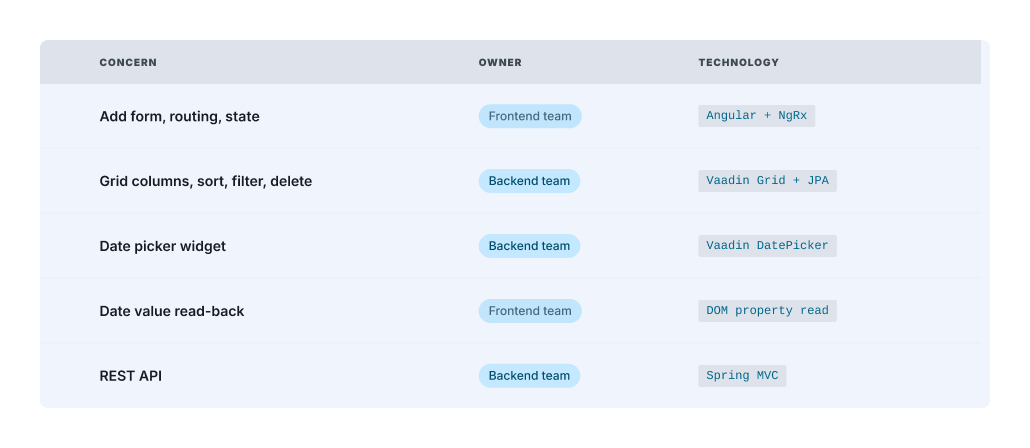
The backend team writes Java: column definitions, comparators, DB queries, server-side validation. The frontend team writes TypeScript: routing, actions, form logic, CSS. The contract between them is a small set of HTML attributes and DOM properties. That interface and contract is narrower and easier to review than a REST surface with several endpoints.
What we learned and what to improve?
This was a practical example of how to use Vaadin inside Angular. The syncRevision encoding is functional, but it leaks an integration detail into the attribute. Utilizing custom DOM events could make a cleaner architecture in a bigger app.
The dev proxy configuration is manual. With Vaadin's Spring Boot integration and a shared origin in production, this disappears, but in development it requires careful ordering of proxy rules to avoid intercepting Angular routes. Definitely something that should be automatically set up for you.
Also one thing to notice is that session affinity is required in a load-balanced deployment. Vaadin sessions are typically pinned to a server instance, so three Spring Boot replicas need sticky routing by cookie or header. This is standard for all WebSocket workloads, but plan for it before the first deployment.
You can also do this the other way around: using Angular components in your Vaadin application. The blog post from Paola De Bartolo explains this approach in detail.
This was a small sample to highlight the moving parts. If you try something similar, it would be great to hear how things work in your Angular project and development environment.
A limited version of the application is deployed in Clever Cloud, but check out the source in GitHub and let’s continue at the vaadin.com/forum!