
We spent the last SwingBridge release on improving memory usage, so that more users fit on one server. I wanted a number for it, not just my own opinion about how we built it.
SwingBridge runs your Swing application on a server and shows it in a browser, so a user opens a link instead of installing anything. Every user gets a session on that server, and every session costs memory. That cost is your server bill, which can be considerable for large installed bases.
So I asked Eftun Türkmen, our Engineering Manager on this work, to benchmark it. We chose a real Swing application, gave it a server of a fixed size, and counted how many user sessions can fit at once before the machine gives out. For comparison, we ran it for SwingBridge and for Webswing, a popular alternative, on the same box, with the same test. Both sides were tuned properly first.
What we found
Eftun ran it at three server sizes, adding users until the next one could not work.
| Server Size | SwingBridge Users | Webswing Users |
|---|---|---|
| 2 GB | 19 | 5 |
| 3 GB | 27 | 7 |
| 4 GB | 38 | 10 |
SwingBridge can fit about four times as many users on the same hardware, for the same hardware cost. Serving 38 users takes one 4 GB machine with SwingBridge and at least four machines with the alternative solution.
Every simulated user in those tests was active, performing a task. Each user picks features on a map, zooms in and back out, hides a layer and brings it back. Over and over, and we check the screen after every step. A frozen session does not count as a happy user.
We tuned both sides before comparing them. We tried a range of memory settings on each product and took the best result for each. Ours ran best at 2500 MB of heap on the 4 GB box. For Webswing that was 80 MB per session at 2 GB, and 96 MB at 4 GB. Where two of their settings tied at 4 GB, we published the one that is more favorable to them.
We limited memory, not processors. Both sides ran on a machine with plenty of cores, so these numbers show where memory runs out. If your server runs out of processing power first, that is a different test.
What you are choosing between
Both products put a desktop Java application in a browser, but they divide the server differently.
SwingBridge runs a single copy and has everyone share it. The alternative approach gives every user their own copy of the program running on the server. Both work. They fill a server at very different rates. If you are the one paying for the server, that difference is your cost on server memory resources.
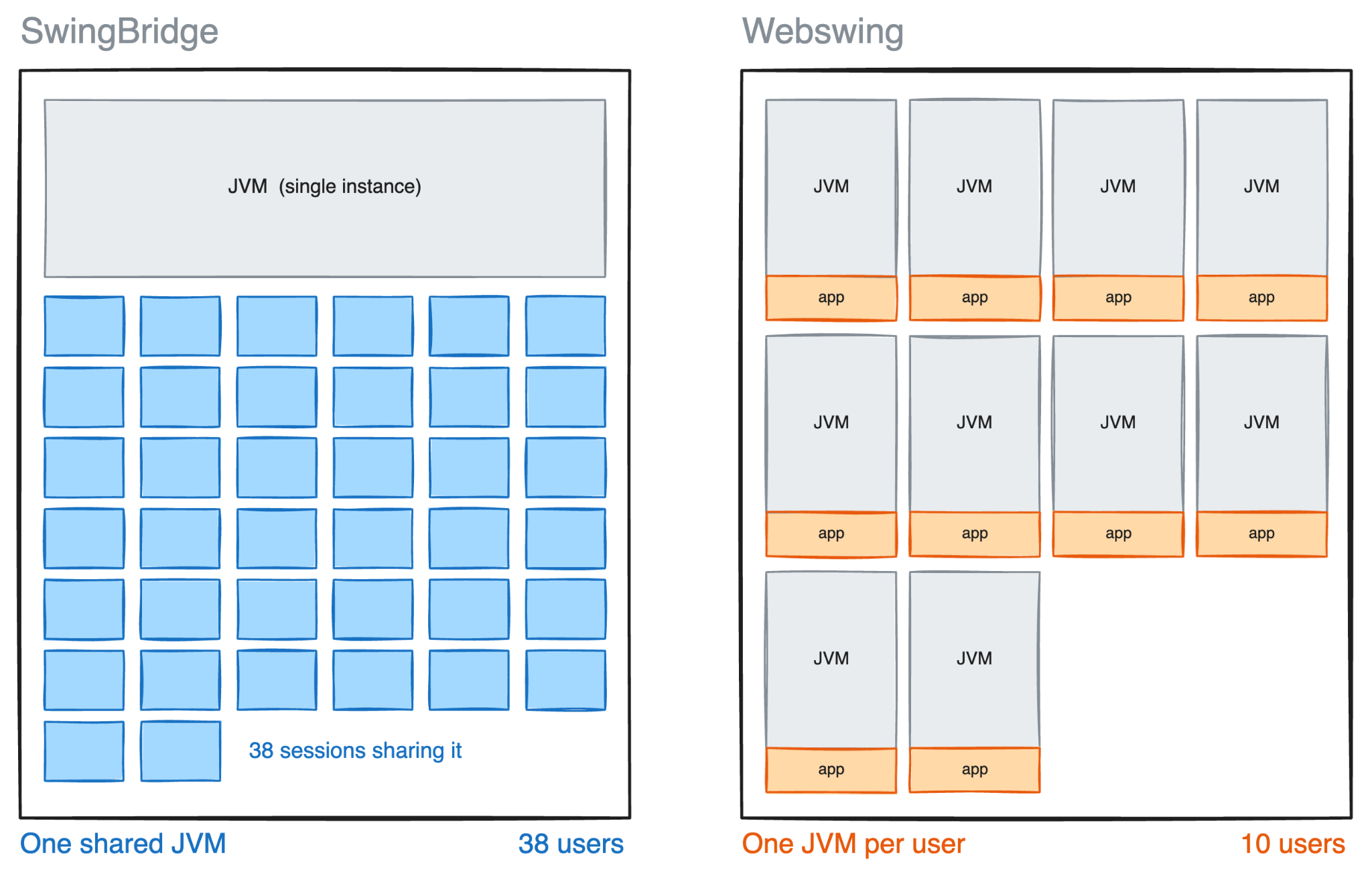
Figure 1: Same 4 GB server, two ways to divide it.
Why the gap is that wide
I assumed the memory went on the users: their data, their documents, whatever they were doing. It turned out that mostly it does not.
When you start a Java program, the Java virtual machine (JVM) that runs it needs a lot of memory just to exist. That goes on the housekeeping, the bookkeeping, and the just-in-time compiler that watches your code as it runs and rewrites the busiest parts into machine code. That last one is real speed, and it is not free: 35 MB of compiled code in a single session. None of that is your users' work. It is the cost of opening the door. Give every user their own JVM and you pay that cost once per user. Share the JVM and you pay it once.
One number made us look twice. In the one-JVM-per-user setup at 2 GB, each session was given 80 MB to work with. Each session cost 332 MB on the machine. The room we gave it to work in was a quarter of what it cost to have it there at all, and that bill arrives once per user.
That is also why turning the memory dial does so little for the one-JVM-per-user approach. We tried giving each session more room, and less. It barely moved the number of users who fit, because the room was never the expensive part: on this workload the heap is about a fifth of what one of their sessions costs, against about two thirds of what one of ours costs. Eftun takes that apart properly, megabyte by megabyte, in the technical write-up, How I benchmarked SwingBridge by counting Swing users.
What the density costs you
Sharing one JVM means sharing one fate. If one user's session brings the JVM down, it takes the others with it. Giving every user their own copy does not have that problem, and that is a real advantage of the other design. Which of those matters more depends on your application and how much you trust it. Ask your own engineers rather than taking my word for it.
There is a lot this test does not tell you. It says nothing about network traffic. That is a separate cost, and we will be testing it next. Nothing about speed, license cost, or how either product behaves over weeks rather than hours. Those are fair questions, but outside the scope of this test.
We can report 2 GB, 3 GB and 4 GB today. We are measuring bigger servers now. They take longer to run, due to more simulated users. Every user we count is a real browser doing real activities, and a browser costs more memory than the session it is driving. To measure an 8 GB server we need a test machine with around 100 GB of its own.
The trade
Sharing one JVM fits about four times as many users into the same memory. That is what matters if you are putting a desktop Java application in the web browser and paying for the server running it. The ratio is for an application the size of JOSM, the OpenStreetMap editor we tested. A smaller application widens the gap and a larger one narrows it, which is why we measured a real one instead of a demo. Your application has a different memory footprint, so the way to get your own number is to run your own test. That write-up comes with the repository that produced these numbers, so you can run this same test against your own application.
You pay for that density by putting everyone in the same JVM. For most teams I think it is a good trade.
Watch the session
SwingBridge 1.3 shipped on 9 September. Eftun and Miikka Andersson talked through what went into the release, what the testing showed and how we ran it, and what is coming in 1.4.
Watch the recording
Working out what this means for your own application? See what SwingBridge does.