Add an Application Service
- Design Guidelines
- Service Naming
- Input & Output
- Package Naming
- Injecting a Service into a View
- Calling a Service
- Calling a Service on View Creation
In a Vaadin application, the application layer contains the business, the data, and any integrations to external systems. The application layer exposes an API that the UI layer (i.e., the views) can call:
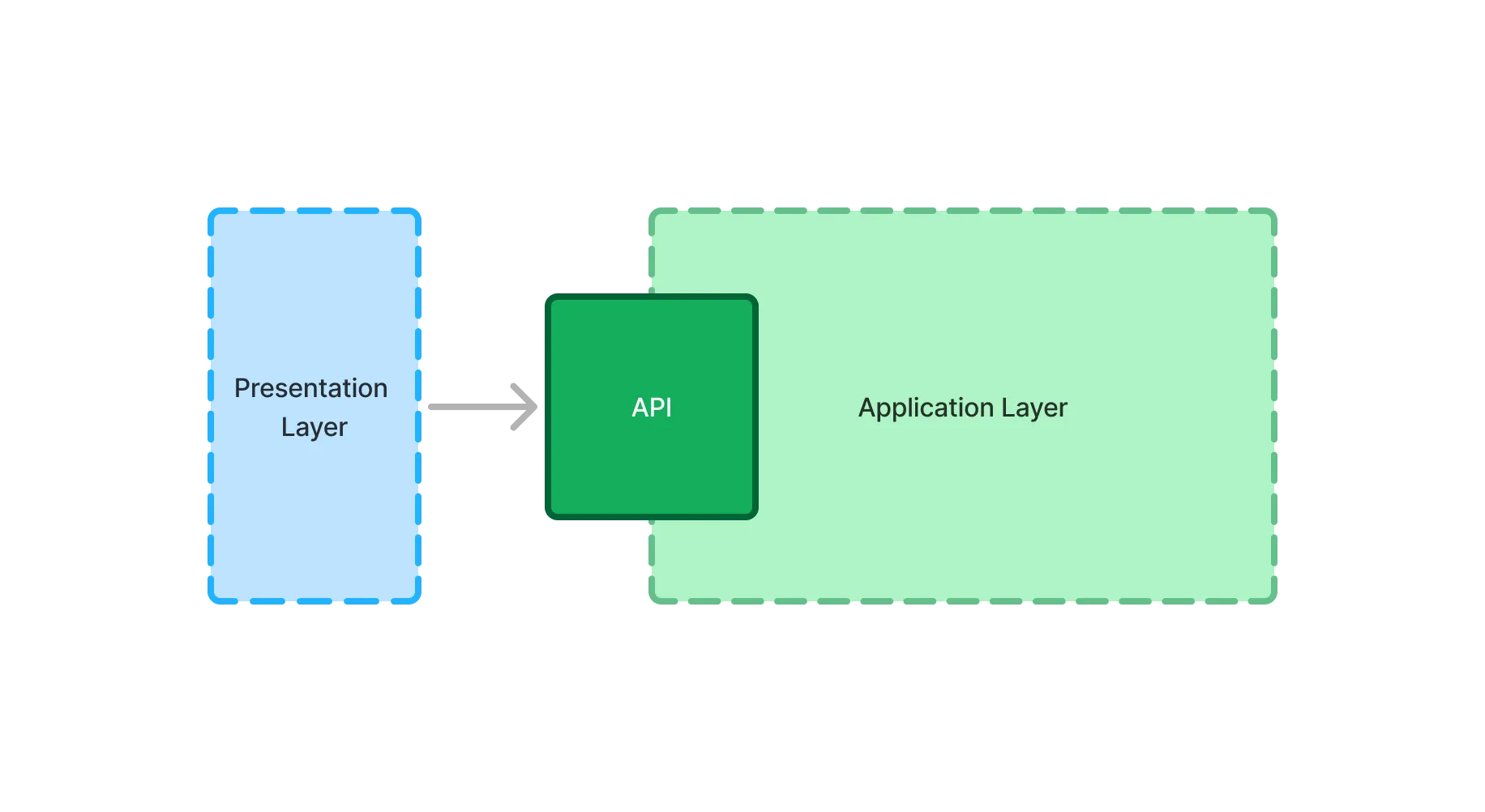
This API is implemented by application services. In practice, application services are Spring beans that you can call from Vaadin views.
Design Guidelines
You can design application services according to your preferred architectural style, but following these best practices helps prevent common issues:
-
The application services should have high cohesion. This means that all the methods in your service should relate to the same thing.
-
The application services should be stateless.
-
Application services should define the boundaries of database transactions, so that views never have to manage transactions themselves.
-
The application services should be secure.
-
Views should invoke application services, but application services should not have dependencies on views. Simple, read-only views are an exception, as described in Calling Repositories from Views.
|
Note
| Application services can use Vaadin’s non-UI-related utilities and interfaces, but should not be tightly coupled to UI components. |
An application service could look like this:
Source code
Java
@Service 1
@PreAuthorize("isAuthenticated()") 2
public class OrderCreationService {

    private final Validator validator;
    private final OrderRepository orderRepository;
    private final ApplicationEventPublisher eventPublisher;

    OrderCreationService(Validator validator,
            OrderRepository orderRepository,
            ApplicationEventPublisher eventPublisher) {
        this.validator = validator;
        this.orderRepository = orderRepository;
        this.eventPublisher = eventPublisher;
    }

    @Transactional 3
    public OrderId createOrder(OrderForm orderForm) {
        var validationErrors = validator.validate(orderForm);
        if (!validationErrors.isEmpty()) {
            throw new ConstraintViolationException(validationErrors);
        }
        var order = orderRepository.save(createOrderFromForm(orderForm));
        eventPublisher.publishEvent(new OrderCreatedEvent(order.orderId())); 4
        return order.orderId();
    }

    private Order createOrderFromForm(OrderForm orderForm) {
        // ...
    }
}-
Makes the service into a Spring bean.
-
Protects the service from unauthorized access.
-
Runs the method inside a database transaction.
-
Notifies other components of the new order. The event is published inside the transaction, so a listener that should only react to committed orders uses
@TransactionalEventListener. See Event Triggered Jobs for details.
Transactions
Use Spring’s default transaction propagation, REQUIRED, for application services. When a view calls a service, there is typically no active transaction, so Spring starts one and commits it when the method returns. When a service is called by another service that already has an active transaction, it joins that transaction. The work of both services is then committed or rolled back together.
Mark methods that only read data as read-only. This allows Spring and your persistence technology to optimize the transaction. A convenient way of doing this is to make all methods read-only at the class level, and to override this for the methods that write data:
Source code
Java
@Service
@Transactional(readOnly = true) 1
@PreAuthorize("isAuthenticated()")
public class CustomerService {

    public Optional<Customer> findById(long customerId) {
        // ...
    }

    @Transactional 2
    public Customer save(Customer customer) {
        // ...
    }
}-
All methods run inside read-only transactions by default.
-
Overrides the class-level annotation, since this method writes data.
Background jobs are an exception, as they should run independently of whatever triggered them. See Implementing Jobs for details.
For more information about transaction management, see the Declarative Transactions documentation page.
Calling Repositories from Views
By default, views call application services, and only application services call repositories. A simple, read-only view can call a repository directly, though, if all of the following are true:
-
The access control of the view is enough. Method security protects services, not repositories. A repository call is protected only by the access rules of the view that makes it.
-
The view only reads data. Changes go through application services, which validate the input and define the transaction boundaries.
-
No business logic is involved. The view passes its parameters, such as a filter string and a
Pageable, straight to a repository method. -
The repository returns everything the view needs. Don’t rely on lazily loaded associations of the returned entities being loaded when the view accesses them.
As soon as one of these no longer holds, introduce an application service and move the call there. For example, do this when users with different roles should see different data, when an operation needs several repository calls in one transaction, or when the view starts to change data.
|
Note
|
When you package by feature, repositories are package private. A view in the same package can call them, but a view in a separate ui package can’t, unless you make the repository public. Introduce an application service instead.
|
Service Naming
Since services form the API of your application, choosing clear and meaningful names is essential. A good service name should be easy to understand and locate in the code.
Vaadin does not enforce a specific naming convention for application services. While the Service suffix is common, it is optional. If you need inspiration, consider these guidelines:
-
CRUD services: Use the entity name (e.g.,
CustomerService,OrderService,ProductService) -
Use-case-specific services: Name them according to their function (e.g.,
CustomerCreationService,SalaryPaymentService) -
Verb-based names: If noun-based names feel awkward, use verbs (e.g.,
CreatingCustomersService,PayingSalariesService)
Input & Output
Application services often need to communicate with repositories or data access objects to fetch and store data. They also need to pass this data to the UI layer. For this, there are two options: pass the entities directly; or pass Data Transfer Objects (DTOs). Both have advantages and disadvantages.
Entities
When the application service passes the entities directly to the UI layer, they become part of the application layer API. Many service methods delegate to the corresponding repository methods. Here’s an example of this:
Source code
Java
@Service
@Transactional(readOnly = true)
@PreAuthorize("isAuthenticated()")
public class CustomerCrudService {

    private final CustomerRepository repository;

    CustomerCrudService(CustomerRepository repository) {
        this.repository = repository;
    }

    public List<Customer> findByName(String searchTerm, Pageable pageable) {
        return repository.findByNameContainingIgnoreCase(searchTerm, pageable);
    }

    @Transactional
    public Customer save(Customer customer) {
        return repository.save(customer);
    }
}
Even when the service returns entities, keep the persistence details out of its API. In the example above, the view passes a search term, and a Spring Data Pageable that describes which page to fetch and how to sort it. The service decides how to turn them into a query. Don’t let the view build the query itself, for example by passing a JPA Specification to the service.
Using entities in your application service is a good idea when your user interface and entities match each other, closely. For example, you could have a form with fields that match the fields of the entity — or a grid with columns that match them.
In both cases, the user interface and the entities are likely to change at the same time, for the same reason. For example, if you need to add a field, you’ll add it to both the user interface and the entity.
When you pass entities to the UI layer like this, they should be anemic, which means that they only contain data and little to no business logic. If your entities contain business logic, use DTOs instead.
Data Transfer Objects
Sometimes, application services shouldn’t return the entities themselves. For instance, the domain model may contain business logic that must be called within some context that isn’t available in the UI layer. It might require access to other services, or run inside a transaction.
In other cases, the user interface may need only a subset of the data stored inside a single entity, or a combination of data from multiple entities. Fetching and returning the full entities would be a waste of resources.
You may also have a situation where the domain model and user interface are changing independently of each other. For example, the domain model may have to be adjusted every year due to government regulations while the user interface remains about the same.
In this case, the application services should accept DTOs as input, and return DTOs as output. The entities should no longer be part of the application layer API.
This adds another responsibility to the application service: mapping between entities and DTOs.
When using query classes, you can do the mapping in them by returning their DTOs, directly. The query DTOs become part of the application layer API.
For storing data, services typically have to copy data from the DTO to the entity. For example, like this:
Source code
Java
@Service
@Transactional(readOnly = true)
@PreAuthorize("isAuthenticated()")
public class CustomerCrudService {

    private final CustomerRepository repository;

    CustomerCrudService(CustomerRepository repository) {
        this.repository = repository;
    }

    // In this example, CustomerForm is a Java record.

    @Transactional
    public CustomerForm save(CustomerForm customerForm) {
        var entity = Optional.ofNullable(customerForm.id())
            .flatMap(repository::findById)
            .orElseGet(Customer::new);
        entity.setName(customerForm.name());
        entity.setEmail(customerForm.email());
        ...
        return toCustomerForm(repository.saveAndFlush(entity)); 1
    }

    private CustomerForm toCustomerForm(Customer entity) {
        return new CustomerForm(entity.getId(), entity.getName(), entity.getEmail(), ...);
    }
}-
Writes the changes to the database before mapping the entity to a DTO.
This example calls saveAndFlush() instead of save(). JPA normally writes changes to the database when the transaction commits, which happens only after the method has returned. Values that are assigned on write, such as an incremented version number, would then be missing from the returned DTO. When the service returns the entity itself, or nothing at all, save() is enough. See JPA & Spring Data for details.
When using DTOs, you have more code to maintain. Some changes, like adding a new field to the application, requires more work. However, your user interface and domain model are isolated from each other, and can evolve independently.
Domain Payload Objects
When using domain primitives, you should use them in your DTOs, as well. In this case, the DTOs are called Domain Payload Objects (DPO). They’re used in the exact same way as DTOs.
Validation
All input should be validated by the application services before they do anything else with it. This is important for security, integrity, and consistency. Even if you use input validation in your user interface, you should still validate the data in the application services.
You can validate the input in different ways. For more information, see the Validation documentation page.
Package Naming
Put an application service directly in the package of the full-stack feature it belongs to, rather than in a separate service sub-package. A service sub-package would force the repositories and entities that the service uses to be public, too.
For example, services related to "customer relationship management" would be placed in: com.example.application.crm
In a small feature, the views can be in the same package as the service. As the feature grows, move the views to a ui sub-package, such as com.example.application.crm.ui. The service then has to be public, as it forms the API that the views call. The views themselves can remain package private.
This structure keeps services easy to find, and next to the rest of their feature. It also lets the Java compiler ensure that other packages only call the public API of the feature.
See the Package Structure documentation page for more information, including when to package by layer instead.
Injecting a Service into a View
Since application services are Spring beans, you can inject them directly into your Vaadin views through constructor injection.
In the following example, CustomerOnboardingService is injected into CustomerOnboardingView:
Source code
Java
@Route
public class CustomerOnboardingView extends Main {

    private final CustomerOnboardingService service; 1

    public CustomerOnboardingView(CustomerOnboardingService service) { 2
        this.service = service;
        // ...
    }
    ...
}-
Store the service in a
finalvariable for future reference. -
Inject the service as a constructor parameter.
Constructor injection is recommended because it ensures that dependencies are provided at object creation, making the class easier to test and avoiding potential issues with uninitialized fields. Additionally, since the service is stored in a final variable, it cannot be reassigned accidentally, ensuring safer code.
Calling a Service
Since Vaadin views are regular Java objects, calling a service is as simple as invoking a method.
In the following example, the view calls CustomerOnboardingService when the user clicks a button:
Source code
Java
@Route
public class CustomerOnboardingView extends Main {

    private final CustomerOnboardingService service;
    private final Binder<CustomerOnboardingForm> binder;

    public CustomerOnboardingView(CustomerOnboardingService service) {
        this.service = service;
        this.binder = new Binder<>(CustomerOnboardingForm.class);

        // Fields omitted

        var createCustomerBtn = new Button("Create");
        createCustomerBtn.addClickListener(event -> createCustomer());
        add(createCustomerBtn);
    }

    private void createCustomer() {
        try {
            var formData = binder.writeRecord(); 1
            var customer = service.onboardCustomer(formData); 2
            CustomerView.navigateTo(customer.customerId()); 3
        } catch (ValidationException ex) {
            // Handle the exception
        }
    }
}-
Retrieves a
CustomerOnboardingFormrecord from the binder. -
Calls the service to onboard the customer.
-
Navigates to the newly created customer’s view.
For more information about forms and data binding, see the Add a Form guide.
Calling a Service on View Creation
Sometimes, you may need to call a service immediately upon view creation—for example, to populate a combo box or grid with data. While it may be tempting to do this in the constructor, this is not recommended.
Vaadin may instantiate a view without actually displaying it. Because of this, you should keep constructors free of side effects.
|
Note
|
What is a side effect?
A side effect is any operation that modifies state outside the object’s scope or interacts with external systems like databases, files, or network services during object construction.
|
After Navigation
To call a service only after the user has navigated to a view, implement the AfterNavigationObserver interface and call the service in the afterNavigation() method:
Source code
Java
@Route
public class MyView extends Main implements AfterNavigationObserver {

    private final CountryService countryService;
    private final ComboBox<Country> countries;

    public MyView(CountryService countryService) {
        this.countryService = countryService;
        countries = new ComboBox<>();
        add(countries);
    }

    @Override
    public void afterNavigation(AfterNavigationEvent afterNavigationEvent) {
        countries.setItems(countryService.getCountries());
    }
}
This ensures that service calls happen only when the view is actually rendered.
Cleaning Up
If a service call requires cleanup afterward — such as unsubscribing from a stream — use Vaadin’s attach and detach events.
Every Vaadin component is notified when it is attached to or detached from the UI. You can handle these events in two ways:
-
Override the protected
onAttach()andonDetach()methods. -
Register attach and detach listeners dynamically.
A common approach is to override onAttach() and register a detach listener.
In the following example, the view subscribes to a reactive stream when attached and unsubscribes when detached:
Source code
Java
public class MyView extends Main {

    private final SubscriptionService subscriptionService;

    public MyView(SubscriptionService subscriptionService) {
        this.subscriptionService = subscriptionService;
        // ...
    }

    @Override
    protected void onAttach(AttachEvent attachEvent) {
        var subscription = subscriptionService.myStream().subscribe(message -> { 1
            // Do something with the message
        });
        addDetachListener(detachEvent -> {
            detachEvent.unregisterListener(); 2
            subscription.dispose(); 3
        });
    }
}-
Calls the service to subscribe to the stream when attached.
-
Removes the detach listener to prevent duplicate listeners.
-
Cancels the subscription to avoid memory leaks.
|
Important
|
Components Can Be Attached and Detached Multiple Times
When adding a detach listener inside onAttach(), always remove it when the component is detached. Otherwise, if the component is reattached later, multiple detach listeners will accumulate, leading to potential memory leaks.
|