Adding A New View To An Application
In this tutorial, we will add a new view to a starter application. We’ll also make our view available by adding a route to that view.
-
First off, let’s start with a Project Base from https://vaadin.com/start
-
Build the project using
mvn clean packageso that we get all the necessary components. -
Import the project into your IDE of choice.
-
Create a new Vaadin 10 design through the IDE menu (New > Vaadin 10 Design).
-
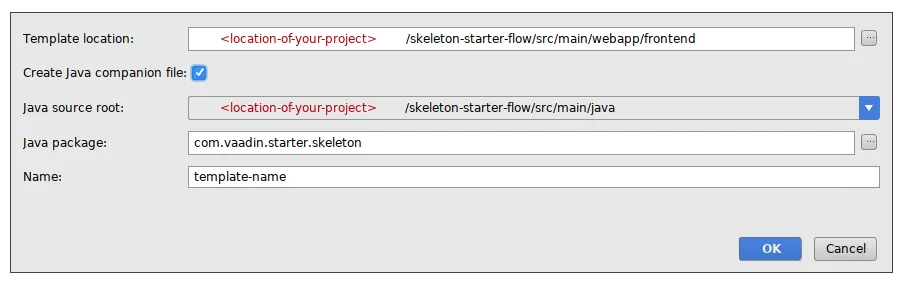
In the wizard, specify the location of the design HTML file, and also check the companion file checkbox and specify a location for the companion Java-file.
Open the design HTML file we created (use the designer perspective). From the palette, drag a vertical layout onto the paper. After that, drag a vaadin-textfield onto the paper and a vaadin-button below the textfield.
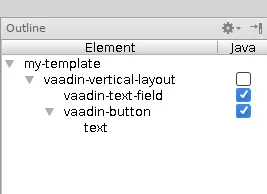
Find a column in the outline with the title "Java". Tick the checkboxes for the button and textfield that we just added. When we now open the java file, the button and textfield have appeared as fields there.
Add a constructor for the java class. In the constructor, we need to add a click listener for the button. In that listener, we will show a notification using the contents of the textfield. The code is as follows:
Source code
Java
public MyDesign() {
    vaadinButton.addClickListener( event -> {
        Notification.show(vaadinTextField.getValue(), 1000*10,
            Notification.Position.MIDDLE);
    });
}
To show our new view, a route needs to be added. Adding a route is done
through the @Route annotation. That annotation is added to the design, and it has
only one value: the path of the route to this design.
Source code
Java
@Tag("my-design")
@HtmlImport("frontend://src/my-design.html")
@Route("myroute")
public class MyDesign extends PolymerTemplate<MyDesign.MyDesignModel> {
This is what the class declaration should look like for a design named my-design.
Running the skeleton project with mvn clean package jetty:run should make
our new view accessible at http://localhost:8080/myroute
It is also possible to use the view as a regular component on the server
side. Just create a new instance of the view with new and add it
to a layout as follows: someLayout.addComponent(new MyDesign());