Docs

Documentation versions (currently viewingVaadin 10)

You are viewing documentation for an older Vaadin version. View latest documentation

Installing in IntelliJ IDEA

Installing Vaadin Designer

Vaadin Designer is compatible with IntelliJ IDEA 16 (and later), both Community and Ultimate Editions.

  • Open IntelliJ IDEA

  • Choose IntelliJ IDEA > Preferences > Plugins in macOS,
    File > Settings > Plugins in Windows and Linux.

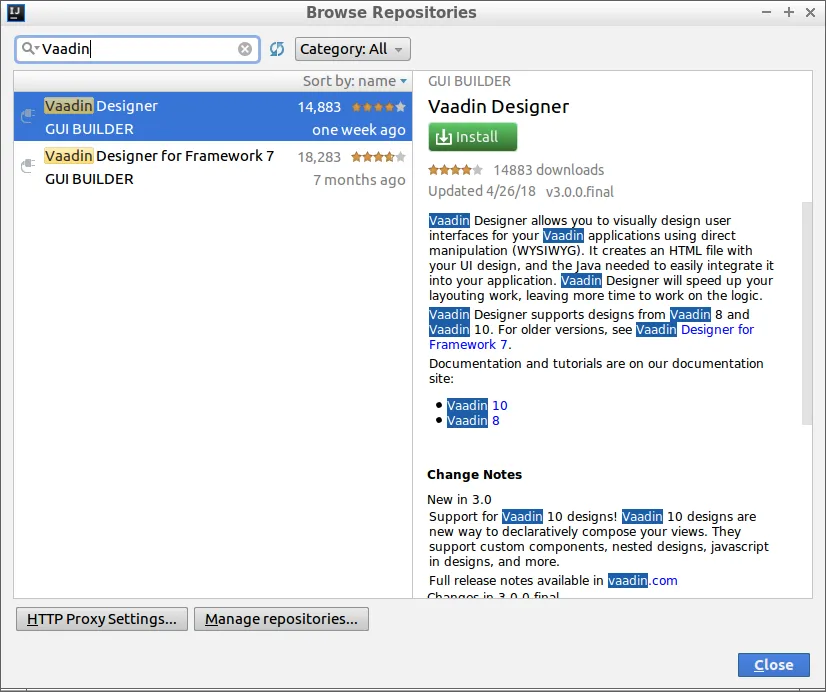
  • Click Browse Repositories…​

  • Search for Vaadin

  • Install Vaadin Designer

  • Restart IntelliJ IDEA when asked

  • Wait for IDEA to restart

designer 3 intellij
Install Vaadin Designer in IntelliJ IDEA

Uninstalling

If you want to remove Vaadin Designer from your IntelliJ IDEA installation, go to IntelliJ IDEA > Preferences > Plugins in macOS, File > Settings > Plugins in Windows and Linux, select Vaadin Designer from the list, then click Uninstall.