Chapter 5. User Interface Components
Table of Contents
- 5.1. Overview
- 5.2. Interfaces and Abstractions
- 5.3. Common Component Features
- 5.4.
Label - 5.5.
Link - 5.6.
TextField - 5.7.
TextArea - 5.8.
PasswordField - 5.9.
RichTextArea - 5.10. Date and Time Input with
DateField - 5.11.
Button - 5.12.
CheckBox - 5.13. Selecting Items
- 5.13.1. Binding Selection Components to Data
- 5.13.2. Basic
SelectComponent - 5.13.3.
ListSelect - 5.13.4. Native Selection Component
NativeSelect - 5.13.5. Radio Button and Check Box Groups with
OptionGroup - 5.13.6. Twin Column Selection with
TwinColSelect - 5.13.7. Allowing Adding New Items
- 5.13.8. Multiple Selection Mode
- 5.13.9. Other Common Features
- 5.14.
Table - 5.15.
Tree - 5.16.
MenuBar - 5.17.
Embedded - 5.18.
Upload - 5.19.
Form - 5.20.
ProgressIndicator - 5.21.
Slider - 5.22.
LoginForm - 5.23. Component Composition with
CustomComponent
This chapter provides an overview and a detailed description of all non-layout components in Vaadin.
Vaadin provides a comprehensive set of user interface components and allows you to define custom components. Figure 5.1, “UI Component Inheritance Diagram” illustrates the inheritance hierarchy of the UI component classes and interfaces. Interfaces are displayed in gray, abstract classes in orange, and regular classes in blue. An annotated version of the diagram is featured in the Vaadin Cheat Sheet.
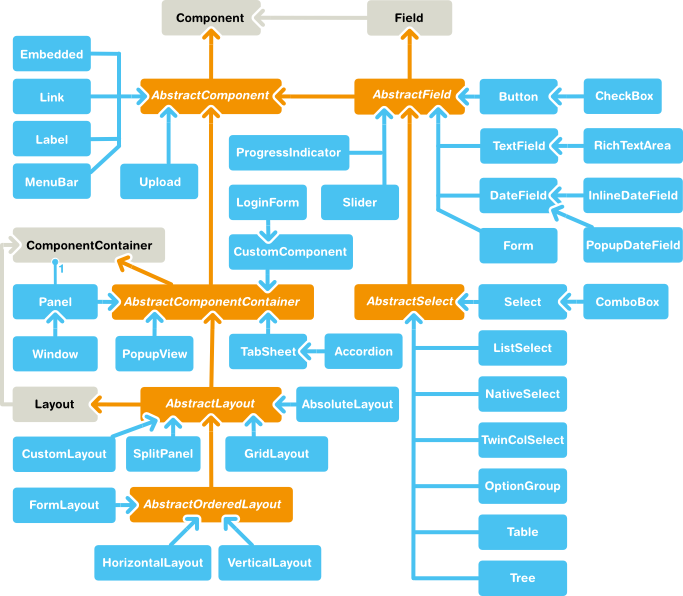
At the top of the interface hierarchy, we have the
Component interface.
At the top of the class hierarchy, we have the
AbstractComponent class.
It is inherited by two other abstract classes:
AbstractField, inherited further by field components,
and AbstractComponentContainer, inherited by various
container and layout components. Components that are not bound to a content
data model, such as labels and links, inherit
AbstractComponent directly.
The layout of the various components in a window is controlled,
logically, by layout components, just like in conventional Java UI
toolkits for desktop applications. In addition, with the CustomLayout
component, you can write a custom layout as an XHTML template that
includes the locations of any contained components. Looking at the
inheritance diagram, we can see that layout components inherit the
AbstractComponentContainer and the
Layout interface. Layout components are
described in detail in Chapter 6, Managing Layout.
Looking at it from the perspective of an object hierarchy, we would
have a Window object, which contains a hierachy of
layout components, which again contain other layout components, field
components, and other visible components.
You can browse the built-in UI components of Vaadin library in the Sampler application of the Vaadin Demo. The Sampler shows a description, JavaDoc documentation, and a code samples for each of the components.
In addition to the built-in components, many components are available as add-ons, either from the Vaadin Directory or from independent sources. Both commercial and free components exist. The installation of add-ons is described in Chapter 15, Using Vaadin Add-ons.
Vaadin Cheat Sheet and Refcard
Figure 5.1, “UI Component Inheritance Diagram” is included in the Vaadin Cheat Sheet that illustrates the basic relationship hierarchy of the user interface components and data binding classes and interfaces. You can download it at http://dev.vaadin.com/browser/doc/trunk/cheatsheet/vaadin-cheatsheet-duplex.pdf.
The diagram is also included in the six-page DZone Refcard, which you can find at https://vaadin.com/refcard.