Vaadin

Join Vaadin Log In

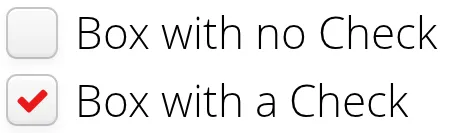
CheckBox is a two-state selection component that can be either checked or unchecked. The caption of the check box will be placed right of the actual check box. Vaadin provides two ways to create check boxes: individual check boxes with the CheckBox component described in this section and check box groups with the OptionGroup component in multiple selection mode, as described in Section 5.11.3, “Radio Button and Check Box Groups with OptionGroup.

Clicking on a check box will change its state. The state is the Boolean property of the Button, and can be set with setValue() and obtained with getValue() method of the Property interface. Changing the value of a check box will cause a ValueChangeEvent, which can be handled by a ValueChangeListener.

// A check box with default state (not checked, false).
final CheckBox checkbox1 = new CheckBox("My CheckBox");
main.addComponent(checkbox1);
// Another check box with explicitly set checked state.
final CheckBox checkbox2 = new CheckBox("Checked CheckBox");
checkbox2.setValue(true);
main.addComponent(checkbox2);
// Make some application logic. We use anonymous listener
// classes here. The above references were defined as final
// to allow accessing them from inside anonymous classes.
checkbox1.addListener(new ValueChangeListener() {
    public void valueChange(ValueChangeEvent event) {
        // Copy the value to the other checkbox.
        checkbox2.setValue(checkbox1.getValue());
    }
});
checkbox2.addListener(new ValueChangeListener() {
    public void valueChange(ValueChangeEvent event) {
        // Copy the value to the other checkbox.
        checkbox1.setValue(checkbox2.getValue());
    }
});

For an example on the use of check boxes in a table, see Section 5.12, “Table.

Table of Contents

Preface
1. Introduction
1.1. Overview
1.2. Example Application Walkthrough
1.3. Support for the Eclipse IDE
1.4. Goals and Philosophy
1.5. Background
2. Getting Started with Vaadin
2.1. Installing Vaadin
2.2. Setting up the Development Environment
2.3. QuickStart with Eclipse
2.4. Your First Project with Vaadin
3. Architecture
3.1. Overview
3.2. Technological Background
3.3. Applications as Java Servlet Sessions
3.4. Client-Side Engine
3.5. Events and Listeners
4. Writing a Web Application
4.1. Overview
4.2. Managing the Main Window
4.3. Child Windows
4.4. Handling Events with Listeners
4.5. Referencing Resources
4.6. Shutting Down an Application
4.7. Handling Errors
4.8. Setting Up the Application Environment
5. User Interface Components
5.1. Overview
5.2. Interfaces and Abstractions
5.3. Common Component Features
5.4. Label
5.5. Link
5.6. TextField
5.7. RichTextArea
5.8. Date and Time Input
5.9. Button
5.10. CheckBox
5.11. Selecting Items
5.12. Table
5.13. Tree
5.14. MenuBar
5.15. Embedded
5.16. Upload
5.17. Form
5.18. ProgressIndicator
5.19. Slider
5.20. Component Composition with CustomComponent
6. Managing Layout
6.1. Overview
6.2. Window and Panel Root Layout
6.3. VerticalLayout and HorizontalLayout
6.4. GridLayout
6.5. FormLayout
6.6. Panel
6.7. SplitPanel
6.8. TabSheet
6.9. Accordion
6.10. Layout Formatting
6.11. Custom Layouts
7. Visual User Interface Design with Eclipse (experimental)
7.1. Overview
7.2. Creating a New CustomComponent
7.3. Using The Visual Editor
7.4. Structure of a Visually Editable Component
8. Themes
8.1. Overview
8.2. Introduction to Cascading Style Sheets
8.3. Creating and Using Themes
8.4. Creating a Theme in Eclipse
9. Binding Components to Data
9.1. Overview
9.2. Properties
9.3. Holding properties in Items
9.4. Collecting items in Containers
10. Developing Custom Components
10.1. Overview
10.2. Doing It the Simple Way in Eclipse
10.3. Google Web Toolkit Widgets
10.4. Integrating a GWT Widget
10.5. Defining a Widget Set
10.6. Server-Side Components
10.7. Using a Custom Component
10.8. GWT Widget Development
11. Advanced Web Application Topics
11.1. Special Characteristics of AJAX Applications
11.2. Application-Level Windows
11.3. Embedding Applications in Web Pages
11.4. Debug and Production Mode
11.5. Resources
11.6. Shortcut Keys
11.7. Printing
11.8. Portal Integration
11.9. Google App Engine Integration
11.10. Common Security Issues
11.11. URI Fragment and History Management with UriFragmentUtility
11.12. Capturing HTTP Requests
A. User Interface Definition Language (UIDL)
A.1. API for Painting Components
A.2. JSON Rendering
B. Songs of Vaadin
Index