Binding Model Data in a PolymerTemplate
At the core of PolymerTemplate is the way model values are bound to different parts of the element tree defined by the template.
To get started with using templates and learn how to set model values, see Creating A Simple Component Using the Template API.
Binding Text Content
The value of a model property can be used as the text content of an element using [[propertyName]] inside a tag.
Source code
Sample HTML Template
<dom-module id="my-template">
    <template>
        <div>[[hostProperty]]</div>
    </template>
    <script>
         class MyTemplate extends Polymer.Element {
           static get is() {return 'my-template'}
         }
         customElements.define(MyTemplate.is, MyTemplate);
    </script>
</dom-module>
For the server-side sample see: Server-side model sample code
Binding Property Values
You can set an element property value based on a model by using the property name in attribute form (dash-case not camelCase):
Source code
HTML
<dom-module id="my-template">
<template>
    <my-element my-property="[[hostProperty]]"></my-element>
</template>
...
</dom-module>
This example binds to the target property, myProperty on <my-element>.
|
Note
|
name="[[binding]]" defines that the element property named name should get it’s value
from the model property named binding, whereas name="binding" (i.e. without brackets)
defines that the element attribute named name should have the value binding
regardless of any value in the model.
|
There are a handful of common native element properties that Polymer can’t data-bind to directly, because the binding causes issues on one or more browsers and you need to use attribute bindings instead. For more information on these properties see: Native properties that don’t support property binding
Binding Attribute Values
A binding written as <div something="[[hostProperty]]"></div> is bound to the property something because the property can typically be changed on the fly while the attribute is often used only for the initial value.
When you want to explicitly bind to an attribute instead, use the attribute name followed by $:
Source code
HTML
<dom-module id="my-template">
    <template>
        <div something$="[[hostProperty]]"></div>
    </template>
    ...
</dom-module>
or
Source code
HTML
<dom-module id="my-template">
    <template>
        <a href$="[[hostProperty]]"></a>
    </template>
    ...
</dom-module>|
Note
|
Text surrounded by double curly bracket {{ }} or double square bracket [[ ]] delimiters identify the host data being bound.
|
Server-side model sample code
Here is the server-side sample for tutorial html templates.
Source code
PolymerTemplate class
@Tag("my-template")
@HtmlImport("/com/example/PolymerBinding.html")
public class PolymerBindingTemplate extends PolymerTemplate<BindingModel> {

    public PolymerBindingTemplate() {
        getModel().setHostProperty("Bound property");
    }
}
Source code
TemplateModel sample
public interface BindingModel extends TemplateModel {
    void setHostProperty(String propertyValue);
    String getHostProperty();
}
Two-way data binding
For two-way data binding the data flows in both directions client-to-server and server-to-client.
To demonstrate the functionality lets create a TwoWayBindingModel with some a couple of different fields like:
Source code
Two-way template model
public interface TwoWayBindingModel extends TemplateModel {
    void setName(String name);
    String getName();

    void setAccepted(Boolean accepted);
    Boolean getAccepted();

    void setSize(String size);
    String getSize();
}
For the server-side PolymerTemplate we will set some default values to the model values and wire listeners for
events save and reset as follows:
Source code
Two-way binding template
@Tag("two-way-template")
@HtmlImport("/com/example/PolymerTwoWayBinding.html")
public class PolymerTwoWayBindingTemplate
        extends PolymerTemplate<TwoWayBindingModel> {

    public PolymerTwoWayBindingTemplate() {
        reset();
        getElement().addPropertyChangeListener("name", event -> System.out
                .println("Name is set to: " + getModel().getName()));
        getElement().addPropertyChangeListener("accepted",
                event -> System.out.println("isAccepted is set to: "
                        + getModel().getAccepted()));
        getElement().addPropertyChangeListener("size", event -> System.out
                .println("Size is set to: " + getModel().getSize()));
    }

    @EventHandler
    private void reset() {
        getModel().setName("John");
        getModel().setAccepted(false);
        getModel().setSize("medium");
    }
}
We use here the Element::addPropertyChangeListener method to get immediate
update for the property values. Another way would be to define an @EventHandler
method on the server side which is just called once when a button is pressed
similar to the reset() method.
On the client we will use different methods to bind binding the model data:
-
Native input element
-
Polymer element
paper-input
-
Native checkbox input
-
Polymer element
paper-check-box
-
Native select
-
Polymer elements
paper-radio-groupandpaper-radio-button
|
Note
|
Native elements need to specify a custom change event name in the annotation using the syntax: |
Source code
Polymer html template
<!-- Import Polymer and Polymer components -->
<link rel="import" href="/bower_components/polymer/polymer-element.html">
<link href="/bower_components/paper-input/paper-input.html" rel="import">
<link href="/bower_components/paper-radio-button/paper-radio-button.html" rel="import">
<link href="/bower_components/paper-radio-group/paper-radio-group.html" rel="import">
<link href="/bower_components/paper-checkbox/paper-checkbox.html" rel="import">

<dom-module id="two-way-template">
    <template>
        <table>
            <tr>
                <td>Paper name:</td>
                <td>
                    <paper-input value="{{name}}"></paper-input>
                </td>
            </tr>
            <tr>
                <td>Input name:</td>
                <td>
                    <input value="{{name::input}}">
                </td>
            </tr>
            <tr>
                <td>Change name:</td>
                <td>
                    <input value="{{name::change}}">
                </td>
            </tr>
            <tr>
                <td>Input accepted:</td>
                <td>
                    <input type="checkbox" checked="{{accepted::change}}">
                </td>
            </tr>
            <tr>
                <td>Polymer accepted:</td>
                <td>
                    <paper-checkbox checked="{{accepted}}"></paper-checkbox>
                </td>
            </tr>
            <tr>
                <td>Size:</td>
                <td>
                    <paper-radio-group selected="{{size}}">
                        <paper-radio-button name="small">Small</paper-radio-button>
                        <paper-radio-button name="medium">Medium</paper-radio-button>
                        <paper-radio-button name="large">Large</paper-radio-button>
                    </paper-radio-group>
                </td>
            </tr>
            <tr>
                <td>Size:</td>
                <td>
                    <select value="{{size::change}}">
                        <option value="small">Small</option>
                        <option value="medium">Medium</option>
                        <option value="large">Large</option>
                    </select>
                </td>
            </tr>
        </table>
        <div>
            <button on-click="reset">Reset values</button>
        </div>
        <slot></slot>
    </template>

    <script>
        class TwoWayBinding extends Polymer.Element {
            static get is() {
                return 'two-way-template'
            }
        }
        customElements.define(TwoWayBinding.is, TwoWayBinding);
    </script>
</dom-module>
Here’s the template representation in the browser:
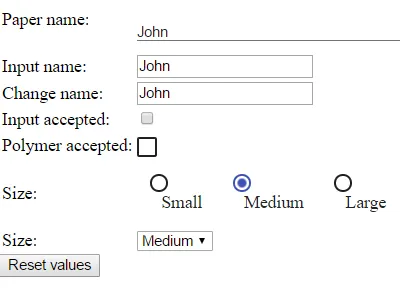
In the template we use two-way bindings for each element and some elements bind to the same property. This will show up in a way that for example the value for name is changed in the paper-input element the value will be reflected to both "Input name:" and "Change name".
|
Note
|
The two input bindings "Input name" and "Change name" have a small difference in the way they work. Input name binds using The functional difference is that |
|
Note
|
For information on the element |