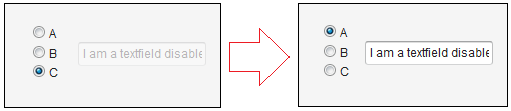
i created a list for radio button. i need listner for one radio button for custom button. i attach the code…
OptionGroup list = new OptionGroup(“Select your option”);
list.addItem(“Today”);
list.addItem(“7 Days”);
list.addItem(“30 Days”);
list.addItem(“Custom”);
list.select(“Custom”);
Here is an example of code. Warning : it works only if the method setImmediate(true) is used !
Texfield text = new Texfield("I am a textfield disabled by default");
text.setEnabled(false);

final OptionGroup optiongroup = new OptionGroup("");
		optiongroup.setMultiSelect(false); [color=#2db93f]
//if true, vaadin creates checkboxes, if false, Vaadin creates radio buttons
[/color]
		optiongroup.addItem("A");optiongroup.addItem("B");optiongroup.addItem("C");
		optiongroup.[color=#ed1a52]
setImmediate(true);
[/color] [color=#2db93f]
// Do not forget this line ! without it the click event is not send to the listener
[/color]

		optiongroup.addListener(new Property.ValueChangeListener() {
			public void valueChange(ValueChangeEvent event) {
				if (optiongroup.getValue()=="A") text.setEnabled(true); [color=#2db93f]
 //If A is selected, the textfield becomes enabled
[/color]
				else text.setEnabled(false);                       [color=#2db93f]
//Otherwise, the texfield is still disabled
[/color]
		}});
For a ValueChangeListener use: optiongroup.addValueChangeListener. The addListener method of the base Component class was deprecated as of Vaadin 7 in favor of more specific methods like addClickListener, addItemClickListener, addValueChangeListener, addTextChangeListener, …etc.