I’ve a grid which has no data initially and it looks like this. The grid is set to fullsize. After adding couple of rows and refreshing the grid also shows the same. But when I try this in iPad Mini I’m able to view the grid properly. What could be the issue ?


Hard to say without seeing your layout structure. Screenshot of the devtools DOM tree would help
Also, make sure you have height defined on the grid and its parent layouts
Would also help to see the full desktop screenshot instead of just the bottom ~200px
or is the problem that you’re simply running out of vertical space in your UI? If that’s the case, you need to decide how it should scale – probably you want it to scroll, which which case you should use a Scroller
The issue seems to be here

The scroller is having position:absolute; which is causing this issue. Not sure from where this is coming from and how to remove this
this is how it looks with full screen and you can see the grid size

Just guessing: your class “card-body” is the culprit. The absolute position of the scroller should only be a problem if you change the position: relative from the grid.
Pro tip from the author of bootstrap: NEVER add “layouting” css to components, always add them to an upper layer, otherwise you always ran into problems. Meaning, the grid is inside your card-body and is NOT the card-body
Sorry, I’m unable follow this. Can you explain with some example?
Also, this problem was there already before adding to Card
If I remove the Form above, Grid shows perfectly
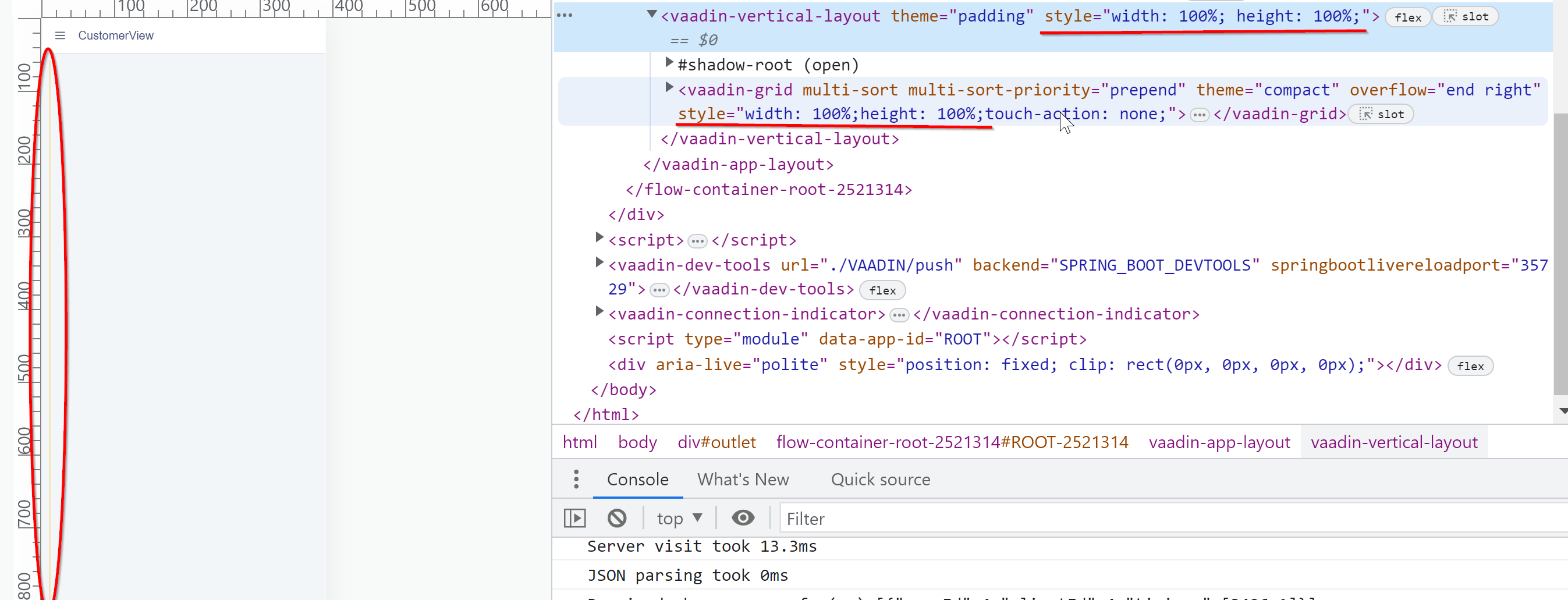
Removed all cards. Now Parent is a VL and the grid is directly added to the VL. Both are set to FullSize as shown here. But grid is not showing
https://vaadin.com/docs/latest/ds/components/app-layout/#scrolling-behavior
explains your problem probably
Looks it is something else. The height is alredy set on the parent as well as on the child too
I doubt that you have used getElement to apply styles to the app layout 
correct
in the doc, I see the example extends AppLayout and height is there using getElement so I did the same here as well