Hi Tapio!
Is there posibility to put text above polygon with your addon? I want to name polygon on the map:
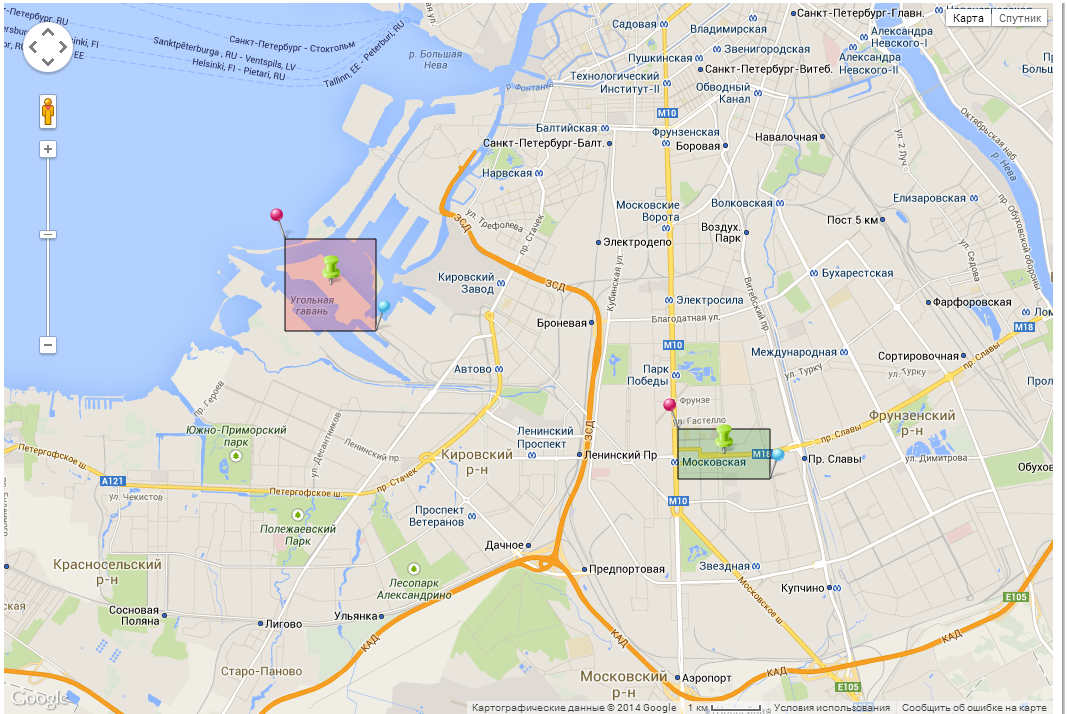
Thanks in advance.
BR,
Anatoly Shirokov
Hi Tapio!
Is there posibility to put text above polygon with your addon? I want to name polygon on the map:
Thanks in advance.
BR,
Anatoly Shirokov
Hi I’m getting “503 Service Unavailable - http://maps.googleapis.com/maps/api/js?v=3&sensor=false&callback=google.loader.callbacks.maps” while loading the map. Getting blank screen. Even demo url also facing similar issue. Any update or idea on this…? “http://tapio.virtuallypreinstalled.com/googlemaps/”
Works for me. Probably just some server of Google was down. If you’re still having problems, check with your ISP; have they had recent fights with Google?
Now it’s working for me thanks Tapio. How can i reset the map after removing all the points.I’m tried to create the object again but no use. Can you suggest me any solution.?
new GoogleMap(new LatLon(latitude, longitude), 4, apiKey);
Tapio, I want to do some custom styling to the map. I realize this isn’t currently supported and am working on a branch to support it. The trouble is, I get a javascript exception in the browser when I try to create and initialize a MapTypeStyle object.
‘undefined’ is not an object (evaluating ‘$wnd.google.maps.MapTypeStyleElementType.all’)com.google.gwt.core.client.JavaScriptException: (TypeError)
Here is an example of some code I have added to initMap() in GoogleMapWidget right before the GoogleMap.create(…) call:
MapTypeStyle style1 = MapTypeStyle.create();
style1.setElementType(MapTypeStyleElementType.GEOMETRY);
…
The exception happens during the setElementType call. I’m wondering if you have any idea whats going wrong here? or if you experience the same exception if you add those lines to yours.
I appreciate any help.
Thanks,
Matt
Can’t you just set zoom, latitude and longitude to the current map object?
I haven’t worked with the styling of the map at all, so I have no idea. The GWT version of Maps API is still in prerelease version so there are some unforeseen problems that arise in really random situations.
But the feature you’re working on sounds really neat, I’d really appreciate if you shared it in GitHub or some other way so that I could integrate it to the official add-on. In case you won’t be able to fix the issue before, I’ll take a look on this as soon as I have time.
Yeah, I plan to share it once complete. This problem has obviously slowed me down. I appreciate you taking a fresh look when you can. I’ll keep at it in the meantime. Thanks.
Tapio, now you explicitly specify vaadin version in the googlemaps pom file
<vaadin.version>7.1.8</vaadin.version>
…
com.vaadin
vaadin-server
${vaadin.version}
Can you specify version range for 7.1 and make this dependency as provided?
It would be perfect!
Thanks in advance!
BR,
Anatoly Shirokov
Hi, ist there a possibility to change the MouseOver event on a Marker?
Have you been able to fix this? I finally had some time to take a look and it seems that this is a bug in the API which, for some reason, doesn’t set any values for
MapTypeStyleElementType
. But if I’ve undestood correctly, the values are supposed to be just strings and therefore you should be able to set them manually by calling a function like:
public static final native void setMapStyleElementTypes()/*-{
    $wnd.google.maps.MapTypeStyleElementType.all = "all";
    $wnd.google.maps.MapTypeStyleElementType.geometry = "geometry";
    $wnd.google.maps.MapTypeStyleElementType.labels = "labels";
}-*/;
This should be called at some point after loading the API but before calling the actual
MapTypeStyleElementType
class.
That isn’t currently supported.
Hi,
is it possible to add a vaadin component (label or TextField) into marker popup info window ??
Thanks
That isn’t supported directly since the info windows are just HTML and don’t have anything to do with actual Vaadin layouting. But I guess you could try
External Layout add-on
, just create a DIV inside the info window and then place the component using an external layout.
Thanks for replying.
But how you can add a DIV in GoogleMapInfoWindow as it accepts only String content ??
Just type it. As is told in the JavaDocs of GoogleMapInfoWindow, it accepts any HTML string as its contents.
Yes sure. This what I am doing I think it is a misunderstood.
What I mean if it is possible layout containing for example button (doing some action on click), textfield where user can enter some data… and not just static http/Text content.
Create a DIV, apply External Layout to it and then add your components to the layout.
Yes sure. But how can I can attach this layout to a GoogleMapInfoWindow object??
The GoogleMapInfoWindow doesn’t accept a Vaadin Component. Or is it possible to generate the HTML code from a layout ??
I’ve been playing with this addon for a bit and I find it really useful, but I encountered a problem (might be my fault). How am I supposed to add icon from localhost? I’ve been trying to do it like this:
googleMap.addMarker(“proba”, new LatLon(
51.121196,17.037621), false, file://localhost/path/image.jpeg);
however it doesn’t seem to work. Does anyone know what I might be doing wrong ? Or is it impossible to choose icon from localhost?