Hello I try to create demo application on Dashboard-demo(vs Spring) using google map in ViewNavigator. But always Map is not loading inside View Component - I see empty Tab content.
Can you explain me where I did a mistake?
13498.zip (1.23 MB)
The add-on doesn’t send anything anywhere but since it’s just a wrapper for Google Maps JavaScript API v3, this is a question you should ask from Google. Their answer to the question can be found from
their FAQ
.
If you analyze layout in debug mode you’ll get a notice that you’re having relatively sized components inside your layout that has no size defined resulting to components with height of 0 pixels. Adding, for example, setSizeFull() inside init() method of your MapView fixes the problem.
I’ve added setSizeFull() inside init() method but it doesn’t help.
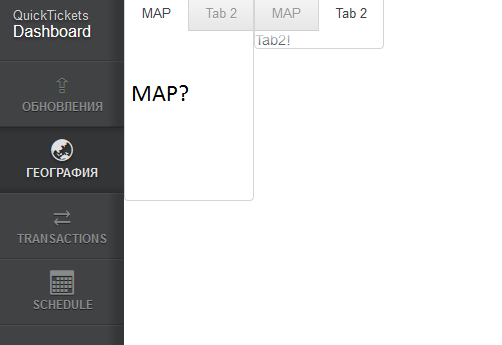
As You can see in attachment there is reserved space in Map-TAB for map placing but the map isn’t showing. I thing the mistake is in widgeset configuration, but I can’t find it.
Quick test: you should actually add it inside
enter
method. Now it works like a charm. If it was an error in widgetset configuration, you’d get an error message about missing client-side widget. Also, it wouldn’t load the API and the DIV would be empty if you inspected it.
13500.java (2.94 KB)
thank you for answer. but i wanted to do it .
https://developers.google.com/maps/documentation/javascript/examples/streetview-overlays
see the button toggleStreetVie. This button do it the i want it.
thank you for answer again.
That’s currently not supported. But I’ll add that to the requested features list, maybe it will be added one day. I guess it would be quite easy to add the support for that as an extension; also, if you create a patch for the actual add-on, I’ll accept it with pleasure. Right now I don’t know when I have time to develope the add-on any further.
Thanks a lot. It helps. Now I need to implement it to my needs.
hi give some example code for using polygon and polyLine
Check out the
demo application from GitHub
. It contains examples of both.
Tanks tapio .i got what i expected .
Got the issue fixed. I got this issue because the widgetset wasn’t compiled properly.
0.8.1 is now out! It’s a really small maintenance release and probably only change worth mentioning is that the div of the map widget has now minimum height of 200 pixels by default. This fixes most of the ‘map is not visible at all’ issues people seem to have. It’s all done in CSS so feel free to overwrite
min-height
property of
.v-widget.googlemap
in your theme if you dislike the setting.
I’ve also added, by request, examples to the Directory page about setting the widgetset parameter. Now there’s also direct examples of using both polylines and polygons in the map.
Next thing I’m going to be working on is creating an API for easy extension development for the map, making adding of missing features as easy as possible. When I few days ago started to investigate about adding support for Geometry Library by doing an extension, I noticed that the current implementation of the widget doesn’t really provide the data needed to create the extension properly without hacks.
The next version of the add-on will hopefully have a nice API together with a simple example extension that can be used as a basis if you want to add new features to the add-on.
Hi Tapio,
I have used google maps in my project , but I can not refresh the map after everytime I add another polygon to map.
I have used refresher in UI already but it doesnt show a new ploygon on map.
thank you in advance,
Would you care to share an example application that demonstrates the issue? It would make much easier to create a workaround for it.
i have problem with this part inside listener to make new polygon , but map will not chnag and refresh.
    final Refresher refresher = new Refresher();
    refresher.setRefreshInterval(2000);

    mapListener = new UpdateListener() {
        public void update(EventBean[] newEvents, EventBean[]
oldEvents) {
final Long polygonNumber = (Long) newEvents[0]
.get(“polygonNumber”);
googleMap.addPolygonOverlay(new GoogleMapPolygon(coordinateStorage.getMap().get(polygonNumber)));
}
};
addExtension(refresher);
I’ve no idea what your UpdateListener does but Refresher seemed to work fine in my small test:
[font=courier new]
final Refresher refresher = new Refresher();
refresher.setRefreshInterval(10000);
    ArrayList<LatLon> points = new ArrayList<LatLon>();
    points.add(new LatLon(60.448118, 22.253738));
    points.add(new LatLon(60.455144, 22.24198));
    points.add(new LatLon(60.460222, 22.211939));
    points.add(new LatLon(60.488224, 22.174602));
    points.add(new LatLon(60.486025, 22.169195));

    ArrayList<LatLon> points2 = new ArrayList<LatLon>();
    points.add(new LatLon(61.448118, 22.253738));
    points.add(new LatLon(61.455144, 22.24198));
    points.add(new LatLon(61.460222, 22.211939));
    points.add(new LatLon(61.488224, 22.174602));
    points.add(new LatLon(61.486025, 22.169195));

    ArrayList<LatLon> points3 = new ArrayList<LatLon>();
    points.add(new LatLon(59.448118, 22.253738));
    points.add(new LatLon(59.455144, 22.24198));
    points.add(new LatLon(59.460222, 22.211939));
    points.add(new LatLon(59.488224, 22.174602));
    points.add(new LatLon(59.486025, 22.169195));

    ArrayList<LatLon> points4 = new ArrayList<LatLon>();
    points.add(new LatLon(60.448118, 21.253738));
    points.add(new LatLon(60.455144, 21.24198));
    points.add(new LatLon(60.460222, 21.211939));
    points.add(new LatLon(60.488224, 21.174602));
    points.add(new LatLon(60.486025, 21.169195));

    final ArrayList<ArrayList<LatLon>> pointsList = new ArrayList<ArrayList<LatLon>>();
    pointsList.add(points);
    pointsList.add(points2);
    pointsList.add(points3);
    pointsList.add(points4);

    refresher.addListener(new RefreshListener() {
        private int index = 0;

        @Override
        public void refresh(Refresher source) {
            if (pointsList.size() == index) {
                return;
            }
            googleMap.addPolygonOverlay(new GoogleMapPolygon(pointsList
                    .get(index), "#ae1f1f", 0.8, "#194915", 0.5, 3));
            index++;
        }
    });
    addExtension(refresher);
[/font]
Ummm, found a ‘little’ bug there. Have to test again.
Update: fixed my test code and everything seems still to be working fine.
thanks for your help.
I have another listener (map listener) that gets the number of polygon from another program maybe every 3 or 4 sec , this time is changing.
I tried to manage it with this code. now it works!
           Long polygonNumber = 0L;
           mapListener = new UpdateListener() {
                public void update(EventBean newEvents, EventBean oldEvents) {
                    polygonNumber = (Long) newEvents[0]
.get(“polygonNumber”);
}
};
            final Refresher refresher = new Refresher();
            refresher.setRefreshInterval(1000);
            refresher.addListener(new RefreshListener() {
                @Override
                public void refresh(Refresher source) {
                    googleMap.addPolygonOverlay(new GoogleMapPolygon(coordinateStorage.getMap().get(polygonNumber)));

                }
            });

          addExtension(refresher);