dashboard issue is resolved (sorry did not mean to bother you with it)
However, pls help us with the Google Map issue
to recap, the issues is that we are able to compile successfully (BUILD Successful) from Eclipse (Kepler) using maven plugin. We use the Goals
vaadin:resources , then
vaadin:update-widgetset then [b]
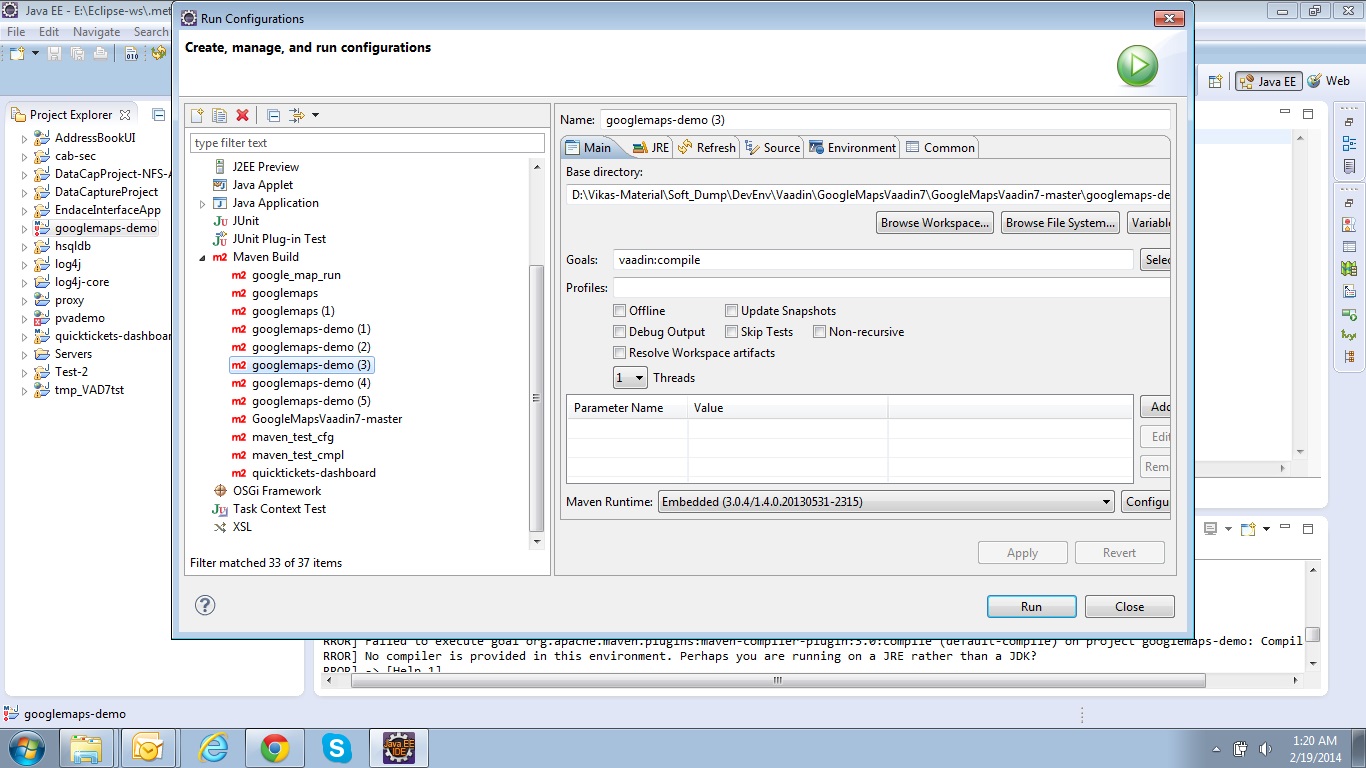
vaadin:compile to successfully compile. (the screen for the build config for the vaadin-compile is attached)
We are not able to build the WAR after compilation. When we do a Maven install then the following error occurs:
[/b]
[ERROR]
No compiler is provided in this environment. Perhaps you are running on a JRE rather than a JDK?
[INFO]
1 error
[INFO]
[INFO]
[INFO]
BUILD FAILURE
[INFO]
[INFO]
Total time: 8.932s
[INFO]
Finished at: Wed Feb 19 01:18:53 IST 2014
[INFO]
Final Memory: 9M/21M
[INFO]
[ERROR]
Failed to execute goal org.apache.maven.plugins:maven-compiler-plugin:3.0:compile (default-compile) on project googlemaps-demo: Compilation failure
[ERROR]
No compiler is provided in this environment. Perhaps you are running on a JRE rather than a JDK?
[ERROR]
→ [Help 1]
when we look at the build configuration - the JRE 7 is attached.
our question is how to make a WAR from the Demo Application, once compilation (vaadin:compile) is completed successfully.
There should’n be need to run vaadin:compile separately. Just check out the root project (consisting of
googlemaps and
googlemaps-demo ) and do
mvn clean install for it. If you’re having problems with Eclipse pluging, I recommend trying command line Maven.
Also, now that I look again on your posts: you’re saying you’re running JRE instead of JDK - just as Maven suggests. How about installing a JDK and then trying to compile the project?
i am gettng followng message on screen while add googlemap add one under my vaadin application.
message :
Widgetset does not contain implementation for com.vaadin.tapio.googlemaps.GoogleMap. Check its component connector’s @Connect mapping, widgetsets GWT module description file and re-compile your widgetset. In case you have downloaded a vaadin add-on package, you might want to refer to add-on instructions.
0.8.0 is out - grab it, break it and whine in this thread! I had to restructure the project in order to keep it maintenanceable so if you just update from older version to this, you’ll have to update your classpaths.
It definitely has that kind of method so something weird is going on. Care to share the full stack trace and the lines of code that cause the exception?
Hi Tapio,
I have managed to integrate your google map plug-in into our application.
A strange thing happens in your demo. When I changes the lat long values –
googleMap.addMarker(“DRAGGABLE: Paavo Nurmi Stadion”, new LatLon(19.0177, 72.8562), true, “VAADIN/1377279006_stadium.png”);
It does not show up at all . I go the location (in India) but the marker is not there.
Currently that can’t be changed from server-side; user has to manually drag the peg man to the place he wants to show on the street view. I’ll add this feature to the wanted features list, hopefully will be in the next release.
Seems to work for me; care to share your app so that I can check what goes wrong?