I’m building an AI powered live sound mixing console setup assistant - originally this started as a monolithic Vaadin web application, but I had to refactor it into a client/server architecture because the app needs to communicate with Mixing Station and other hardware on the user’s local network (which a browser-based app obviously can’t do due to CORS/security restrictions).
Now I have:
Cloud Server: Handles AI/LLM processing and business logic (already deployed)
Local Agent: Spring Boot + Vaadin client that connects to cloud via WebSocket/STOMP and makes REST calls to local hardware
The WebSocket architecture is working perfectly, but now I’m facing something I’ve never dealt with before: how to distribute the local client part to customers. This is completely new territory for me - I’ve only ever deployed web apps to servers, never distributed desktop applications to end users.
Tech Stack:
Spring Boot 3.5.4
Vaadin 24.8.6
Java 24 (with preview features)
Maven build
@PWA annotation already configured
WebSocket/STOMP for cloud communication
RestClient for local API calls
The Problem
I’ve spent an entire day trying to get professional desktop distribution working and hit major roadblocks with every approach. Need guidance on the best path forward.
What I’ve Tried
1. jDeploy
Result: App installs but only shows splash screen, then freezes completely
Attempts: Removed splash screen, specified Java 24 in package.json, various config tweaks
Status: Dead end - completely non-functional
2. GraalVM Native Images (Currently working but unprofessional)
Build: Successfully compiles with my Maven profile using native:compile
Multi-platform: GitHub Actions workflow generates executables for Windows, macOS (Intel + Apple Silicon), Linux
File sizes: ~178MB per executable (includes JVM)
Major Issue: When users run the executable, it opens a terminal window showing all Spring Boot logs and implementation details. Users must then manually navigate to localhost:9090
User Experience: Completely unprofessional - no one wants to see console output when running a “desktop app”
App works perfectly in development (mvn spring-boot:run)
PWA annotation configured but users still need initial browser step
GraalVM native compilation succeeds
Multi-platform executables generate correctly
Critical Issue: Terminal window ruins professional appearance
Users shouldn’t need to manually open localhost:9090
Questions for the Community
Is there a way to make GraalVM native images launch without the terminal window? Some kind of background/windowed mode?
Can I configure the native image to auto-open the browser and then hide/minimize the console?
Should I be looking at JavaFX WebView wrapper instead? Would that integrate well with my existing Spring Boot + Vaadin setup?
Has anyone successfully used Tauri as a wrapper around a Vaadin Spring Boot app? Any gotchas?
Am I missing something obvious about desktop deployment with Vaadin? This feels like it should be a solved problem.
Requirements
Professional desktop app experience (no visible terminals/consoles)
Cross-platform (Windows, macOS, Linux)
Keep existing Spring Boot + Vaadin architecture
Maintain Java 24 support if possible
Users shouldn’t need to manually open browsers or see technical details
Constraints
Can’t downgrade from Java 24 (using preview features)
Don’t want to rewrite the entire frontend (invested heavily in Vaadin)
Need to maintain WebSocket/STOMP cloud connectivity
App needs to control local hardware via REST APIs
Has anyone solved similar desktop distribution challenges with Vaadin? Any guidance would be hugely appreciated - feeling pretty stuck after burning a whole day on this.
That last option -H:WindowsSubsystem=windows tells the linker to generate a GUI binary → no console window will ever be created when you launch it (according to chatgpt, not tried this myself)
I agree that a solution based on something like Electron could be the best approach here. If you still go with opening it in a regular browser instead, then keep these things in mind:
Opening a browser when the application is started is doable using e.g. GitHub - vaadin/open.
If the only UI is in the browser, then the user will still need the terminal window to have a way of closing the application since it will keep running after they close the browser.
I’ve had some success now building locally with Tauri, but I’m not marking that as the solution because I’m a novice and it seems like I should do more tests with it before recommending it to others.
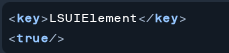
On MacOS create an app bundle with an Info.plist file containing
It is not one universal way of doing it across different OS’es, but the .desktop file should work across most of the different Linux desktop environments.
All according to chatgpt…
PS and on Windows you also have javaw.exe, but then you just run the jar file, no native image.
I investigated a bit further, found that jlink, jdep and jpackage should be able to handle this (but not with native-image). Initially. jpackage will inspect the main class and decide if it is a gui app or console app, and just do the right thing given the current platform. However, using a fat-jar and the spring bootloader confuses things so i ended up with a build-script that manually puts a post-install script in the deb file to create a desktop file in /usr/share/applications. Also jdep struggles a bit with reflection dependencies, so i had to add a bunch of modules manually. But after a little bit of vibe-scripting I had something that works for deb-packages.
This is no native-image approach. And it would have worked smoother in a non-fat-jar spring boot project I suppose.
The thing with jpackage it turns out, is that it doesn’t play well with latest spring boot. I have an “old” app on vaadin 23.4.1 and spring boot 2.7.18 where it works ok. The installation of desktop file for linux needed some tweaks, but in the end everything worked out (linux). On the latest versions however, not that trivial. I have exhausted chatgpt and claude. Maybe deepseek can fix the last issue … :0)
If you are using native-image anyways, you really don’t need to resolve any problems with jpackage, you just need a .desktop file on linux. On Windows use the parameter mentioned earlier and on Mac, a Info.plist in a dmg-file.
When it comes to the desktop “experience” I chose to let the app itself start the browser. Works sort of fine, if you are ok with just a new tab in your already running browser. The app will continue to run if the user closes the browser. If the app receives no requests within the time any session will have expired anyway, it closes itself. If it detects another instance when it starts, it just launches the browser and exits.
Not posting code, because the parts that works was trivial to have ai generate for me, but let me know and i will post.
 App works perfectly in development (
 Critical Issue: Terminal window ruins professional appearance