My team and I are developing an application using Vaadin Flow v24.6.
We have very similar application created with Vaadin v8.
Both are deployed on AWS with same hardware resources, but somehow the application created with Vaadin 24.6 feels slower than the application created with Vaadin v8 even if technology stack is upgraded on new app.
To be sure that we are comparing Vaadin 24.6 with Vaadin 8 and not something else, we used some dummy in memory data in both cases, so there is no db call or something else…
As a result we get Vaadin v24.6 app showing load indicator almost on every request, and Vaadin v8 app not showing load indicator at all.
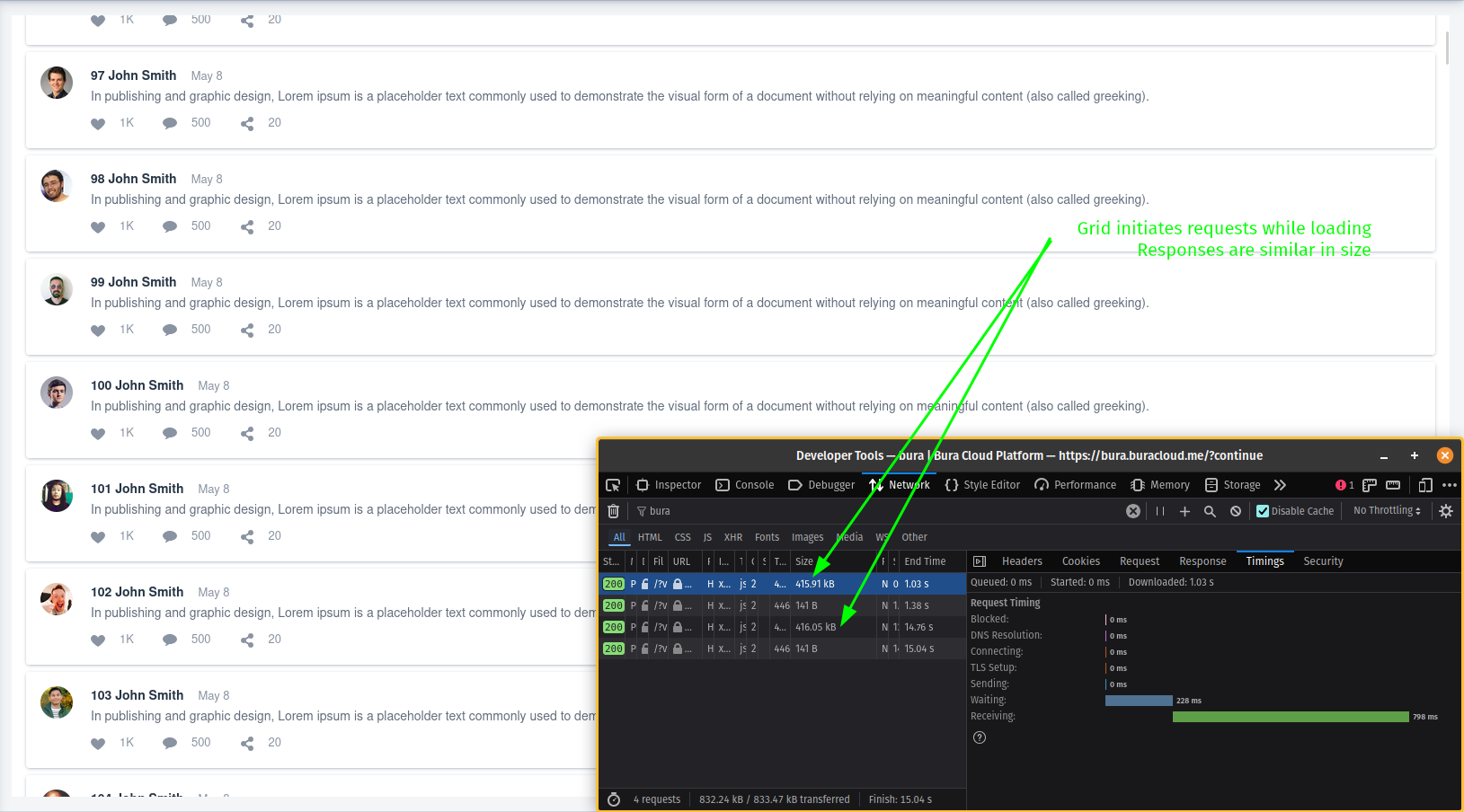
By using Firefox DevTools we concluded that every response on Vaadin v24.6 is near 500kB, and on Vaadin v8 is around 30kB. Because of this difference in response size Vaadin v8 app fills faster and has better UX than Vaadin 24.6 app.
In both cases we are using similar UI components, VericalLayout with 50 custom cards created from other components like HorizontalLayout, Label, Icon and so on nothing too complex.
How is this possible considering v24.6 is latest version?
What can we do to make responses smaller?
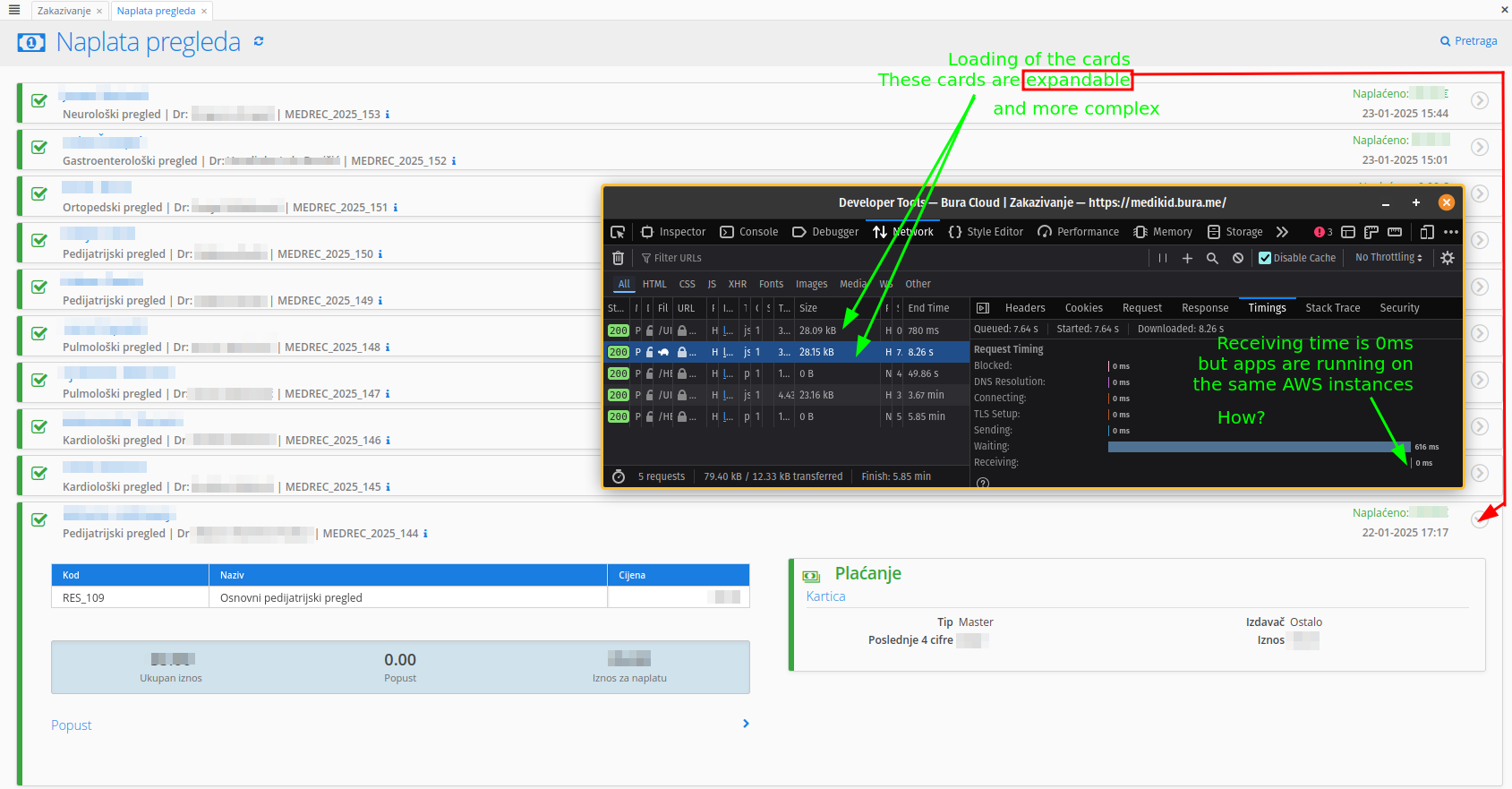
As you can see view is even more complex than the one created with Vaadin v24.6. Firefox Dev Tools show that Receiving time on Vaadin v8 version is 0ms and I can’t figure out why.
Older app is much more UX friendly because of faster response
Unfortunately I don’t have the code for app created with v8. I created a post to see if there were any comparisons in size of the UIDL response.
We didn’t dig deep into understanding of UIDL but just throwing a quick look at the json we can see that v24.6 contains lots of objects in changes list, while v8 version contains objects in state list…
I wasn’t able to find information about the difference between v8 and v24 response size on the internet, so I’m asking here if anyone else noticed that or we are doing something wrong, and if we do how to fix it.
You are comparing pears with apples. That feed view example is non optimized and is using component renderer with a lot of content. Replace that with a LitRenderer or a client side lit template and we are talking performance.
It would be very interesting to see the code (or preferably a reduced examples) of both versions. If newer Vaadin version now requires one to use LitRenderer instead of pure Java to make some view usable, we have gone to bad direction because LitRenderer usage is already kind of breaking the Java abstraction we provide.
I have seen some performance regressions, but this looks quite serious.
Vaadin Grid should still do lazy loading to client side automatically, even if the server side contains 5000 items (which is usually nothing for the server).
I tried to create apps as similar as I could in short time(it’s hard for me to switch from v24 api to v8 api fast).
Before I used 5000 objects on backend but to be sure we are not comparing pears and apples, as Christian said, I reduced that number to 40. I chose that number because I saw that v8 grid is loading 40 rows initialy and v24 grid is loading 80 rows(or maybe it loads 2 times in row).
I tested like this. Started both applications and let them render their views. Then I started DevTools with Networking tab clean and after clicking on the Refresh grid button on both apps I get that response for v24 is around 270k and for v8 is around 75k.
Earlier, I was wrong about comparing old version with new version and was comparing pears and apples, but we can see that response in this case is about 3.5 times bigger.
We already know about performance recomendations. We are following all the Vaadin content and we tend to use Flow more than Hilla. LitRenderer and custom components are not always solution for us.
It’s just our new apps created with v24 feel slower than the old ones created with v8. That don’t make much sense to us and that’s why I’m reaching you.
3x bigger sounds more realistic and probably falls in the ballpark Matti has mentioned… I would guess it would drop to like 20-30kb with LitRenderer but that requires breakage of the Java abstraction…
I checked the reduced examples, I could only hope all users would provide with this good ones
Notes:
Indeed, much more data transmitted, but not 20X, but more like 2-3X, which I still consider unacceptable.
We should bring back API to hand-tune how Grid acts with the amount of rows it loads. The old Table component had quite sophisticated APIs to fine tune these (page size and amount of rows that were cached), both V8 and V24 versions woulb benefit significantly of these, both on transferred data and rendering performance. In certain apps this could have significant benefits for both UX and hosting cost.
Oh I hate that V8’s progress indicator that always flashes when entering the page. Makes it look slowers to render than it really is…
This is a very interesting topic. While currently also migrating from V8 to V24, we had longer client loading time when handling much data with grid or other complex layouts.
In general these issues improved (but not vanished) when we enabled react back when Flow and Hilla were merged.
There is some difference how Vaadin 8 and Vaadin 24 lazy loading in the Grid is working. In Vaadin 8 the lazy loading is initiated at Escalator level (it is component inside Grid doing the virtual scrolling) and it loads only the amount of rows that is visible. On the other hand in Vaadin 24, the amount of rows is defined by pageSize field of the Grid as it loads a buffer of data, that is usually somewhat larger than amount of rows visible. The initial value is 50 (there is a public API to set, so you could play with it), but could rise to 100. This explains most of the 2-3x difference. There are pros and cons in this. Vaadin 8 requires to load the data more often, but smaller amounts and if there are some fixed cost per request (e.g. database / backend query static time) it may mean that Vaadin 8 performance is worse in the bigger picture. Vaadin 24 loads a bit more at the time, but less frequently.
We are aware of differences in grid behaviour on Vaadin 8 and Vaadin 24 and that’s why we limited number of objects to 40 in both examples.
In that case both versions load the same amount of objects first time when the grid is shown.
3x difference is in that case, not while scrolling and lazy loading.
I couldn’t make v8 and v24 behave the same in short amount of time using available APIs for pageSize, etc.
I found the problem. The issue was that my brain was on autopilot . It’s called inattentional blindness or something like that…
In older Vaadin versions, responses were compressed. I know this because when we upgraded to Vaadin 6.5 (or so), compression was enabled by default, and we needed to disable our custom compression to avoid double-compressing the responses.
I thought that compression was enabled by default in newer versions of Vaadin, so I didn’t even consider checking it. Sorry about that…
Please consider updating start.vaadin.com by adding the following to application.properties:


 . It’s called inattentional blindness or something like that…