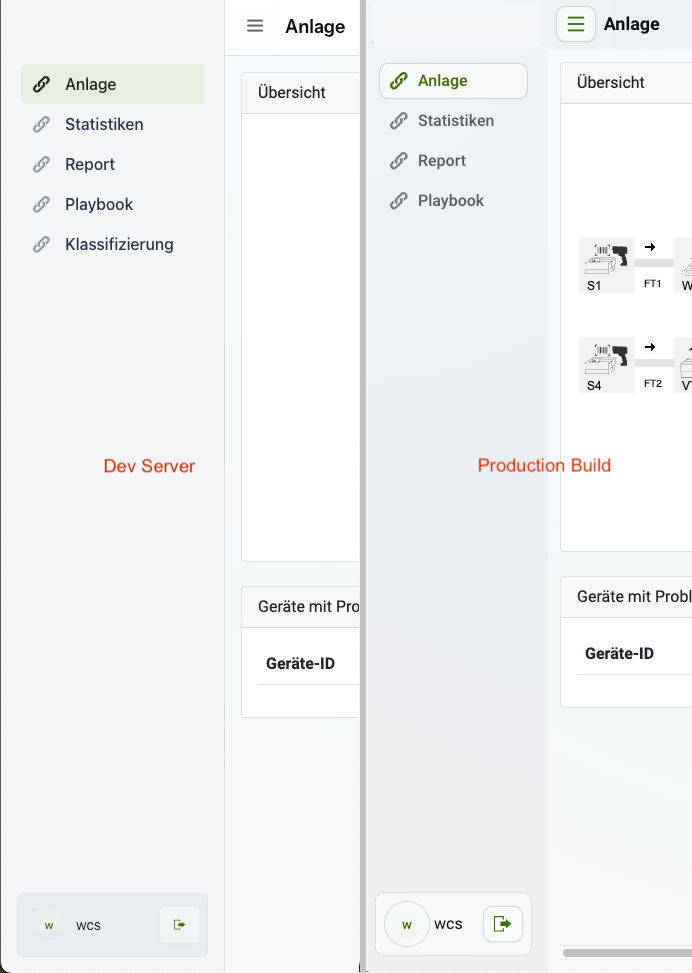
Vaadin 25 + Quarkus: AppLayout renders differently in dev vs production build

Hi everyone,

I’m running into a UI inconsistency between dev mode (local) and the production build when using Vaadin AppLayout with Quarkus.

Environment

  • Vaadin: 25.x
  • Quarkus: 3.27.1
  • Java: 21
  • Build tool: Gradle 9
  • Deployment:
    • Dev mode: ./gradlew quarkusDev
    • Prod build: ./gradlew build + runnable JAR
  • UI: AppLayout (Aura-style layout)

Problem

The UI renders correctly in dev mode, but looks noticeably different after a production build:

  • In dev mode:
    • As expected
  • In production:
    • Same navigation and views are loaded, but layout/styles differ

No runtime errors in the browser console or server logs. All stylesheets loaded successfully.

What I’ve checked so far

  • Same codebase, same configuration
  • No custom theme switching between environments
  • Happens consistently after clean build

Screenshots

  • Dev mode: (working layout)
  • Production build: (broken layout)

(Attached in the forum post)

Question

Is there a known difference in AppLayout / Aura styles / CSS handling between dev mode and production mode in Vaadin 25?

Could this be related to:

  • CSS bundling / tree-shaking
  • @CssImport vs theme styles
  • Quarkus + Vaadin production optimizations
  • Missing frontend build step or misconfigured vaadinBuildFrontend

Any hints on what to check next would be highly appreciated.

Thanks in advance!

— Benjamin

Can you please provide additional details about the application? Do you use only aura css or do you have custom styles? If so how do you load them?

Gradle prepare frontend task is not required anymore for quarkus, since it is embedded in the extension.

Can you provide a sample project that reproduces the issue?

Thanks for the reply, Marco.

I use only very little custom css yet. For example on menu items on sidebar no custom css is involved.

Build command:
gradle -x test --build-cache --warning-mode all :build -Dquarkus.package.type=uber-jar

The css is loaded like this below:

@Push
@StyleSheet(Aura.STYLESHEET)
@StyleSheet(value = "css/styles.css")
@ApplicationScoped
public class VaadinConfigurator implements AppShellConfigurator {

	@Serial
    private static final long serialVersionUID = -7935693983143211063L;
}

styles.css is actually only this:

html {
    --aura-app-layout-inset: 0px;
    --aura-app-layout-border-width: 0px;
    --aura-app-layout-radius: 0px;
    --aura-font-family: Roboto, "Helvetica Neue", sans-serif;
    --aura-base-font-size: 16;
}

.navbarLogo {
    width: 170px;
    padding-left: 50%;
    margin-left: calc(170px / -2);
}

#current-user-info {
    align-items: center;
    gap: var(--vaadin-gap-xs);
    padding-right: 1rem;
    cursor: pointer;

    vaadin-avatar {
        cursor: pointer;
    }
}

I can provide a sample project but was hoping i can delay until i know its nothing obvious i am missing out.

Just a totally wild guess: in development mode… you still have a not updated development bundle that contains lumo… your dev view looks like lumo… your production view looks like aura

2 Likes

Thanks Christian, will check right now. Struggling to force the dev-bundle to be regenerated. Need to read docs first.

From what is know yet visual differences can be observed exclusively in Vaadin constructed stylesheets injected at runtime. Using vaadin-drawer-toggle as an example, DevTools shows that the effective styles applied to [part="icon"] (including ::before / ::after) differ between dev mode and production build. Static CSS files and theme resources are identical in both cases; the differences are only visible in the runtime-generated (constructed) stylesheets.

Dev Server:

[part="icon"], [part="icon"]::after, [part="icon"]::before {
    position: inherit;
    height: auto;
    width: auto;
    background: transparent;
    top: auto;
}

Prod Build:

[part="icon"] {
    background: currentcolor;
    display: block;
    height: var(--vaadin-icon-size, 1lh);
    mask: var(--_vaadin-icon-menu) 50% / var(--vaadin-icon-visual-size, 100%) no-repeat;
    width: var(--vaadin-icon-size, 1lh);
}

Turns out that “wild guess” was spot on :sweat_smile:

After deleting the frontend/ folder and the dev.bundle, dev mode now looks exactly like the production build. The dev view was indeed still using Lumo, while prod was already on Aura.

So yeah — problem found, which is awesome.

That said, I’m still wrapping my head around why this happens. The interaction between the generated frontend/ folder (gitignored), the dev.bundle (checked in), and Quarkus dev mode / hot reload isn’t fully clear to me yet. I’ll need a bit of time to understand when Vaadin decides to reuse existing bundles vs. rebuilding them in dev mode.

But at least now we know what was going on :+1: Thanks very much!

2 Likes