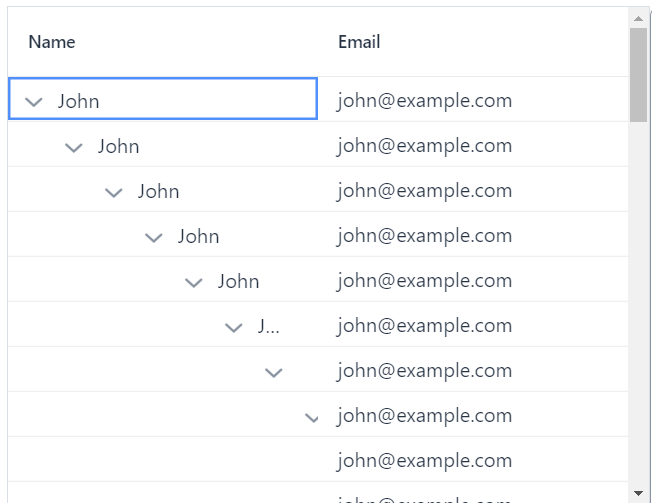
This is an example how I try to use :
const items = [
  {
    name: "John",
    email: "john@example.com",
    children: [
      { name: "Tom", email: "tom@example.com" },
      { name: "Jane", email: "jane@example.com" },
    ],
  },
  {
    name: "Mike",
    email: "mike@example.com",
    children: [
      { name: "Alice", email: "alice@example.com" },
      { name: "Bob", email: "bob@example.com" },
    ],
  },
];

<vaadin-grid .items="${items}">
      <vaadin-grid-tree-column
        path="name"
        header="Name"
      ></vaadin-grid-tree-column>
      <vaadin-grid-column path="email" header="Email"></vaadin-grid-column>
    </vaadin-grid>
And this is how it looks like if I open the first item
joint-pug
January 25, 2024, 1:28pm
3
Hey, probably you should use dataprovider for treegrid as in examples:https://vaadin.com/docs/latest/components/tree-grid (use Typescript examples)
Simplified dataprovider:type Person = { name: string; email: string; children?: Person[]; };
async dataProvider( params: GridDataProviderParams<Person>, callback: GridDataProviderCallback<Person> ) { const people = params.parentItem ? params.parentItem.children : items ; callback(people ?? [], people?.length); }
<vaadin-grid .dataProvider="${this.dataProvider}"> ....
I tried to use dataProvider, the result is same
  async dataProvider(
    params: GridDataProviderParams<any>,
    callback: GridDataProviderCallback<any>,
  ) {
    // The requested page and the full length of the corresponding
    // hierarchy level is requested from the data service
    callback(items, items.length);
  }
}
...

<vaadin-grid .dataProvider="${this.dataProvider}">
joint-pug
January 25, 2024, 1:54pm
5
You should filter based on params.parentItem in dataprovider (see my example)
Thanks a lot, this small secret is missing in official documents