Styling a disabled Button (only with Icons) with css

Hi there,
i have Buttons disabled (Buttons with an icon only) and tried to style them with css.
With text things working out of the box

here my part off the css
----- CSS Start --------------
vaadin-button[disabled] {
color=#dddddd
}
------ CSS END -------------
any ideas

Vaadin 25.0.6
Ubuntu 24.04
same behavior on chrome, firefox and brave Browser

Your description is missing the actual problem - I assume the color is not applied to the icon? Would also be helpful to know how you create the icon, and which iconset you are using, which theme you are using.

One notable issue is that your CSS contains a syntax error, it should look like this:

      vaadin-button[disabled] {
        color: #dddddd;
      }

thx for the very quick response.

The Button is “vaadin-Blue” and should be “light-gray” in case, the button is disabled. I want to solve this by using css only.

Otherwise i have to create a method.
“MyButton extends Button” setEnabled(boolean) that also changes the color
or an a method

setEnabled(Button button,boolean enabled) {
if (enabled) {
button.setEnabled(enabled)
button.getElement().getStyle().set(“color”, “#245cf9”);
} else {
button.setEnabled(enabled)
button.getElement().getStyle().set(“color”, “#dddddd”);
}

that does the same

Does the Java code actually work? Does the CSS snippet I posted not work?

setEnabled(Button button,boolean enabled) {
if (enabled) {
button.getElement().getStyle().set(“color”, “#245cf9”);
} else {

button.getElement().getStyle().set(“color”, “#dddddd”);

}
button.setEnabled(enabled)
button.setVisible(enabled)
}

Changeing the Style /** does not work set on the server but comes not to the UI
using button.push() /** does not work
button.setVisible(enabled) /** works but is, not that what i want

The tooltip is not visible , if the Button is disabled . That was so writen in the documentation

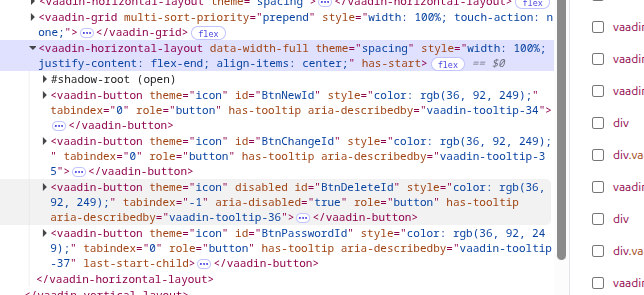
if i change the color in WebConsole, color of the Button changes.

image

Have a look an BtnDeleteId (is disabled but has the same color like the other Buttons

You can enable the accessibleDisabledButtons feature flag to make tooltips work on disabled buttons: How to configure feature flags in Vaadin Flow

Based on that screenshot of the DOM, it looks like all buttons have a color: rgb(36,92,249) inline style. That would override any color you set in a stylesheet.

Where is that inline style coming from? Presumably from your java code? (In general, you should do those kinds of things with css, not through the getStyle() API, which is more appropriate for styling individual elements or setting styles dynamically based on business logic).

Yes, the Color comes from my java code, but this was the onyl way i found to color the Buttons

like the snippet above

button.getElement().getStyle().set(“color”, “#dddddd”);

Thx for the hint,
My main goal is to have gray buttons. Tooltip for diabled buttons is nice to have

A stylesheet is really a much better way of doing that.

Could you tell me how you tried to use a stylesheet, and how that failed?

I totally aggree, but maybe i am to stupid as a backend developer

image

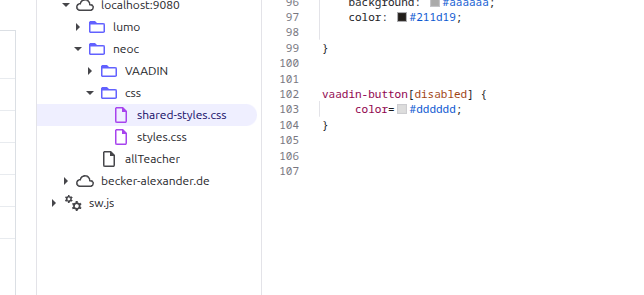
Here you caan see, what my first approach was ( see my first post in this thread.

And as mentioned already, that syntax was incorrect.

I propose you remove ALL getStyle() stuff from the button, fix the css, and try again.

Thank you so much.
I did not see the error in css. Now it works like expected
Stupid white old man, thats me.
image

Glad it helped!

Tiny CSS syntax errors can be hard to spot, since you don’t get a compile-time error.
Using an IDE with proper css support (like IntelliJ Ultimate Edition, or the Eclipse Web Developer Tools plugin) helps, as it highlights css errors for you in the editor.