Maybe this is a losing battle, but really ? :
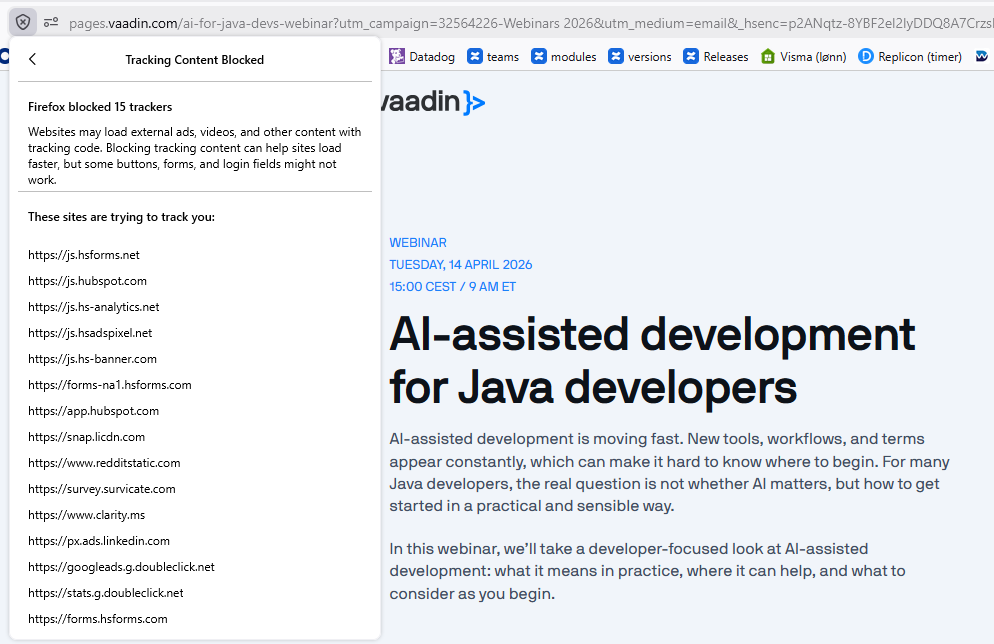
Therefor you have a tracking blocker :D
Yes, but that also means the form submit doesn’t work
Strange with Safari it worked. Looks like firefox is more restrict. Was the button missing to join or is the submit button not working?
Nothing happens when I click the button.
If I were to guess, I see the button has class “hs-button”, and one of the blocked trackers is forms.hsforms.com
6 different domains with “hs” in their name. Looks shady as heck
Uh thats really not well. Maybe @Leif can check or forward the issue.
If I understand this correctly, you are using a “free” service but we are paying with our information :(
Again; This is probably a losing battle, but I chose to not participate whenever possible
I think its more a “track who received the mai l and attend” its usual email marketing and important for each organization have those KPIs. But some one of the Vaadin Team has for sure more information.
Many of those scripts are related to keeping track of how our ads work. If we run ads on e.g. Reddit and want to get insights on whether that’s worth the money, we basically need to have Reddit’s tracking script there. And the same goes for LinkedIn and Google.
“hs” is for HubSpot that we use for e.g. CMS, CRM and sending out newsletters. We’re not happy with the impression it gives from this perspective but it’s also not trivial to find a replacement…
2 Likes
You can also find the upcoming webinar on YouTube without a form (sorry Leif  ) https://www.youtube.com/live/jNrfEwNOWv0?si=f2YudmwQ8IfcaYP0
4 Likes
I usually never bother to “Save my seat”. Mainly because even if I am logged into vaadin.com, I am still asked to fill up a form!!
Instead
- Find the youtube link (like Christian above)
- Click the “Notify me”
- Google nicely adds it to your calendar, after converting it to your timezone!
- Get reminded
- Attend
Normally that’s what I do too, except I always forget #5 
2 Likes