button_guardar.setStyleName("v-mybuttons");
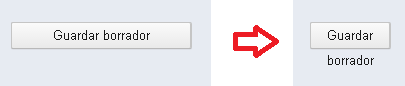
With maximized window, the text is shown in just one line, and when I resize the window, the wrap works fine but the height of the button has not modified. I attach a image that I hope it explain the problem.
Button btn = new Button(
"Lorem ipsum dolor sit amet, consectetur adipiscing elit, sed do eiusmod tempor incididunt ut labore et dolore magna aliqua.");
btn.addStyleName("multi-line");
btn.setWidth("100%");
I replace button as Image using css like:
.mystyle .V-button{
padding: 0px;
background: none;
border: none;
text-shadow: none;
border-radius: 0px;
box-shadow: none;
}
but when the button click
overlayout will come,i need to set hidden help me…
thanks ji now its work fine !!!
Button save = new Button(“Save”);
Button cancel = new Button(“cancel”);
HorizontalLayout buttonLayout = new HorizontalLayout();
buttonLayout.addcomponent(save);
buttonLayout.addcomponent(cancel);
buttonLayout.addstylename(“mystyle”);
In css :
.mystyle .v-button{
color: black;
pading:0px;
}
how to add different style for button
both button …plz explain in detail
.mystyle3 .v-button-caption{
font-weight: bold;
}
[/code]You need to know there are two methods to apply styles: setStyleName(“mystyle”) and addStyleName(“mystyle”). See the API references (it’s trivial )
With these, you only need to add the styles, in the right order, to apply the styles you want to see. But apply the styles to the components, not to the layout. If you do that, the styles are applied to all buttons you add to the layout. I advice you to use Joacim’s code and my above code.
 )
)