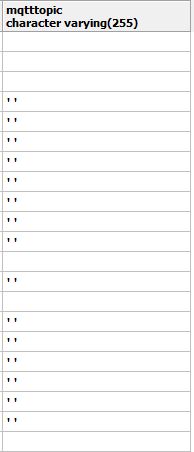
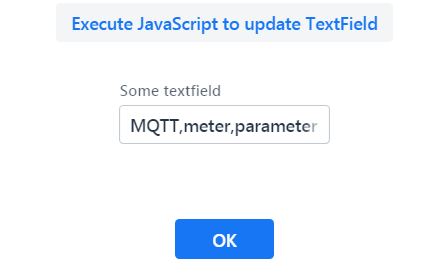
Hello, I want to fetch data from javascript to vaadin textfield ,data is getting fetched properly in textfeild. But somehow for some reasons empty values are stored in the database until I personally edit the fetched data in the text box. I don’t want to edit the data, that’s why I have made the field readOnly and as I told it will save the empty values to the database.
=====================!Componenet of textfield…=================================
HorizontalLayout hr = new HorizontalLayout();
		mqtt = new TextField("MQTT Topic");
		mqtt.setReadOnly(true);
		mqtt.setWidth("65%");
		mqtt.setId("treeTopic");
		//mqtt.setValue("mqtttopic");
		mqtt1.addClickListener(event -> {
			UI.getCurrent().getPage().executeJavaScript(
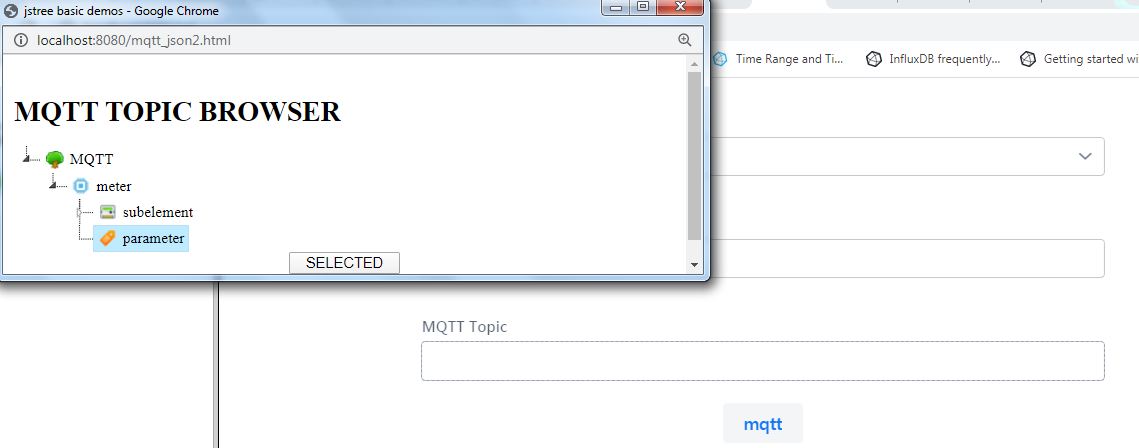
					"window.open('mqtt_json2.html','popUpWindow','height=300,width=700,left=50,top=50,resizable=yes,scrollbars=yes,toolbar=yes,menubar=no,location=no,directories=no, status=yes');");
		});
=======================================Button in which i am saving the data=========================================================================
okbutton.addClickListener(event -> {
			Notification.show("hihih");
	    	 // UI.getCurrent().getPage().executeJavaScript("window.open('/treeTopicData?tagid='"+tagid.getValue()+"&description="+description.getValue()+"&enabled="+enabled.getValue()+"&storehistory="+storehistory.getValue()+"&historydeadband="+historydeadband.getValue()+"&mqtt=document.getElementById('treeTopic').value&datatype" +datatype.getValue()+"&value="+value.getValue()+"&engunit="+engunit.getValue()+"&lowlimit="+lowlimit.getValue()+"&highlimit="+highlimit.getValue()+"&tagid="+tagid.getValue()+"&text="+text.getValue()+"&tagtype="+tagtype.getValue()+"&parentid="+parentid.getValue()+");");
			//UI.getCurrent().getPage().executeJavaScript("window.open('/treeTopicData?tagid="+tagid.getValue()+"&description="+description.getValue()+"&enabled="+enabled.getValue()+"&storehistory="+storehistory.getValue()+"&historydeadband=\"+historydeadband.getValue()+\"&mqtt=document.getElementById('treeTopic').value&datatype\" +datatype.getValue()+\"&value=\"+value.getValue()+"&engunit="+engunit.getValue()+"&lowlimit="+lowlimit.getValue()+"&highlimit="+highlimit.getValue()+"&tagid="+tagid.getValue()+"&text="+text.getValue()+"&tagtype="+tagtype.getValue()+"&parentid="+parentid.getValue()+"');");
	    	 mqtt_tagtree_entity m1 = new mqtt_tagtree_entity();

			m1.setTag_id(Long.parseLong(tagid.getValue()));
			// m1.setText(text.getValue());
			m1.setDescription(description.getValue());
			m1.setEnabled(enabled.getValue());
			m1.setStore_history(storehistory.getValue());
			m1.setHistory_deadband(historydeadband.getValue());
			m1.setMqtttopic(mqtt.getValue());
			// m1.setTag_type(tagtype.getValue())"";
			m1.setDatatype(datatype.getValue());
			m1.setValue(value.getValue());
			m1.setEng_unit(engunit.getValue());
			m1.setEng_low_limit(lowlimit.getValue());
			m1.setEng_high_limit(highlimit.getValue());
			// m1.setIcon(icon.);

			//System.out.println("Mqtt :"+mqtt.getValue());

			//mq.save(m1);
========================================Javascript==========================================================================================
var dat=/*[[${treeproduct}]
]*/ "TEST";
$.ajax({url:"treeaction" ,success: function(result){
//alert(result);
dat=result;
var str=dat;
//alert(str);
$('#data2').jstree({
'core' : { 'data' : eval(str) },
});
$('#data2').on("changed.jstree", function (e, data) {
var path = data.instance.get_path(data.node,'');
console.log('Selected: ' + path);
selectedNode=$('#data2').jstree().get_selected(true)[0]
;
if(selectedNode.original.type=="parameter" || selectedNode.original.type=="Parameter")
{
document.getElementById('txtText').value=path;
document.getElementById('btnSelected').disabled=false;
}
else
{
document.getElementById('btnSelected').disabled=true;
selectedNode="";
}
});
// $('#data2').on('loaded.jstree', function(){$('#data2').jstree('open_all');});
//} );
}});
function SetData() {
if (window.opener != null && !window.opener.closed) {
alert(document.getElementById('txtText').value);
var data=document.getElementById('txtText').value;
var start = window.opener.document.getElementById("treeTopic").value=data;
window.opener.document.getElementById("treeTopic").text=data;
//start.dispatchEvent(new Event('change'));
//start.onchange();
}
window.close();
}
/*]]>*/
</script>
<div id="data2">dhjfgskdh</div>
</head>
<form><center><input id="btnSelected" type="button" value=" SELECTED " onclick="SetData();"/></center>
<input type="hidden" id="txtText"><input type="hidden" id="txtId"></form>
</body>
</html>
Below the given images are of output…
Help would be appreciated…
Thank You.