The text field has a readonly status and child, but I need to make the font color of the label and field value black there, I don’t understand how I can interact with the DOM element
You can use the ::part() selector to style specific parts of the component. Look in the inspector and you’ll see that different parts of the component have part="..." attributes.
For instance, if you wanted to style the label, you can do
vaadin-text-field::part(label) {
  color: hotpink;
}
Thanks a lot for the tip, I’ll try it now
its not work for form, but work for login-page, at part  PS; edited on red color
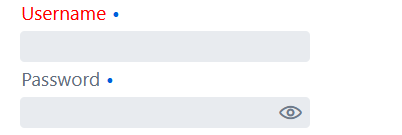
The password field has a different tag name (vaadin-password-field). In this case, you will want to define some more specific selectors, for instance:
myFormLayout.addClassName("my-specific-form"), then
.my-specific-form vaadin-text-field::part(label) {
  color: red;
}
(applies to all text fields within that layout)
Or for a single field: textField.addClassName("specific-field")
.specific-field::part(label) {
  color: red;
}
Thank you so much for helping me figure it out!! Just started to delve into DOM elements