What is the best way to achieve this please ? A label and it information. I have a couple of information to display on a view like this but I don’t think using so much verticalLayout is best practice. Kindly assist
Good question!
This can be approached from two sides:
- Visual – just making it look like that
- Semantic – actually using appropriate HTML structures for read-only label-and-value pairs
Ideally the solution would provide both, of course.
I’ll provide some options, but @quirky-zebra might have ideas too?
I think semantically a description list would make the most sense (the
- ,
- and
- elements)
I’ve used https://developer.mozilla.org/en-US/docs/Web/HTML/Element/dl for it with great success, Vaadin flow has a class for it as well
right, so we’re on the same line about that
so, in Flow code you could build that e.g. like so:
DescriptionList dl = new DescriptionList();
DescriptionList.Term dt = new DescriptionList.Term("Label");
DescriptionList.Description dd = new DescriptionList.Description("Value");
dl.add(dt, dd);
add(dl);```that comes with an unfortunate default (native) styling
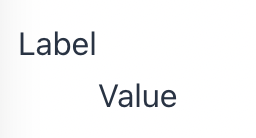
(which you can of course override with css)
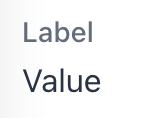
e.g. this gives you that structure but with nicer styling
DescriptionList dl = new DescriptionList();
        DescriptionList.Term dt = new DescriptionList.Term("Label");
        dt.addClassNames(LumoUtility.TextColor.SECONDARY, LumoUtility.FontSize.SMALL, LumoUtility.FontWeight.MEDIUM);
        DescriptionList.Description dd = new DescriptionList.Description("Value");
        dd.addClassName(LumoUtility.Margin.Left.NONE);
        dl.add(dt, dd);
        add(dl);
Excellent! Thank you @useful-whale @quirky-zebra
This is great! I didn’t know Vaadin had this component.
yeah, we should make these plain HTML element Flow classes easier to find somehow…