Hello!
I am currently having an issue with the Tree-Component of Vaadin.
You can reconstruct it with the Vaadin-Demo at
http://demo.vaadin.com/sampler#TreeMultiSelect
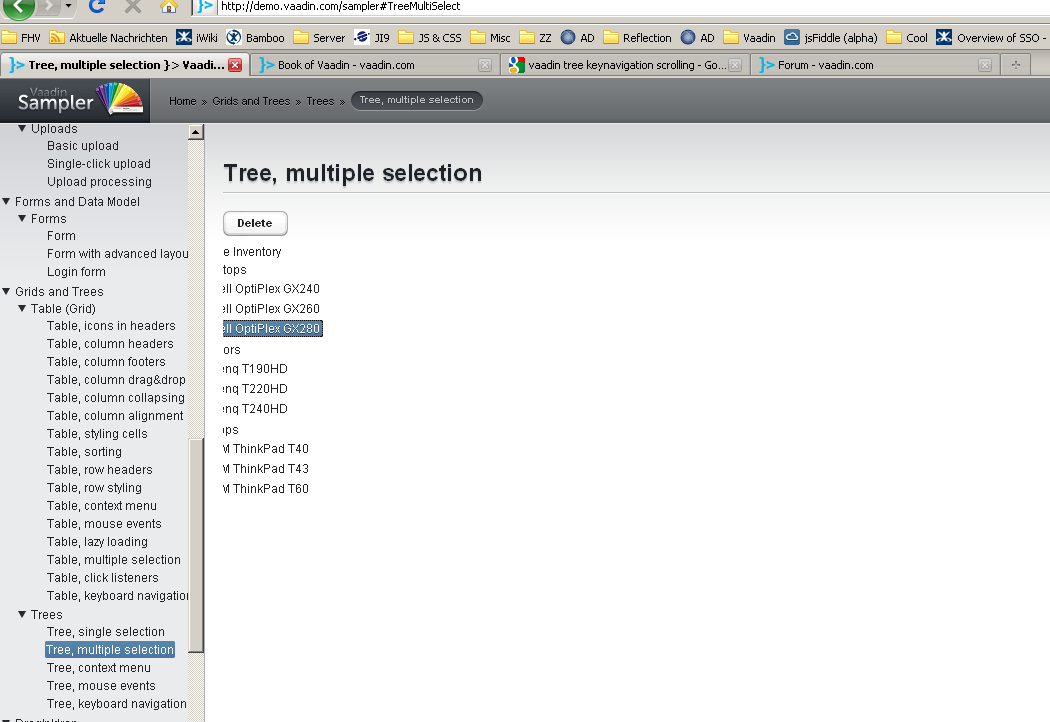
Attached you will see some screenshot of the “problem”:
- Starting with th demo above: Go to the link above and mark an element of the tree. You can move up and down, no problem so far.
- tree-key-nav_1.png: Resize the window, so that the width is small enough, that the tree is partly hidden.
- tree-key-nav_2.png: Again, move up and down with your keyboard arrows. You will see, that the tree-component “scrolls” to the right side.
Already here it’s a problem for me, because in a split-panel you can’t see the interesting part of the tree anymore!
- tree-key-nav_3.png: Resize the window back to fullscreen. The tree stays partly hidden.
I don’t know, if it’s a bug, but if you are using the tree in a split-panel you usually won’t resize the window to fullscreen. The problem here is, that if the (content of the) tree is wider than it’s parent split-panel, the component will scroll to the right side and you will only see the end of the elements.
In my application the tree is in a panel (to have scrolling enabled). This panel is the content of the left part of a split-panel.
I tried it with
scrollLeft(0);
after a the
valueChange
of the tree was called, but it didn’t behave smoothly, which means, that it first scrolled to the right and then to the left 
Maybe someone already have a solution for this.
Thank you (or Kiitos ;-)),
koerblar