in Vaadin (7.4.6 but also older versions) we use the table component to show data from a container.
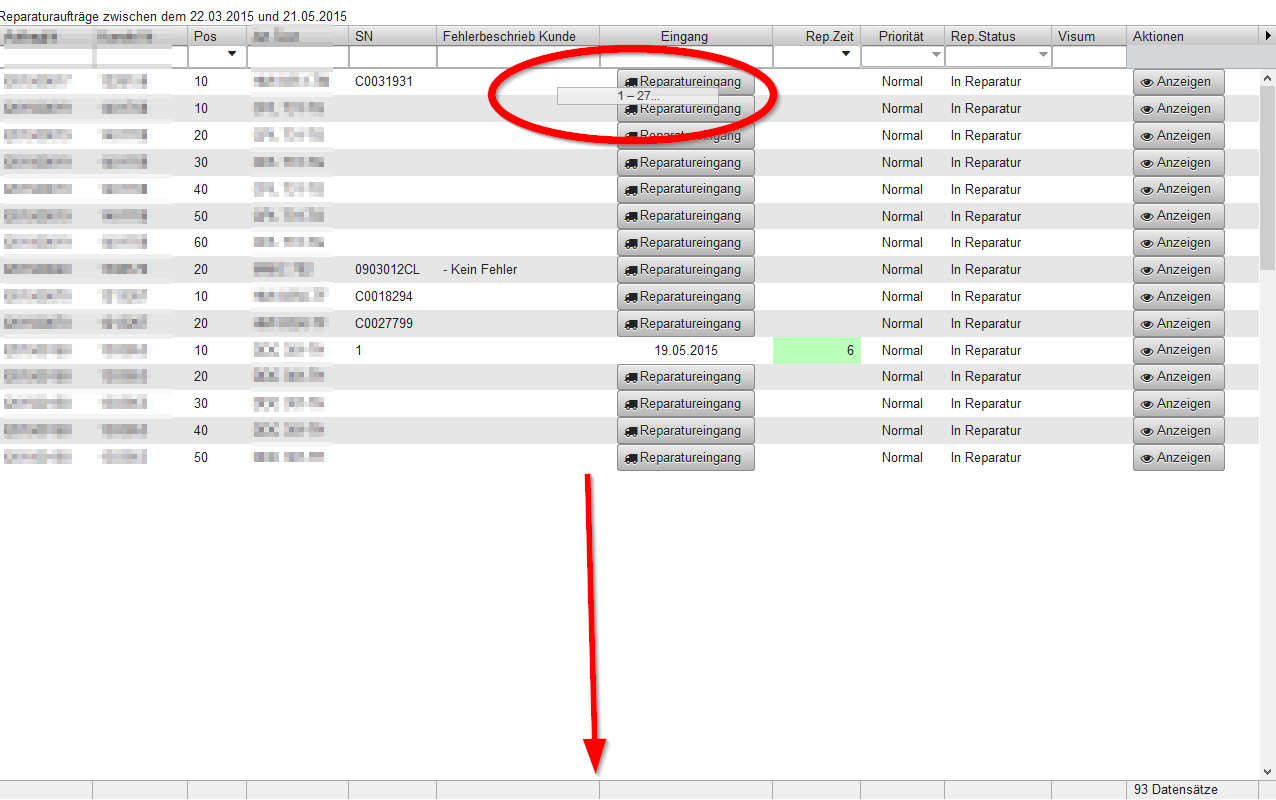
In the example we have 93 rows of data in the table.
In the visible part of the table it has place to display 27 rows.
When the table is displayed for the first time, it displays the top 15 rows,
the 12 rows below are white, then, after 1-2 seconds they are also displayed.
See attached printscreen.
This is not nice for the users, since it feels “slow” to them.
I think this has to do with the table row-height calculation. (Which we would not need, we could fix the row height if it helps)
Is there a way to have the display showing all rows in the visible part of the table, instead of the top 15 rows?
With a quick look I think the issue is in Table pageLength. So initially Table has a page length of 15, this basically means that when Table is sending data to the client, it only sends a pagelength. Since you know you can display more than that, you could try to set page length to be 30. This should make it send a whole screen at once.
setPageLength() did the trick,
is there a way to have this automagically done, so that it uses the correct amount of rows,
even when the user screens have different heights?
You can see an ugly work-around I’ve used to solve a similar problem in Grid. In Grid, header and footer rows have to be expanded from standard (using CSS) in order to properly accomodate buttons. So to calculate the total height of the Grid, it adds:
the headers and footers’s pixels
a maximum of 23 rows (for best fit on the page) times the standard 26 pixels
fewer than 23 rows if the container has less data to avoid white space in a table with less data
am unfortunate extra amount needed to fit the scroll bars that happen on windows machines
This method might not make sense out of context, but it’s the implementation for the description above:
 public void setDynamicRowNumber() {
        int showRows = Math.min(dispatchContainer.size(), 23);  // <-- change this to change the number of whole rows shown
        // magic numbers here are header row, expanded header row and expanded footer row height
        int gridHeight = 26 + 30 + 30 + (showRows * 26 ) + CommonConstants.WINDOWSSCROLLBARHEIGHT;
        setHeight(gridHeight, Unit.PIXELS);
        messageCell.setText( gridHelper.getFooterMessage() );
    }
So like in your requirement, the container size is one driver of the number of rows shown, but limited by a maximum allowed. I presume something similar could be done for the Table component.
We are developing a program with your framework and with touch devices sometimes disappears all the controls, showing white screen. it is needed something like touchkit?
Is not a native mobile app and this occurs when we drag the scrollbar with the finger in All in one device and android mobile, with tables and grids.
Now i tested in diferents navigators and only happens with chrome and firefox.