Hi folx,
I want to alter the default stroke width of SVG icons. According to Base Styles Reference, this should work via the --vaadin-icon-stroke-width property. However, no matter to which element I apply it and regardless whether I do it in the css file or via Java, I can’t get this to work.
Here’s some example code demonstrating the problem. I pasted this code into the MainView class of the vaadin-starter-quarkus project, version 25.0.3.
    public MainView() {
        addClassName("centered-content");

        add(makeIconRow("darkred", 1));
        add(makeIconRow("darkgreen", 3));
        add(makeIconRow("black", 5));
    }

    private @NonNull HorizontalLayout makeIconRow(String color, int strokeWidth)
    {
        var row = new HorizontalLayout();
        row.getStyle().setBackground("lightblue");
        row.getStyle().set("--vaadin-icon-color", color);
        row.getStyle().set("--vaadin-icon-stroke-width", "%dpx".formatted(strokeWidth));
        row.setPadding(true);
        row.add(LumoIcon.PHOTO.create());
        row.add(LumoIcon.RELOAD.create());
        row.add(VaadinIcon.PHONE.create());
        return row;
    }
Here’s its output:
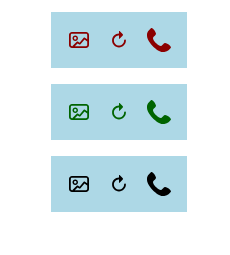
As you can see, the stroke width does not change at all.
What am I doing wrong? Is this a bug in Vaadin?
Kind regards,
Jens