Tony.52
March 18, 2026, 3:21pm
1
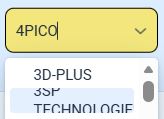
so I have a combo box that has a set height
vaadin-combo-box-item {
    font-size: 12px;
    min-height: 14px;
    max-height: 20px;
}
However, when a item has a long text, it would get cut off
Tony.52
March 18, 2026, 4:32pm
3
so I see that we can set a fixed width with
comboBox.getStyle().set("--vaadin-combo-box-overlay-width", "350px");
However, is there a way to dynamically adjust the overlay width?
vaadin-combo-box-overlay::part(overlay) {
    white-space: nowrap;
    min-width: 150px;
    max-width: 200px;
}
But the overlay just stays at 150px, and it is not expanding?
Tatu2
March 18, 2026, 7:53pm
4
There is no API for that, but it has been studied and some solutions have been posted like this for example:
opened 03:21PM - 24 Jun 20 UTC
enhancement
vaadin-combo-box
Description
Vaadin-combo-box by default wrap the drop-down-list. while It would… be better to have Combobox like vaadin 8. This is irritating having a wrapped drop-down list.
Expected outcome
Unwrap and automatically adjust, until not specifically instruct to wrap (Should work like vaadin 8 combo box).
### Actual outcome
### Live Demo
### Steps to reproduce
<!-- Example
1. Put a `vaadin-combo-box` element in the page.
2. Open the page in a web browser.
3. Click the input of `vaadin-combo-box` element.
-->
### Browsers Affected
- [x] Chrome
- [x] Firefox
- [x] Safari
- [x] Edge
- [x] IE 11
- [ ] iOS Safari
- [ ] Android Chrome