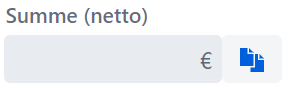
I rememberd that it was possible to group textfields and buttons : Valo Theme Test

How can i achiv this in vaadin 24.latest ?
I rememberd that it was possible to group textfields and buttons : Valo Theme Test
How can i achiv this in vaadin 24.latest ?
Hi!
Look this components https://v-herd.eu/jonte-vaadinplus/input-groups
You can use TextField#setPrefixComponent and TextField#setSuffixComponent

Thats really nice. Is there any way to keep the blue color of the icon?

Grey in grey it does not get enough attention to the eye.
You can use Icon#setColor

Note that from an accessibility point of view, you shouldn’t nest interactable elements: Accessibility Insights - nested-interactive
True but what happend to the Group Funktion for Textfield and Buttons.
Just place them next to each-other and remove the spacing between them, e.g. with a horizontal layout or flex layout. no magic needed
Simply does not look good this way, cause the corners where the components “meet” are rounded:
vaadin-text-field {
   --vaadin-input-field-bottom-end-radius: 0;
   --vaadin-input-field-top-end-radius: 0;
}

vaadin-button {
   --vaadin-button-border-radius: 0 var(--lumo-border-radius-m) var(--lumo-border-radius-m) 0;
}
Thanks a lot =). The Textfield css was what i did not found. For the button also this works like expected.
button.getStyle().set("border-top-left-radius", "0");
button.getStyle().set("border-bottom-left-radius", "0");
What is the correct way of doing it?
Is setAriaLabel() sufficient?
Nested elements are a regular in Google UX
Those are not nested. It’s just visual
Ah of course. CSS.
Duh!