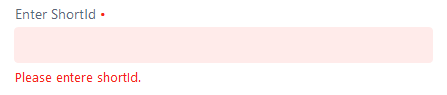
Using Vaadin 13…
How to do the null check validation for textbox and date fields when clicking SUBMIT button in a page.
User has not entered any values in the textbox field.
User has not selected any From date avalue and To date values in the component.
When the page is loaded directly User click the Submit button.Now some kind of validation message should the shown in the screen.
Ex:
textField.setRequired(true);
textField.setErrorMessage(“Please enter the value.”);
– This message will be shown to the users only when the user click the component and without entering any value and clicks the date selection button then error message will be visible to the users.
Thank you for your reply. I dont have any POJO class, all the variables like textbox object and date objects are locally initalized. In this case how to do the validation?
TextField textField = new TextField();
textField.setLabel("Enter ShortId");
textField.setSizeFull();
textField.setRequired(true);
textField.setErrorMessage("Please enter the value.");
textField.addValueChangeListener(e -> {
	//reset();
});

DatePicker dfFromDate = new DatePicker();
dfFromDate.setLabel("From");
dfFromDate.setRequired(true);
dfFromDate.setErrorMessage("Please select the from date.");
DatePicker dfToDate = new DatePicker();
dfToDate.setLabel("To");
dfToDate.setRequired(true);
dfToDate.setErrorMessage("Please select the to date.");

dfFromDate.addValueChangeListener(e -> {
	selectedFromDate = e.getValue();
	System.out.println("<><><><><>FromDate:" + selectedFromDate);
	dfFromDate.setValue(selectedFromDate);
	LocalDate endDate = dfToDate.getValue();
	System.out.println("<><><><><>endDate:" + endDate);
	if (selectedFromDate != null) {
		dfToDate.setMin(selectedFromDate.plusDays(1));
		if (endDate == null) {
			dfToDate.setOpened(true);
			message.setText("Select the ending date");
		} else {
			message.setText(
					"Selected period:\nFrom " + selectedFromDate.toString() + " to " + endDate.toString());
		}
	} else {
		dfToDate.setMin(null);
		message.setText("Select the starting date");
	}
});
Button startQuery = new Button("Start Query", e -> {
		System.out.println("Check box value:" + checkboxReportingValue);
		textField.setRequired(true);
		dfFromDate.setRequired(true);
		dfToDate.setRequired(true);
		textField.setErrorMessage("Please enter the value.");
		dfFromDate.setErrorMessage("Please select the from date.");
		dfToDate.setErrorMessage("Please select the to date.");
		if(!textField.isEmpty() && dfFromDate.getValue() !=null &  dfToDate.getValue()!=null){
			reset();
			updateGrid(textField, dfFromDate, dfToDate, checkboxReportingValue, shortidRepository,
					counterNameRepository, counterNameSummaryRepository);
			paginateBackward.setVisible(true);
		}
	});
	startQuery.addClickShortcut(Key.ENTER, KeyModifier.ALT);
	startQuery.addClickListener(e -> {
		// how to do the validate here for input components with out POJO if all are local variable ///
	});

Thank you.
I am trying to do the validation for textbox notnull and not empty. When clicking ‘StartQuery’ button.
Already included 'Hibernate Validator ’ in class path and added in pom.xml file.
Below is my code… But still i am not getting the message in the screen.
Code:

Bean class or POJO class (Reporting.java):
@Nonempty @NotNull
	private String shortIdReporting;

Other.java
TextField textField = new TextField();
textField.setLabel("Enter ShortId");
textField.setSizeFull();
textField.setRequired(true);

Reporting reportingPOJO = new Reporting();
Label formStatusLabel = new Label();
BeanValidationBinder<Reporting>  binder = new BeanValidationBinder<>(Reporting.class);
binder.bind(textField, "shortIdReporting");		binder.setRequiredConfigurator(RequiredFieldConfigurator.NOT_EMPTY.chain(RequiredFieldConfigurator.NOT_NULL));
//formStatusLabel.setFor(formStatusLabel);
System.out.println("?????"+binder.hasChanges()+"??????????");
binder.readBean(reportingPOJO);
System.out.println("?????"+binder.hasChanges()+"??????????");
formStatusLabel.setText("Please enter shortID");
formStatusLabel.setVisible(true);
binder.setStatusLabel(formStatusLabel);

	Button startQuery = new Button("Start Query", e -> {
			System.out.println("Check box value:" + checkboxReportingValue);
		});
		startQuery.addClickShortcut(Key.ENTER, KeyModifier.ALT);
		startQuery.addClickListener(e -> {
			binder.validate();
		});
If you want to use bean validation annotations(like @NotNull on Bean fields), then you must use the binder.bindInstanceFields type binding, not binder.bind().
The parameter you pass to bindInstanceFields is typically a layout that contains the fields. The names of the variables for the fields should match the properties of the Bean, or otherwise you need to use the @PropertyId annotation to determine which property the field is for.
Thank you for your time and reply Olli.
I can use the code below like and it will work for sure,
binder.forField(textField)
    .withValidator(string -> string != null && !string.isEmpty(), "Please enter the shortId.")
    .withValidator(inputString -> inputString.length() >= 40, "ShortId name must contain at least 40 characters.")
    .bind(Reporting::getShortIdReporting, Reporting::setShortIdReporting);
And 'binder.validate();' in the buttons addClickListener method.
But i would like to know and learn data binding using beans,
I have tried your suggestion also,
// Member that will bind to the "shortIdReporting" property
    @PropertyId("shortIdReporting")
	TextField textField = new TextField();
	......
	buttons addClickListener method ..
	binder.bindInstanceFields(textField);
	Also tried hard coding like "shortIdReporting";
But still nothing happens while clicking the StartQuery button.?
No, you are mixing up two kinds of binding. Either you use binder.[...] .bind() or binder.bindInstanceFields(), not both. I recommend you watch the training video Forms and Databinding carefully: https://vaadin.com/training/courses/v10-forms
Hello Olli,
Still i have doubt in my code…
I have listened the video link you have shared…
on submit button click with out readbean and writebean not working.
In video tutorial it says binder.bind(value1,propertyValue) is enough.Even though not working.
View.java
lodaData(){
TextField textField = new TextField();
Reporting reporting = new Reporting();
BeanValidationBinder<Reporting>  binder = new BeanValidationBinder<>(Reporting.class);
binder.bind(textField, "shortIdReporting");
binder.readBean(reporting);  // Is this is mandatory to give for BeanValidation

startQuery.addClickListener(e -> {
			try {
				binder.writeBean(reporting); // Is this is mandatory to give for BeanValidation
			} catch (ValidationException e1) {
				 TODO Auto-generated catch block
				e1.printStackTrace();
			}
			binder.bindInstanceFields(textField);
		});
}

Reporting.java

public class Reporting {

	@Nonempty @NotNull @NotBlank(message = "Please entere shortId.")
	private String shortIdReporting;
}