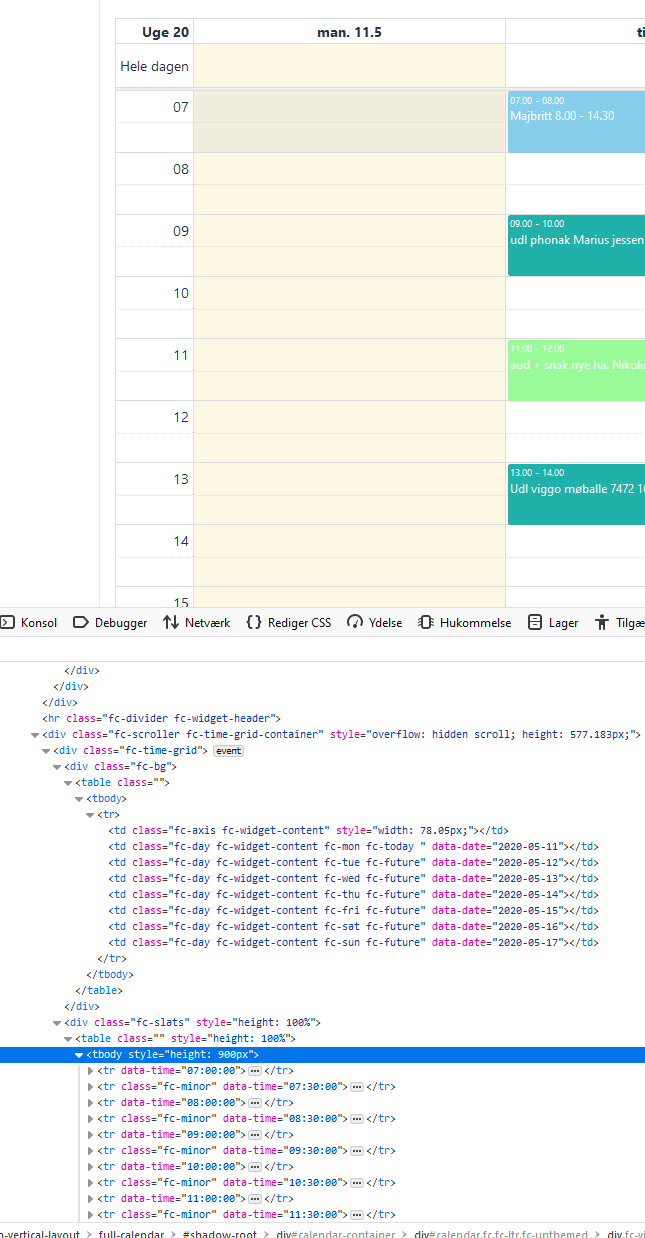
Hi - thanks for working on this component!
im trying to limit the space wasted on hours not needed - I need only working ours. When I limit the hours displayed it does not change the height of the rows - it only removed the rows not displayed. I would like it to take advantage of the space and make the row hight higher - its almost unreadable if a entry is 30 min. and if less its totally unreadable. I can see from the hightlight of the current day that the component does fill the full screen - just from the last row to the end of screen its blank.
Im setting the start of the day at 7 and end at 19.00 hours:
    calendar = FullCalendarBuilder.create().build();
    calendar.setLocale(new Locale("da", "DK"));
    calendar.setFirstDay(DayOfWeek.MONDAY);
    calendar.changeView(CalendarViewImpl.TIME_GRID_WEEK);
    calendar.setNowIndicatorShown(true);
    calendar.setMinTime(LocalTime.of(7, 0));
    calendar.setMaxTime(LocalTime.of(20, 0));
    calendar.setNowIndicatorShown(true);
    calendar.setWeekNumbersVisible(true);
    Timezone copenhagen = new Timezone(ZoneId.of("Europe/Copenhagen"));
    //calendar.setTimezone(copenhagen);
    calendar.setSnapDuration("00:15");
    calendar.setBusinessHours(new BusinessHours(LocalTime.of(8, 0), LocalTime.of(19, 0),BusinessHours.DEFAULT_BUSINESS_WEEK));
did I make sense? :)
if my screen has 240px left in height for the calendar it shows the 24 hours with 10px each (probably not correct but for the example). If I set the calendar to show only 12 hours, not 24, I would like it to use the full 240px for the 12 hours. It does not. It uses the same 10px per row, so leaving half the 240px unused. Since it highlights the current day and this hightlight uses the full 240px I can see the calendar component does use all space.
(agian 240px is just an example)