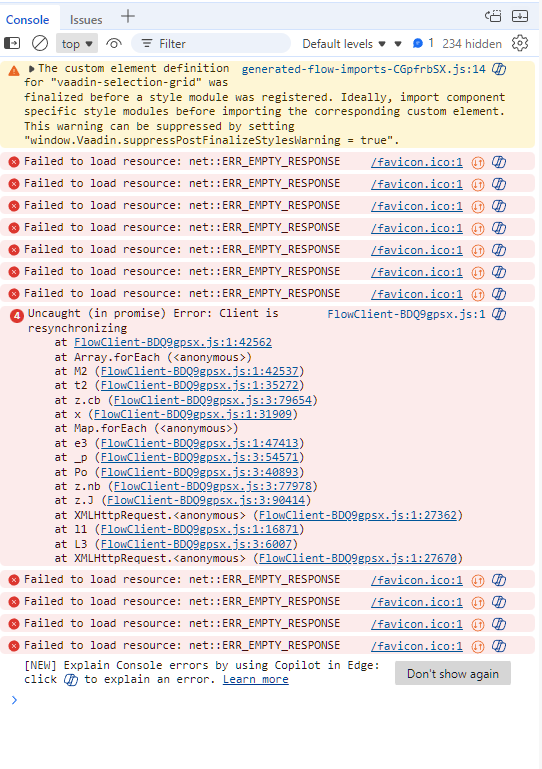
A user is reporting an error that sometimes occurs when working with our internal Vaadin Flow application. He says that after just a minute of changes he could no longer save his work.
We are using @Push and Vaadin 25
(the missing favicon will be fixed and not related)
The application is deployed on Azure App Service and after consulting AI I got recommendation to lower the heartbeat interval to keep the connection live.
Not sure if it would help but I wanted to give it a try but the suggested way of changing it seems overly complicated, isn’t there an easier way to configure the Atmosphere heartbeat with Vaadin?
@Configuration
public class PushConfiguration {

  // Naming the bean "servletRegistrationBean" cleanly overrides Vaadin's default Spring Boot
  // auto-configuration
  @Bean(name = "servletRegistrationBean")
  public ServletRegistrationBean<SpringServlet> customVaadinServlet(SpringServlet servlet) {
    ServletRegistrationBean<SpringServlet> registration =
        new ServletRegistrationBean<>(servlet, "/*");

    // Force the Heartbeat Interceptor into the Vaadin Servlet
    registration.addInitParameter("org.atmosphere.cpr.AtmosphereInterceptor",
        "org.atmosphere.interceptor.HeartbeatInterceptor");
    registration.addInitParameter(
        "org.atmosphere.interceptor.HeartbeatInterceptor.clientHeartbeatFrequencyInSeconds", "60");

    // Ensure async is supported for websockets
    registration.setAsyncSupported(true);
    registration.setName("springServlet"); // Required so internal Spring routing doesn't break
    return registration;
  }
}
It downgrades only if the websocket cannot be established at all after several attempts. But if the WebSocket channel is established but then dies unexpectedly, Atmosphere will not immediately fall back to long-polling.
If you are mainly pushing Grid updates, the payload will be larger, and the benefit of the WebSocket smaller header size is not so big. WebSocket is better for small frequent pushes. With bigger push loads there is the performance difference is neglible.