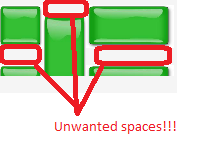
Hi,
i need to have a GridLayout containing an Embedded image in each cell,
The user will see just one hole image, (the GridLayout), with clickable events on each cell.
When i tried to create the grid, i had a problem with spaces between rows and columns, the global image looks broken in pieces.
Here is a sample code:
public void init() {
		mainWindow = new Window("Vaadin_test Application");
		VerticalLayout vl = new VerticalLayout();
		vl.setSizeFull();
		vl.addComponent(addImageGrid());
		mainWindow.setContent(vl);
		setTheme("reindeer");
		setMainWindow(mainWindow);
	}


	private GridLayout addImageGrid(){
		GridLayout grid = new GridLayout(4, 2);
		grid.setSpacing(false);
		grid.setHeight("80px");
		grid.setWidth("160px");
		ThemeResource resource = new ThemeResource("floorPlan/rect.jpg");
		Embedded b1 = new Embedded("", resource);
		b1.setHeight("40px");
		b1.setWidth("40px");
		Embedded b2 = new Embedded("", resource);
		b2.setHeight("40px");
		b2.setWidth("40px");
		Embedded b3 = new Embedded("", resource);
		b3.setHeight("80px");
		b3.setWidth("40px");
		Embedded b4 = new Embedded("", resource);
		b4.setHeight("40px");
		b4.setWidth("80px");
		Embedded b5 = new Embedded("", resource);
		b5.setHeight("40px");
		b5.setWidth("80px");

		grid.addComponent(b1, 0, 0);
		grid.addComponent(b2, 0, 1);
		grid.addComponent(b3, 1, 0, 1, 1);
		grid.addComponent(b4, 2, 0, 3, 0);
		grid.addComponent(b5, 2, 1, 3, 1);
		for(int i=0; i<4; i++){
			grid.setColumnExpandRatio(i, 0);
			for(int j= 0; j<2; j++){
				grid.setRowExpandRatio(j, 0);
				Component c = grid.getComponent(i, j);
				grid.setComponentAlignment(c, Alignment.MIDDLE_CENTER);
			}
		}
		return grid;
	}
Please find below the desired grid format and the layout that i got when i tried with a single rectangle (i circled in red the spaces that needs to be removed)
Thanks,
Dany