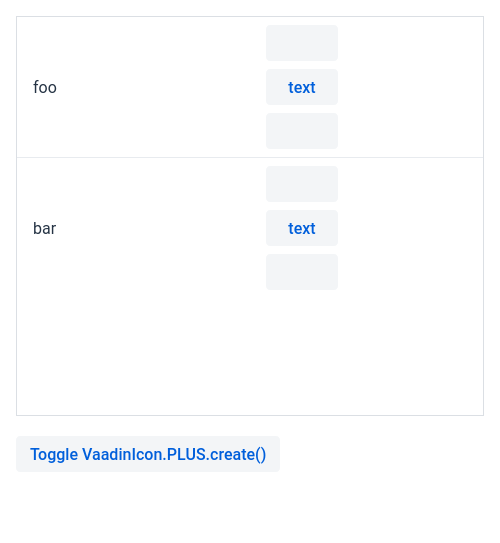
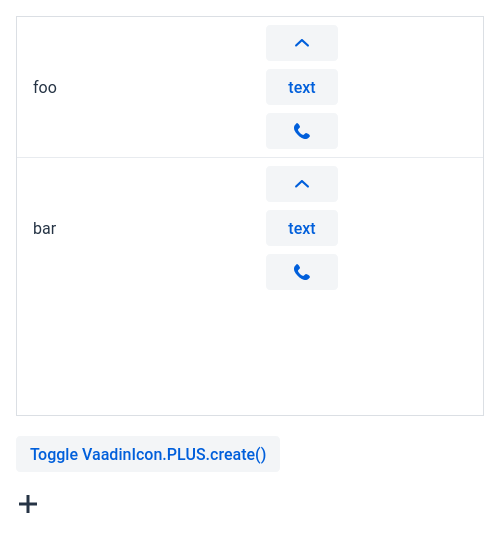
Grid-LitRenderer-Button-Icon not visible if there are no other icons

Is this a bug or am I having some implicit version number wrong again?

private static boolean createIcon;

And then

var g = new Grid<String>();
g.addColumn(s -> s);
g.addColumn(LitRenderer.<String> of("""
                <vaadin-button><vaadin-icon icon="lumo:angle-up""></vaadin-icon></vaadin-button><br>
                <vaadin-button>text</vaadin-button><br>
                <vaadin-button><vaadin-icon icon="vaadin:phone""></vaadin-button><br>
                """));
g.setItems("foo", "bar");
add(g);
add(new Button("Toggle VaadinIcon.PLUS.create()", event -> {
        createIcon = !createIcon;
        UI.getCurrent().getPage().reload();
}));
if(createIcon) {
        add(VaadinIcon.PLUS.create());
}

When the PLUS icon is created, everything in the Grid works.
If all icons on the page are the LitRendered ones in the grid, then the icons are not visible.

This only happens in production mode.


It’s expected, though I agree it’s confusing. Flow optimizes the frontend bundle for production builds, so it only includes frontend files that are referenced somewhere in your app. For that it only looks for usages of Java classes, it does not analyze strings such as your Lit renderer code. If you never reference VaadinIcon somewhere the build then drops the Vaadin iconset from the bundle and it is never loaded in the frontend.

To solve this you need to tell Flow that you want to use the <vaadin-icon> element and the Vaadin iconset in your code. You can do this by adding this annotation on one of your Java classes:

@Uses(Icon.class)
public class MyGridView ...

Adding @Uses(Icon.class) didn’t help.

In my example code, the problem can be turned on and off at runtime by clicking a button that toggles a boolean and reloads the page. That doesn’t seem like the icons are optimized away.

I think Icon.class is not right, that’s the generic Icon; try VaadinIcon.class instead.

Type mismatch: cannot convert from Class<VaadinIcon> to Class<? extends Component>

And same with LumoIcon

Oh yeah, Sascha is right, @Uses(Icon.class) should work; VaadinIcon is an enum. Is it the correct Icon? There are similarly named classes elsewhere…

I tried with com.vaadin.flow.component.icon.Icon. (Other Icon classes that were in classpath didn’t fit)

Not sure if this is related, but there are extra " characters in the code here

Fixing the quotes didn’t help. Here is a video of the situation in Peertube Grid-LitRenderer-Button-Icon - PeerTube

It looks like a bug in Vaadin. The default production bundle contains the icons related resources in a chunk identified by a hash related to the Icon class, but at runtime Flow loads the chunks related to the current view.
The @Uses annotation does not trigger a custom bundle.

If you try to set <forceProductionBuild>true</forceProductionBuild> in the Vaadin maven plugin configuration, it should work.

I created an issue in the Flow repository `@Uses` does not load the dependencies of the used component when the default production bundle is used · Issue #26310 · vaadin/flow · GitHub

I’ve run with <optimizeBundle>false</optimizeBundle> for years, and never noticed any downside. My prod bundle is 1MB, which is about the size of 1 photo on my phone.

Is this premature optimization from Vaadin’s side? Should the default be to not optimize?