Hello everyone, we are using Vaadin 24.8 and we encounter problems with Safari.
Images are not always loaded (created with src=“relative url of images”)
Tabs selection graphics are not updated when changing Tab
Does someone have a clue about this?
Hello everyone, we are using Vaadin 24.8 and we encounter problems with Safari.
Images are not always loaded (created with src=“relative url of images”)
Tabs selection graphics are not updated when changing Tab
Does someone have a clue about this?
Seeing some code would help a lot.
Did you try in other browsers? Seems unlikely this would be Safari-specific.
It is absolutly Safari specific 
Code would be “Tabs tabs = new Tabs(tab1, tab2)” added to a VerticalLayout.
When client clicks on tab2, tab1 keeps blue color
Or “Image image = new Image(“my-image.png”)”
my-image.png in frontend directory
added to a VerticalLayout but not loaded
Interesting. Seeing more of the code would certainly help.
Also, which Safari version are we talking about here?
And you could you check if this sample UI has the same tabs issue? https://vaadin.com/docs/v24/example?embed=tabs-basic-wc.js&import=component/tabs/tabs-basic.ts,component/tabs/react/tabs-basic.tsx&theme=lumo
At least on my Safari 18.3 I was not able to reproduce any issues with the Tabs component.
Thank you for replying
tab selection from you link works well on Safari
is it java flow built?
safari version is 26.2.1 on iOS and 26.2 on OSX
what would you need me to search from the code to show you?
That sample is rendered with Flow (through a web component wrapper thingy), so it should work the same as in your app (except that it’s on V24.9.10, but there should not be any meaningful difference between the two).
If you could share the full source for that view (or, if there’s too much other stuff in it, create a new view with just those two cases) and share that, that could help.
The image issue could be something with security settings for example, or something in your project setup, but the tabs issue is really quite perplexing: if the component renders, I don’t see how tab switching wouldn’t work too.
Do other Vaadin components seem to be functioning as expected? E.g. can you bind a clicklistener to a button and trigger a server-side function?
Even better if you could create a minimal reproducible example in a project you can share in its entirety – then we could run it ourselves and see if we can reproduce it.
Just a note: Images inside Tabs are also broken with 24.9 and 25.0 - just noticed some minutes ago.
Simplest example would be
    var tabsheet = new TabSheet();
    tabsheet.add("First", new Image(Base64.getDecoder().decode("iVBORw0KGgoAAAANSUhEUgAAACAAAAAgCAIAAAD8GO2jAAAAR0lEQVR4nG"
      + "LZpSTMQAq4cOQBSeqZSFJNBhi1YNSCUQtGLRi1gBqAxV5mGUkalqz5RZL6oR9EoxaMWjBqwagFI8ICQAAAAP//2iEG8xoR99EAAAAASUVORK5CYII="), "first.png", "image/png"));
    tabsheet.add("Second", new Image(Base64.getDecoder().decode("iVBORw0KGgoAAAANSUhEUgAAACAAAAAgCAIAAAD8GO2jAAAARklEQVR4nGKZ"
      + "2+3JQArQaOwiST0TSarJAKMWjFowasGoBaMWUAMwSpXvJUmDpswaktQP/SAatWDUglELRi0YERYAAgAA///h2AUlic2YTQAAAABJRU5ErkJggg=="), "second.png", "image/png"));
    tabsheet.setSelectedIndex(1);
    add(tabsheet);
OPening the first tab results in a lot of errors in the console
Ah, thanks @knoobie, please make an issue about that, if there isn’t one already.
But I feel that the issues @Steeve2 describes are slightly different:
To make it clear: Tabs switching works, just graphics on selected Tab is not refreshed.
Like this: 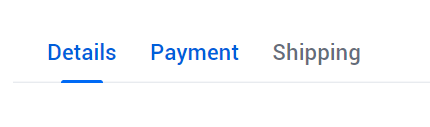
Image problem is not a matter being included in a Tabs: it’s standalone.
There should be an image here for example:
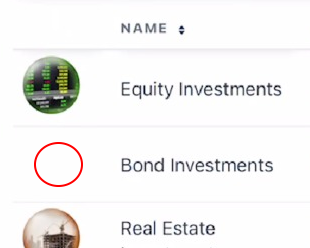
Wait, so some images render, others don’t?
And the text color of the tab stays blue after a different tab is selected?
This is one of the strangest bugs I’ve ever tried to help with.
Could you create a new project from scratch and just add a Tabs component there and one of the images that isn’t loading – nothing else, just those two elements?
We managed to “fix” the problem by forcing Safari draw with this code
image.getElement().executeJs(
"const img = this;" +
"const fix = () => {" +
"  const p = img.parentElement;" +
"  if(p) { p.style.overflow = 'visible'; requestAnimationFrame(() => p.style.overflow = ''); }" +
"};" +
"if(img.complete && img.naturalWidth > 0) { requestAnimationFrame(fix); }" +
"else { img.onload = fix; }"
);
Edit: was just luck…
We are trying to convert our pictures into base64 to force client having them already instead of looking for src request