Hello Forum!
Vaadin 25 introduces flattened hierarchy support to HierarchicalDataProvider which provides more predictable scrolling behavior for TreeGrids that use the drag-and-drop functionality or call refreshAll() frequently. It also gives more flexibility for designing optimal data queries, enabling you, for example, to use database techniques like SQL Common Table Expressions to construct the visible range directly in the database.
In addition, TreeGrid has been refactored overall to address various other issues and inconsistencies, which also made it possible to support the scrollToItem feature.
We’d greatly appreciate your feedback and testing. Give it a try with Vaadin 25.0.0 or later and let us know how it works for your project!
More details below:
HierarchyFormat
HierarchicalDataProvider now supports two formats for returning hierarchical data, allowing you to choose the one that best fits your use case: HierarchyFormat.NESTED or HierarchyFormat.FLATTENED.
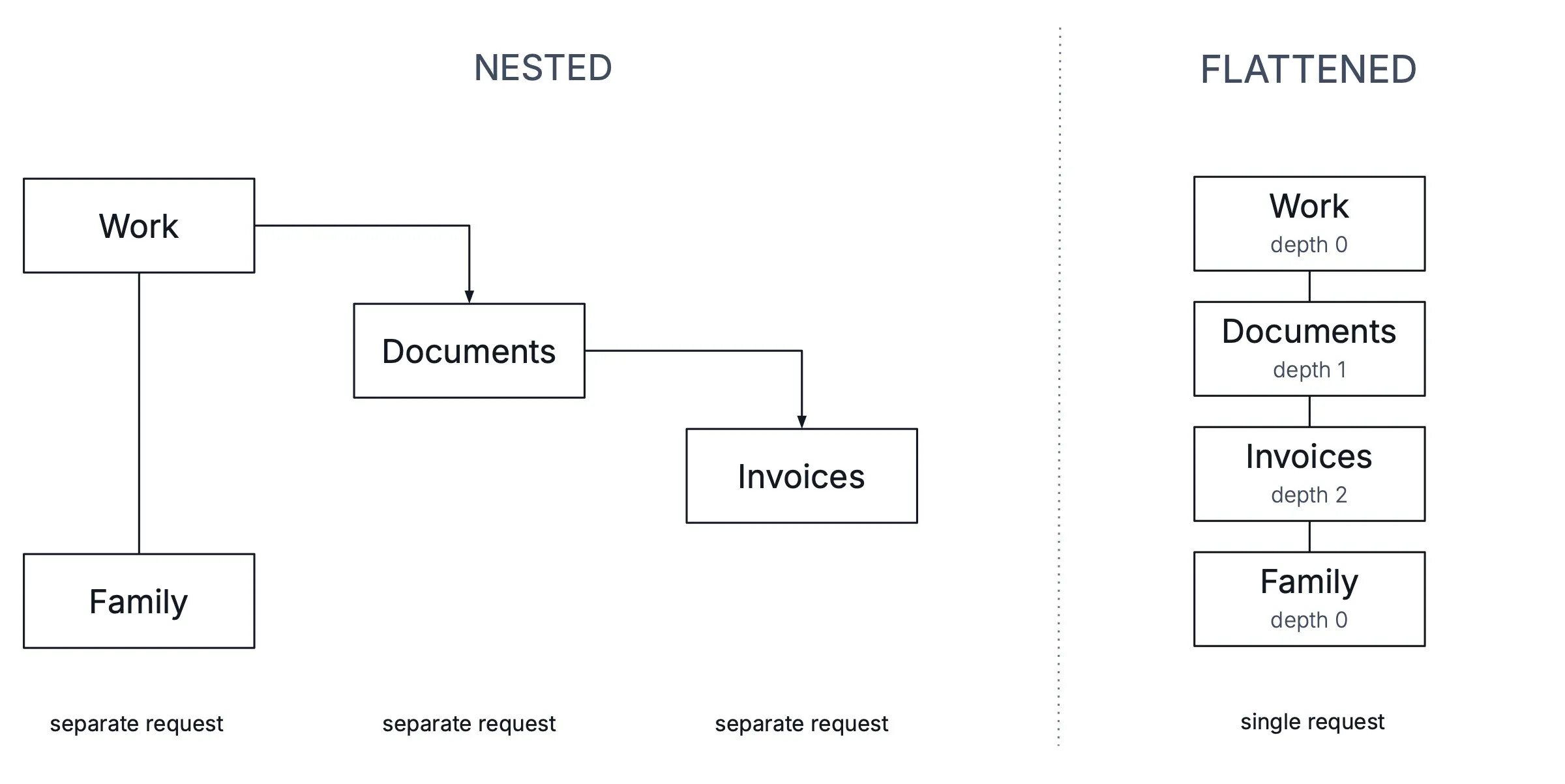
HierarchyFormat.NESTED (default)
Before version 25, this was the only supported format, and it remains the default in Vaadin 25. This format describes a data provider that, in each request, returns only the direct children of the requested parent:
└── Item 0              <-- 1st request (parent = null, offset = 0, limit = 4)
    └── Item 0-0        <-- 2nd request (parent = Item 0, offset = 0, limit = 4)
        └── Item 0-0-0  <-- 3rd request (parent = Item 0-0, offset = 0, limit = 4)
└── Item 1              <-- Received in the 1st request
The component loads deeper levels by making separate requests based on the viewport and current expanded items. The hierarchy structure is cached in memory incrementally as it’s discovered.
Advantages:
- Simple and fast data queries. Each request fetches only the direct children, which are then cached hierarchically.
Disadvantages:
- The full size and structure of the tree remains unknown without recursively fetching the entire hierarchy, which is impractical due to potentially a lot of consecutive requests and heavy memory usage. As a result, the scroll position cannot be restored automatically after using
HierarchicalDataProvider.refreshAll()which resets the cached hierarchy state. - The scroll container size updates dynamically while scrolling, which can cause users to skip levels if they scroll quickly.
HierarchyFormat.FLATTENED (new)
This is a new format that you can choose to implement starting with Vaadin 25. This format describes a data provider that returns the entire subtree of the requested parent in a single, flattened list. This allows the component to retrieve multiple hierarchy levels in one request, avoiding the need for recursive fetching:
└── Item 0             <-- 1st request (parent = null, offset = 0, limit = 4)
└── Item 0-0           <-- Received in the same request
└── Item 0-0-0         <-- Received in the same request
└── Item 1             <-- Received in the same request
To load the current viewport, the component sends a HierarchicalQuery, where:
HierarchicalQuery#getOffset()specifies the start of the visible range across the entire flattened listHierarchicalQuery#getExpandedItemIds()provides a set of item IDs that are currently expanded- Other methods work as usual
This format also requires the data provider to implement HierarchicalDataProvider#getDepth(T), which the component uses to display indentation for hierarchical levels.
Here is a simple example to get you started:
class MyDataProvider implements HierarchicalDataProvider<String, Void> {
    private HashMap<String, List<String>> data = new HashMap<>() {
        {
            put(null, List.of("Item 0", "Item 1"));
            put("Item 0", List.of("Item 0-0"));
            put("Item 0-0", List.of("Item 0-0-0"));
        }
    };

    @Override
    public HierarchyFormat getHierarchyFormat() {
        // Indicate that this data provider returns data as a flat list
        return HierarchyFormat.FLATTENED;
    }

    @Override
    public Stream<String> fetchChildren(
            HierarchicalQuery<String, Void> query) {
        // Return a flat list that includes all expanded descendants
        return flatten(query.getParent(), query.getExpandedItemIds())
                .skip(query.getOffset()).limit(query.getLimit());
    }

    @Override
    public int getChildCount(HierarchicalQuery<String, Void> query) {
        // Return the total number of items in the flat list
        return (int) flatten(query.getParent(), query.getExpandedItemIds())
                .count();
    }

    @Override
    public int getDepth(String item) {
        // Implement this method to apply visual indentation based on depth
        return item.split("-").length - 1;
    }

    private Stream<String> flatten(String parent,
            Set<Object> expandedItemIds) {
        // Flatten the subtree into a list, including only expanded branches
        return data.getOrDefault(parent, List.of()).stream()
                .flatMap(child -> expandedItemIds.contains(getId(child))
                        ? Stream.concat(Stream.of(child),
                                flatten(child, expandedItemIds))
                        : Stream.of(child));
    }
}
You can also implement sorting and filtering in the flatten method, if needed. A couple of things to keep in mind:
- Sorting should be applied separately within each level to maintain the correct depth-first order.
- Sorting should ideally be skipped when flattening the tree to count items, to reduce extra computation.
Here is how sorting and filtering might be implemented:
private Stream<String> flatten(String parent,
        Set<Object> expandedItemIds,
        Optional<Predicate<String>> filter,
        Optional<Comparator<String>> comparator) {
    Stream<String> stream = data.getOrDefault(parent, List.of())
            .stream();

    if (filter.isPresent()) {
        stream = stream.filter((child) -> {
            // Include the item if it satisfies the filter condition
            if (filter.get().test(child)) {
                return true;
            }

            // Include the item if any of its descendants satisfy the filter condition
            return expandedItemIds.contains(getId(child))
                    && flatten(child, expandedItemIds, filter,
                            null).findAny().isPresent();
        });
    }

    if (comparator.isPresent()) {
        // Sort items before flattening their children
        stream = stream.sorted(comparator.get());
    }

    return stream.flatMap(
            child -> expandedItemIds.contains(getId(child))
                    ? Stream.concat(Stream.of(child),
                            flatten(child, expandedItemIds,
                                    filter, comparator))
                    : Stream.of(child));
}
Advantages:
- Fetching the full tree size upfront allows the component to set a fixed scroll container, making scrolling more stable and predictable.
- By refetching the full tree size,
refreshAll()is able to preserve the scroll position, avoiding unexpected jumps. - Developers have full control over data queries, allowing for more advanced optimizations and storage strategies at the database level.
Disadvantages:
- Increased complexity and potentially heavier data queries due to the need for hierarchy reconstruction, which may require, for example, using recursive CTEs (Common Table Expressions) to fetch all descendants of an item in a single SQL query.
TreeDataProvider (and TreeData)
TreeDataProvider now also supports HierarchyFormat.FLATTENED. However, it must currently be enabled manually by passing this format as the second argument to the constructor:
- new TreeDataProvider(treeData);
+ new TreeDataProvider(treeData, HierarchyFormat.FLATTENED);
The same applies when using TreeGrid#setTreeData:
- treeGrid.setTreeData(treeData);
+ treeGrid.setDataProvider(new TreeDataProvider(treeData, HierarchyFormat.FLATTENED));
This is to avoid a breaking change, since enabling it alters how TreeGrid#scrollToIndex(int index) works – the provided index is treated as referring to an item in the flattened structure rather than only at the root level.
Scrolling to items
The overall refactoring of TreeGrid made it possible to add the long-awaited scrollToItem feature. It supports both hierarchy formats mentioned earlier. For more details, please refer to TreeGrid scrollToItem feature in v25

