-
After download the sample vaadin project, the application can be available at: http://localhost:8080
…
025-11-10T11:26:58.765+08:00 INFO 17980 — [ restartedMain] com.zaxxer.hikari.HikariDataSource : HikariPool-1 - Starting…
2025-11-10T11:26:59.082+08:00 INFO 17980 — [ restartedMain] com.zaxxer.hikari.pool.HikariPool : HikariPool-1 - Added connection conn0: url=jdbc:h2:mem:1c6bceae-db69-491a-b4c8-83a0b94e44da user=SA
2025-11-10T11:26:59.085+08:00 INFO 17980 — [ restartedMain] com.zaxxer.hikari.HikariDataSource : HikariPool-1 - Start completed.
2025-11-10T11:26:59.150+08:00 INFO 17980 — [ restartedMain] o.hibernate.jpa.internal.util.LogHelper : HHH000204: Processing PersistenceUnitInfo [name: default]
2025-11-10T11:26:59.220+08:00 INFO 17980 — [ restartedMain] org.hibernate.Version : HHH000412: Hibernate ORM core version 6.6.33.Final
… -
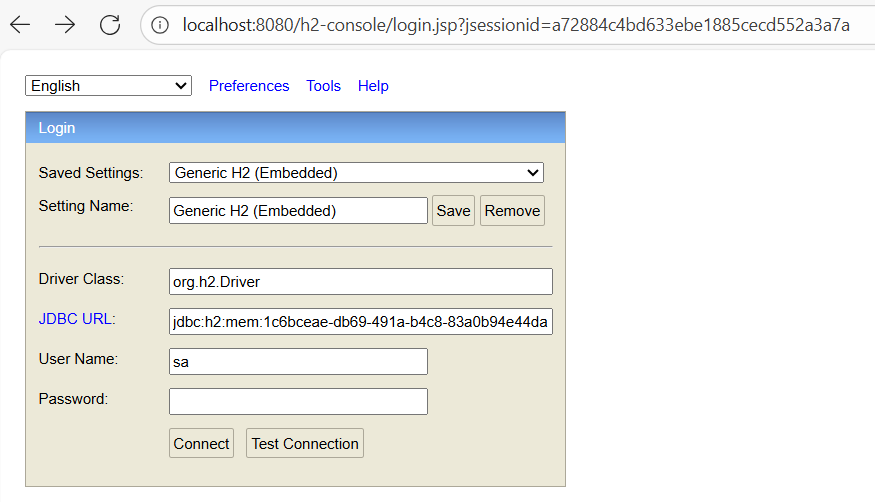
h2-console also can be accessed at http://localhost:8080/h2-console:
-
Replace JDBC URL with url=jdbc:h2:mem:1c6bceae-db69-491a-b4c8-83a0b94e44da , and click button Connect or Test Connect:

The error is also reported after /h2-console:/** is permitted in class SecurityConfiguration:
http.authorizeHttpRequests(authorize -> authorize.requestMatchers("/h2-console/**").permitAll());
Does anyone have a suggestion for the issue?