This is vulnerable to XSS attacks because the label displaying the content is in XHTML mode without any sanitization.
XSS vulnerable from yourself  Or well, if you use shared file, then the preview might be visible to others as well.
I have in all my use cases always made domain specific implementation for the preview part, but indeed the default implementation could be safer as well. I created a new version where the default implementation filters the content via JSOUP library.
__
m
Hi Matti,
I tried to use this addon with Vaadin 7.2 + Vaadin4spring(https://github.com/peholmst/vaadin4spring) and got this error:
The Error is very common:
Widgetset does not contain implementation for <…>. Check its component connector’s @Connect mapping, widgetsets GWT module description file and re-compile your widgetset. In case you have downloaded a vaadin add-on package, you might want to refer to add-on instructions.
I tried to recompile Widgetset with following command: mvn vaadin:compile, but this didn’t help. Also I tried to annotate my vaadin servlet class with @VaadinServletConfiguration and specify widgetset atribute with addon widgetset route, but this did not solve the problem. Could you please help me?
Hi,
Do you have widgetset in your project? Did your recompile (mvn vaadin:compile) the client sides stuff once you added the dependency?
cheers,
matti
- Do you have widgetset in your project?
Yes I have tag for easy upload addon in my .gwt.xml file
-Did your recompile (mvn vaadin:compile)
Yes
Then either the widgetset didn’t compile propertly, or the new version wasn’t deployed propertly.
You could try “mvn clean compile vaadin:compile -Dgwt.compiler.force=true”. Otherwise, I’m pretty much clueless without the actual project and/or compilation output.
cheers,
matti
I am trying out 7.3.beta1 with the Valo theme and I am having some issues.
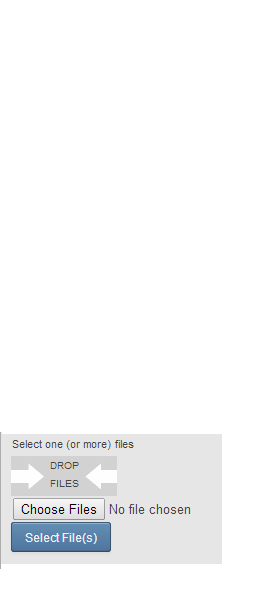
I have an issue with the look and function of the component for easy upload. Attached is a screen shot of the component and it is visually different that what I have in my other theme. It has a ‘Choose File’ button with a ‘No file Chosen’ label next to it. The ‘Select File(s)’ button is the only one suppose to be there. Both buttons function but if I try to drag a file onto the ‘DROP FILES’ area it actually will open the file. If I drop the file on the ‘Choose File’ button area, then it will upload the file as intended.
I guess my question is why is there a change in the functionality and how can I get the look and feel of the way I had it with the reindeer theme?
Regards,
Eric
Hi,
Appaears to be an issue with Valo theme and “immediate mode” Uploads. I created
a ticket
about ti.
cheers,
matti
Im having a issue with the component, I can upload one file, but if I upload a another after, Its overwriting the first one, I noticed that after the firs upload the component dont enter on the FileFactory I specified again, I dont know if I miss something from your examples.
Also a OnFinish event will be good.
uploadImgs = new ImgUpload();
        uploadImgs.setFieldType(FieldType.FILE);
        uploadImgs.setFileDeletesAllowed(false);
        uploadImgs.setFileFactory(new FileFactory(){

            @Override
            public File createFile(String fileName, String mimeType) {

                if(!mimeType.equalsIgnoreCase("image/jpeg")){
                    Notification.show("Error", "No es un archivo JPG", Notification.Type.ERROR_MESSAGE);
                    return null;
                }
                File file = null;
                try{
                    String path = DBParams.getParam(OrderingSettings.APP_IIMGPATH.toTxt()).getValue();
                    System.out.println("writing...: " + path+ "\\copy_"+fileName);
                    file = new File( path + "\\copy_"+fileName);
                    if(file.exists()){
                        System.out.println( "Sobreescribiendo el archivo" + fileName );
                        file.delete();
                    }
              }catch(Exception e){
                   }

                return file;
            }} );
public class ImgUpload extends UploadField {
private static final long serialVersionUID = -426303535257543607L;
@Override
protected void updateDisplay() {
//final byte[] pngData = (byte[]
) getValue();
String filename = getLastFileName();
String mimeType = getLastMimeType();
long filesize = getLastFileSize();
System.out.println("Upload terminado:" + filename + " ("+filesize+")"+" - "+ mimeType );
}
}Hi,
I have a problem with a “double file upload”.
Following situation:
The user selects a (big) file and starts the upload process. While the file upload process is running the user selects a the same file a second time for uploading. Now the file will be uploading two times (at the same time). And in some cases the uploaded file is invalid on server side after the upload process was finished.
I think the problem is that the generated temporary file name for both upload files are the same.
I have also try to set the upload component to disable (setEnabled(false)). But if I click on the disabled upload button the “select file dialog” will be still open.
Anybody knows how I can prevent to uploading a file more as one time at the same time? Or is there another solution for this problem?
Thanks,
Steffen
Hi,
is there a way to set Valo.BUTTON_TINY to the Upload Button Style?
Hi,
The “button” comes from the upload component so I’d expect the styles not be compatible. So I’m afraid you have to manually copy the styles to so that the upload button also supports “tiny” version.
cheers,
matti
Vaadin 7 Easyuploads an Internet Explorer 11 Problem
Hello,
when I try to upload a file in IE11 get an erorr, this only happens in ie me in Chrome, Safari and Firefox works fine.
dic 31, 2014 2:22:06 PM com.vaadin.server.DefaultErrorHandler doDefault
GRAVE:
java.lang.NullPointerException
at com.vaadin.server.communication.FileUploadHandler.handleRequest(FileUploadHandler.java:269)
at com.vaadin.server.VaadinService.handleRequest(VaadinService.java:1406)
at com.vaadin.server.VaadinServlet.service(VaadinServlet.java:305)
at javax.servlet.http.HttpServlet.service(HttpServlet.java:725)
at org.apache.catalina.core.ApplicationFilterChain.internalDoFilter(ApplicationFilterChain.java:291)
at org.apache.catalina.core.ApplicationFilterChain.doFilter(ApplicationFilterChain.java:206)
at org.apache.tomcat.websocket.server.WsFilter.doFilter(WsFilter.java:52)
at org.apache.catalina.core.ApplicationFilterChain.internalDoFilter(ApplicationFilterChain.java:239)
at org.apache.catalina.core.ApplicationFilterChain.doFilter(ApplicationFilterChain.java:206)
at org.apache.catalina.core.StandardWrapperValve.invoke(StandardWrapperValve.java:219)
at org.apache.catalina.core.StandardContextValve.invoke(StandardContextValve.java:106)
at org.apache.catalina.authenticator.AuthenticatorBase.invoke(AuthenticatorBase.java:506)
at org.apache.catalina.core.StandardHostValve.invoke(StandardHostValve.java:142)
at org.apache.catalina.valves.ErrorReportValve.invoke(ErrorReportValve.java:79)
at org.apache.catalina.valves.AbstractAccessLogValve.invoke(AbstractAccessLogValve.java:610)
at org.apache.catalina.core.StandardEngineValve.invoke(StandardEngineValve.java:88)
at org.apache.catalina.connector.CoyoteAdapter.service(CoyoteAdapter.java:537)
at org.apache.coyote.http11.AbstractHttp11Processor.process(AbstractHttp11Processor.java:1081)
at org.apache.coyote.AbstractProtocol$AbstractConnectionHandler.process(AbstractProtocol.java:658)
at org.apache.coyote.http11.Http11NioProtocol$Http11ConnectionHandler.process(Http11NioProtocol.java:222)
at org.apache.tomcat.util.net.NioEndpoint$SocketProcessor.doRun(NioEndpoint.java:1566)
at org.apache.tomcat.util.net.NioEndpoint$SocketProcessor.run(NioEndpoint.java:1523)
at java.util.concurrent.ThreadPoolExecutor.runWorker(Unknown Source)
at java.util.concurrent.ThreadPoolExecutor$Worker.run(Unknown Source)
at org.apache.tomcat.util.threads.TaskThread$WrappingRunnable.run(TaskThread.java:61)
at java.lang.Thread.run(Unknown Source)
dic 31, 2014 2:22:06 PM org.apache.catalina.core.StandardWrapperValve invoke
GRAVE: El Servlet.service() para el servlet [com.inicio.exp.ExpsUI$Servlet]
en el contexto con ruta lanzó la excepción [com.vaadin.server.ServiceException: java.lang.NullPointerException]
con causa raíz
java.lang.NullPointerException
at com.vaadin.server.communication.FileUploadHandler.handleRequest(FileUploadHandler.java:269)
at com.vaadin.server.VaadinService.handleRequest(VaadinService.java:1406)
at com.vaadin.server.VaadinServlet.service(VaadinServlet.java:305)
at javax.servlet.http.HttpServlet.service(HttpServlet.java:725)
at org.apache.catalina.core.ApplicationFilterChain.internalDoFilter(ApplicationFilterChain.java:291)
at org.apache.catalina.core.ApplicationFilterChain.doFilter(ApplicationFilterChain.java:206)
at org.apache.tomcat.websocket.server.WsFilter.doFilter(WsFilter.java:52)
at org.apache.catalina.core.ApplicationFilterChain.internalDoFilter(ApplicationFilterChain.java:239)
at org.apache.catalina.core.ApplicationFilterChain.doFilter(ApplicationFilterChain.java:206)
at org.apache.catalina.core.StandardWrapperValve.invoke(StandardWrapperValve.java:219)
at org.apache.catalina.core.StandardContextValve.invoke(StandardContextValve.java:106)
at org.apache.catalina.authenticator.AuthenticatorBase.invoke(AuthenticatorBase.java:506)
at org.apache.catalina.core.StandardHostValve.invoke(StandardHostValve.java:142)
at org.apache.catalina.valves.ErrorReportValve.invoke(ErrorReportValve.java:79)
at org.apache.catalina.valves.AbstractAccessLogValve.invoke(AbstractAccessLogValve.java:610)
at org.apache.catalina.core.StandardEngineValve.invoke(StandardEngineValve.java:88)
at org.apache.catalina.connector.CoyoteAdapter.service(CoyoteAdapter.java:537)
at org.apache.coyote.http11.AbstractHttp11Processor.process(AbstractHttp11Processor.java:1081)
at org.apache.coyote.AbstractProtocol$AbstractConnectionHandler.process(AbstractProtocol.java:658)
at org.apache.coyote.http11.Http11NioProtocol$Http11ConnectionHandler.process(Http11NioProtocol.java:222)
at org.apache.tomcat.util.net.NioEndpoint$SocketProcessor.doRun(NioEndpoint.java:1566)
at org.apache.tomcat.util.net.NioEndpoint$SocketProcessor.run(NioEndpoint.java:1523)
at java.util.concurrent.ThreadPoolExecutor.runWorker(Unknown Source)
at java.util.concurrent.ThreadPoolExecutor$Worker.run(Unknown Source)
at org.apache.tomcat.util.threads.TaskThread$WrappingRunnable.run(TaskThread.java:61)
at java.lang.Thread.run(Unknown Source)
My code is:
    MultiFileUpload multiFileUpload = new MultiFileUpload() {
        @Override
        protected void handleFile(File file, String fileName,
                String mimeType, long length) {
            String msg = fileName + " uploaded. Saved to file "
                    + file.getAbsolutePath()  + " (size " + length
                    + " bytes)  :"+mimeType;

            System.out.println(msg);


        }

        @Override
        protected FileBuffer createReceiver() {
            FileBuffer receiver = super.createReceiver();
            /*
             * Make receiver not to delete files after they have been
             * handled by #handleFile().
             */

            receiver.setDeleteFiles(false);
            return receiver;
        }
    };

    multiFileUpload.setUploadButtonCaption("Fichero/s");
    multiFileUpload.setImmediate(true);
    Subidadeficheros.addComponent(multiFileUpload);
    Subidadeficheros.setComponentAlignment(multiFileUpload, Alignment.MIDDLE_CENTER);
    multiFileUpload.setRootDirectory(sPath );
In various configurations
java 8
tomcat 8.0.14 - 8.0.9
Vaadin 7.3.7 - 7.3.3 - 7.3.4
Hi,
Please add an issue to https://github.com/mstahv/easyuploads/ I can see what I can do next time I work with the add-on.
If you are hurry, consider
hiring our expers
to fix the issue immediately.
cheers,
matti
Thanks for the reply. I’ve fixed the problem. The problem was in my web.xml had a very low value heartBeatInterval
thx
With these values work well
org.atmosphere.cpr.SessionSupport org.atmosphere.cpr.sessionSupport true heartBeatInterval 300 disable-XSRF-protection true 30 closeIdleSessions trueHi Matti,
I am using your “easy uploads addon”, It is working in firefox and newest versions of chrome perfectly but in case of 35.0.1916.153 and 37 versions of chrome(checked with these two versions) it is not working,it is not selecting the files properly by the file chooser.If we select twice the same file then it is picking in these two versions of chrome
And coming to IE 10, totally it is not working.
My vaadin version 6.8
Easy Uploads -0.5.3
Liferay 6.1
Is there any dependency i forgot to set or the addon itself is working like this, please clarify
Thanks
Hi,
Do you have Flash installed in you IE10? IIRC it still depends on it to allow multifile upload. BTW. Are you stuck to Vaadin 6.8? I think there was maybe some small IE related issue that was fixed to 7.X compatible versions, but wasn’t backported to 6.X compatible version.
If those Crome versions where broken and latest versions work again, I think I won’t be doing anything for the add-on, but just be happy it works again. Chrome has been changin boldly lately and there has been some unfortunate regressions, but luckily they fix stuff fast too. And I think there is only a fraction of people don’t have autoupdates on for their Chrome browser. If you would like to come up with a solution for those versions, but don’t have the skills/wills/time to look for solution yourself, check out our
expert services
. Our experienced web hackers are masters at finding a workaround, if there just is one.
cheers,
matti
Hi thanks for the great Addon!
I can’t find a description, how to remove the Filename and Content label?
I also don’t need the X button?
Is there an easy way to remove?
regards
Meex
I need change text "DROP FILES’ " in easyUploads. Thanks
Hi,
Override method called getAreaText in the MultiFileUpload component and return the desired text there. HTML formatting is allowed.
There is also image below it with “arrows”. That is currently brutally defined with css like this:
[code]
.v-multifileupload-dropzone {
background: #d2d2d2 url(drophere.gif) no-repeat center center;
text-align:center;
display:inline-block;
margin-right: 5px;
vertical-align: middle;
width: 106px;
height:40px
}
.v-multifileupload-dropzone .v-label {
text-align:center;
width: 100%;
font-size:13px;
}
.v-multifileupload-uploads {
display:inline-block;
vertical-align: middle;
}
.v-upload .swfupload {
position: absolute;
z-index: 1;
}
[/code]You can override the drophere.gif with another, or just define .v-multifileupload-dropzone {background-image:none;} to hide it completely.
cheers,
matti