Clement7
November 7, 2014, 1:35pm
1
Hi,
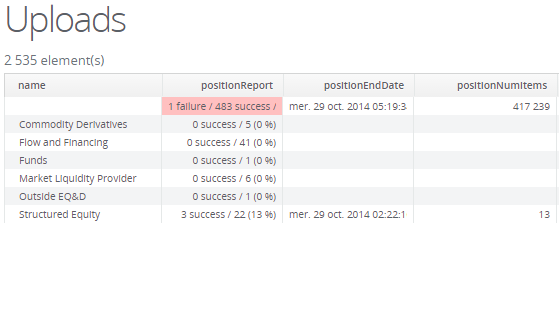
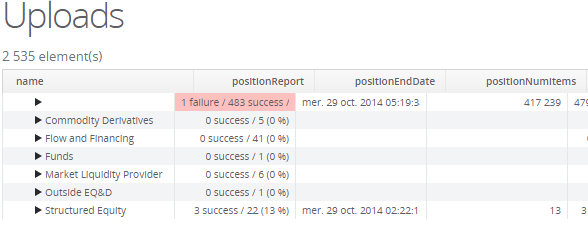
I’ve got a problem with my TreeTable.
I’m sure it is related to my CSS sheet but I can’t seem to find the right fix …
What I tried (none of this solved it):
changed the size of the icon
removed the left margin
Any help would be appreciated
Anatoly2
November 7, 2014, 4:00pm
2
Why did you decide to use css? TreeTable has several way to show icon. Here is universal:
        HierarchicalContainer container = new HierarchicalContainer();
        container.addContainerProperty("name", String.class, null);
        container.addContainerProperty("date", Date.class, null);
        Item item = container.addItem(1);
        item.getItemProperty("name").setValue("Test1");
        item.getItemProperty("date").setValue(new Date());
        item = container.addItem(2);
        item.getItemProperty("name").setValue("Test2");
        item.getItemProperty("date").setValue(new Date());
        item = container.addItem(3);
        item.getItemProperty("name").setValue("Test3");
        item.getItemProperty("date").setValue(new Date());

        container.setParent(2, 1);
        container.setChildrenAllowed(2, false);
        container.setParent(3, 1);
        container.setChildrenAllowed(3, false);

        TreeTable table = new TreeTable(null, container);
        table.addGeneratedColumn("icon", new Table.ColumnGenerator() {

            @Override
            public Object generateCell(Table source, Object itemId, Object columnId) {
                Container dataSource = source.getContainerDataSource();
                if( dataSource instanceof Container.Hierarchical ) {
                    Container.Hierarchical h = (Hierarchical) dataSource;

                    Image image = new Image(null, new ThemeResource(h.hasChildren(itemId) ? "folder.png" : "file.png"));
                    return image;
                }
                return null;
            }
        });
        table.setVisibleColumns("icon", "name", "date");
Yet another way is more natural:
[code]
    container.setParent(2, 1);
    container.setChildrenAllowed(2, false);
    container.setParent(3, 1);
    container.setChildrenAllowed(3, false);

    TreeTable table = new TreeTable(null, container);
    table.setItemIconPropertyId("icon");
    table.setVisibleColumns("name", "date");
[/code]
Clement7
November 13, 2014, 8:15am
3
I don’t personally use css, it is just that it is the default behavior of TreeTable on my project and I don’t know why. I tried your sample, even with it I’ve got problems.
Anatoly2
November 13, 2014, 8:18am
4
If you have problem with IE, switch off compatible mode. What is your vaadin version?
Clement7
November 13, 2014, 8:22am
5
I’m having this problem with IE, Chrome and Firefox. I’m using Vaadin 7.3.2.
Kurki
November 13, 2014, 10:23am
6
Hi,
please post a minimal code & css sample which demonstrates the problem. This will make it much easier to help you.
-tepi