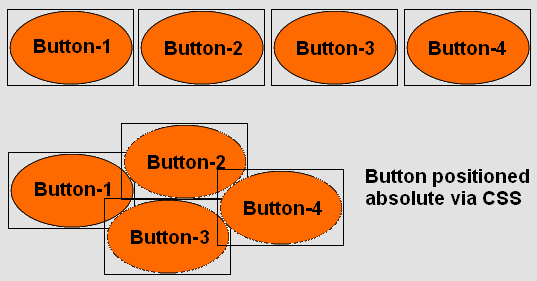
I am using the Button component with an Icon (ThemeResource with trasparent image parts).
In my application, I have many such buttons.
The Icon is not (as the button) a square. Lets say, it is a circle.
I layout these buttons using a custom layout and absolute positioning with CSS, which works very good.
I have one problem though.
When I click one button (on the icon directly), I want exactly that button to handle the event.
Because the button is a square element, but it “looks” like it is a circle, the user does not always click the correct button.
Do you see my problem?
(See also the attached file)
The boundaries of one button overlapps with the other other buttons. So, when I click a button (or I think I click that button), it can be the other button as well. Sounds weird, I know. But, because of the overlapping components and the fact that they are squares, this behavior is normal.
Still, is there any way to define clickable areas for a button. Or is there another component, which can do that?
Important is, I must be able to configure a ThemeResource and I must also be able to handle the click event.
I’ve also tried with the Embeddable component. It is also square. (of course) 
I don’t want to use an ImageMaps. I think there is no such component with such functionality, is there?
Using the Z-Index, it gets better, but the problem is not solved.