Hey. How do you create a project with the Aura theme? When I create a project via https://start.vaadin.com/ and then switch the theme to Aura first, it looks like it’s not working properly because, for example, the sidebar doesn’t look right.
What is the right way to create a clean project with the Aura template?
Replacing Lumo.STYLESHEET with Aura.STYLESHEET should be enough.
I assume you have tried out restarting the server and clearing the browser cache? (clearing the cache should not be necessary, but it might be a good trace for spotting the issue).
Can you check, if a prod.- or dev.bundle has been created and delete them respectively? If that did not help: can you check, what happens, when you activate vaadin.frontend.hotdeploy in the application.properties?
And if you feel, that you encountered a bug (which it sounds a bit like), it would be nice if you could report that in the github repo with everything you encountered and done, so that it will be analyzed.
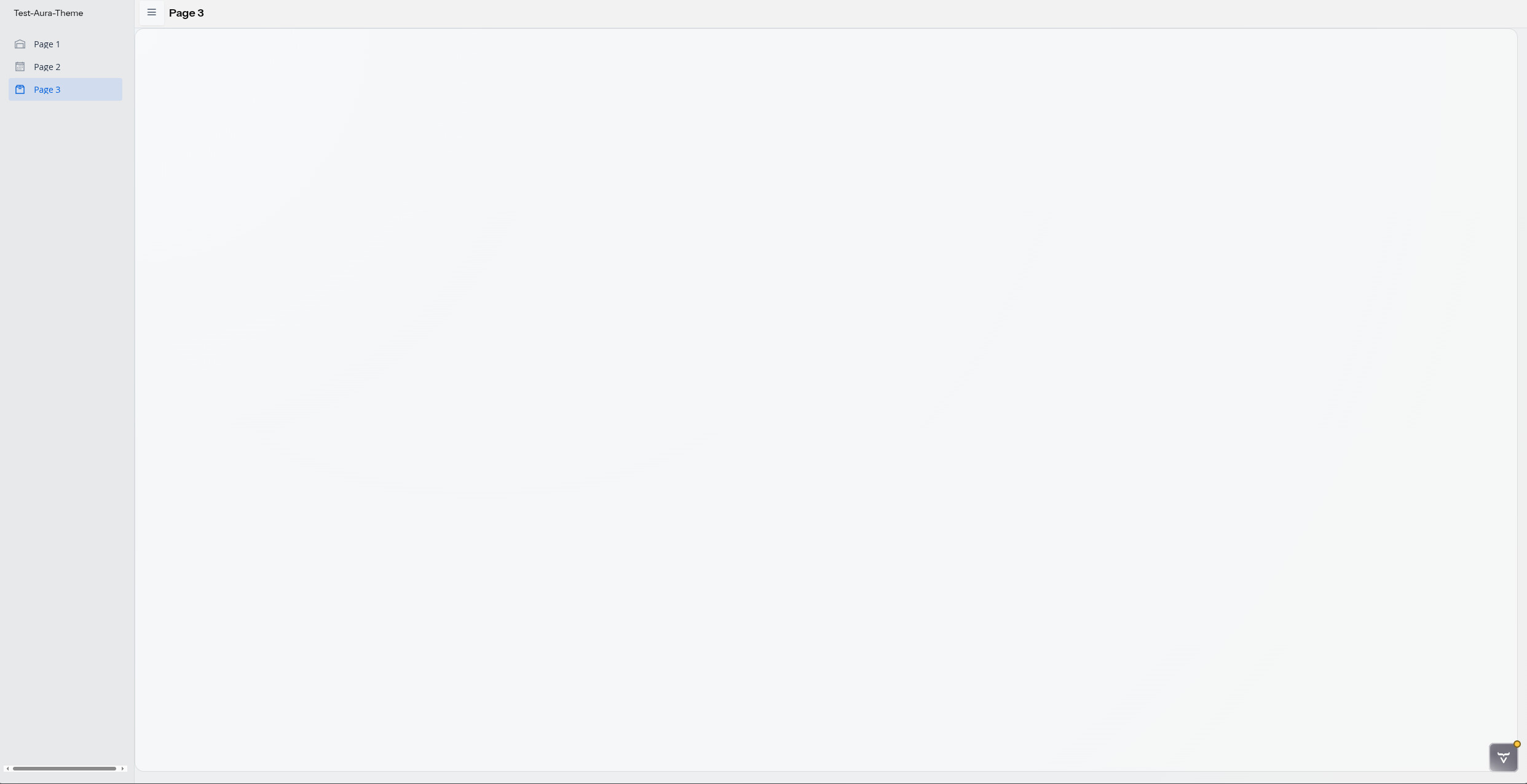
Thats how its look like.
For example, I don’t think the navigation bar should be scrollable.
I’m not sure, but I think the NavBar looked different in a preview?
I know there are no components - but I believe even the scrollable NavBar (i.e., scrollable from left to right) should not be like this
That looks like you have both Lumo and Aura imported at the same time. Make sure to just import one of them. You might need to do some cache clearing also before restarting the app.
 could help others in a same case, if it is a common issue.