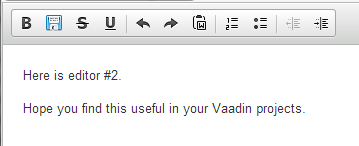
I’ve upgraded to CKEditor Wrapper for Vaadin 1.8 and now my custom toolbar is having issues.
At first, it simply wouldn’t show the toolbar.
Then, I revised the custom toolbar code to:
config.addCustomToolbarLine(“{ name: ‘styles’, items : [‘Bold’,‘VaadinSave’,‘Strike’,‘Underline’,‘-’,‘Undo’,‘Redo’,‘PasteFromWord’,‘-’,‘NumberedList’,‘BulletedList’,‘-’,‘Outdent’,‘Indent’]
}”);
This resulted in the toolbar being shown, but several icons were missing, e.g. Paste from Word.
Not sure since the configuration of CKEditor can be tricky. Don’t know if this syntax will work any better, but it more closely matches how we’d set that up (removing the name: ‘styles’):
Also, if you are using the VaadinSave button, you need to enable that: config.enableVaadinSavePlugin();
When we upgraded from CKEditor 3.x to the 4.x branch, we saw something similar in that it was showing the wrong icons, and that appeared to be fixed after clearing the browser caches.