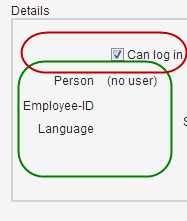
I was really pleased when I saw how easy life was with FormLayout - the label appeared at the
left
side of the value, without any mystic CSS operations, perfectly aligned.
But now I used CheckBox in a FormLayout, and it seems that the CheckBox caption is on the
right
side (see screenshot).
Is there a workaround (hopefully in Java) to get the CheckBox caption to the left?
I work with Vaadin 7.0.0 beta11.
Here is my UI code:
		final Layout layout1 = new FormLayout();

		layout1.addComponent(activeField = new CheckBox());
		layout1.addComponent(userNameField = new Label());
		layout1.addComponent(employeeIdField = new Label());
		layout1.addComponent(languageField = new Label());
_